
To create a service plan that's specific to your company's policies and practices, Service Assistant grounds itself in your data through several grounding sources: record data, subagents, agent actions, knowledge, and related records.
Required Editions
| View supported editions. |

Record Data
Record data is the primary grounding source that Service Assistant references to identify the customer's issue, assign a subagent, and build the service plan for that issue from your instructions and grounding sources. The specific record details it analyzes vary by record type.
- Case: Service Assistant grounds on Case object fields and related objects, such as Case Email, Case Comments, and Case Feed. You choose which fields and objects to ground on with Service AI Grounding. The Subject and Description fields are always used to assign a subagent.
- Messaging: Service Assistant grounds on the conversation transcript throughout the life cycle of the session. Transcript grounding is turned on by default.
- Voice: Service Assistant grounds on the conversation transcript throughout the life cycle of the call. Transcript grounding is turned on by default.
How Service Assistant incorporates new record data as the interaction progresses differs by record type and between dynamic and guidance plans. Find more details and best practices in these articles.
Subagents
At the core of a service plan are subagents that contain instructions. Subagents in Service Assistant define your company's policies and procedures that service reps follow to resolve a particular customer issue. They provide the framework that outlines your policy for Service Assistant, which then draws on your grounding sources, such as knowledge articles, to turn that framework into concrete, step-by-step guidance in the service plan. We don't provide any preconfigured subagents for Service Assistant. You must create your own subagents and instructions.
Because Service Assistant uses record data to match the customer's issue to a subagent, and that match is what starts plan creation, define the specific issues you want to resolve as individual subagents. A broad subagent, such as "Customer Issue" or "Resolve Customer Issue," can't supply the steps a specific issue requires, so Service Assistant can't make a match or build a plan. Create narrowly scoped subagents, such as "Password Reset" or "Order Return," so that each one clearly describes a single issue and the guidance to resolve it.
Each subagent contains a label, a general description, and a defined scope. These parts define what the subagent is and set boundaries for what the agent can and can't do with the subagent. They play a key role in Service Assistant because you can use the description to specify variations of the issue. Here's an example.
| Subagent Part | Example |
|---|---|
| Label | Transaction Declined |
| Description | Guide service reps in helping customers resolve declined credit card transactions. Questions are related to authorization failures, including declining reason codes such as insufficient funds, suspected fraud, incorrect card details, travel blocks, and daily spending limits. |
| Scope | Your job is to assist service reps in identifying the reasons behind declined transactions and providing the necessary steps to either allow the charge or secure the customer's account. You must not handle inquiries outside of declined transactions and account security. |
Specifically, when a service rep initiates a service plan:
- Service Assistant analyzes the record details to summarize the issue and assign a subagent. For a case, Service Assistant uses the Subject and Description fields to assign a subagent. For a messaging session, Service Assistant uses the conversation transcript.
- Service Assistant selects which instructions to include as plan steps based on the assigned subagent and the record details.
Because plan creation depends on analyzing the record details and then assigning a subagent based on the details, it's important that subagents are clearly tailored to your company's service policies and practices. Find more details and best practices in these articles.
Knowledge Articles
Subagents and their instructions serve as a foundation for Service Assistant to create steps in a service plan that service reps take to resolve a case. When you add your knowledge articles to the foundation through Agentforce Data Libraries, Service Assistant makes your service plans even more accurate and aligned with your policies and practices.
For example, when a "Returns Management" subagent is assigned to a case, Service Assistant uses your data library to search your knowledge base for relevant information and adds it as steps in the service plan. Service Assistant summarizes the information rather than including the exact wording of your articles, so not all of an article's content is added to a plan.
This example uses a guidance plan because it shows how instructions and knowledge work together to form the steps. A dynamic plan combines instructions and knowledge the same way, but shows one step at a time.
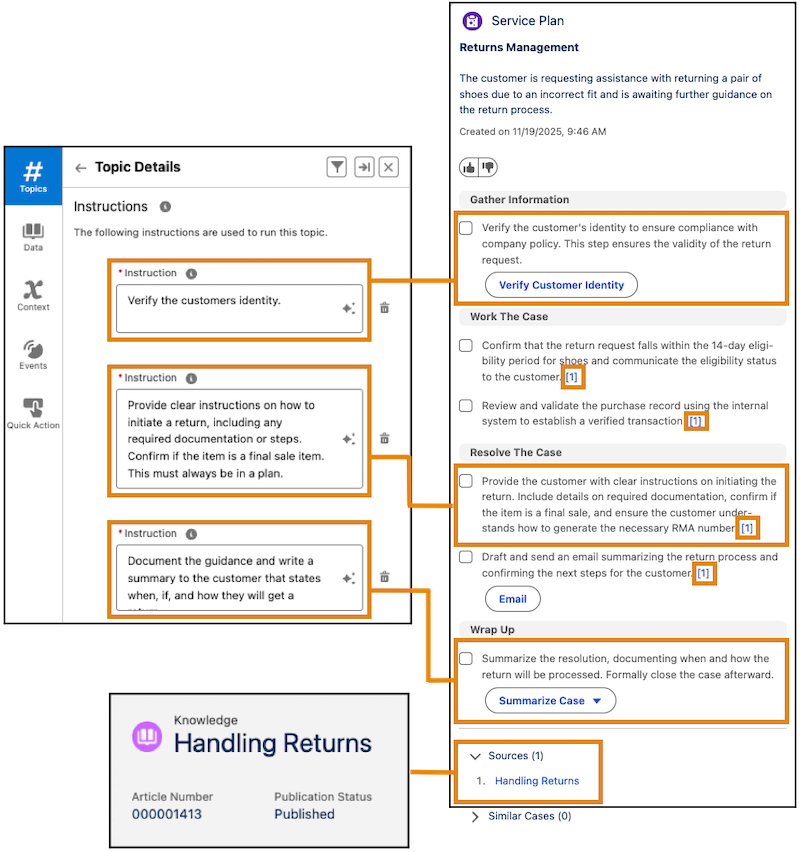
When you turn on Show Sources in your data library, each plan step created from a knowledge article is cited with a number, such as [1], and the article names are listed in a Sources section. Uncited steps come from subagent instructions. Where the Sources section appears depends on the plan type.
A guidance plan lists all articles in a single Sources section at the bottom of the component. In this example, all cited steps come from the Handling Returns article.
In a dynamic plan, each step has its own Sources section, so the same article can appear under a different citation number from one step to the next.
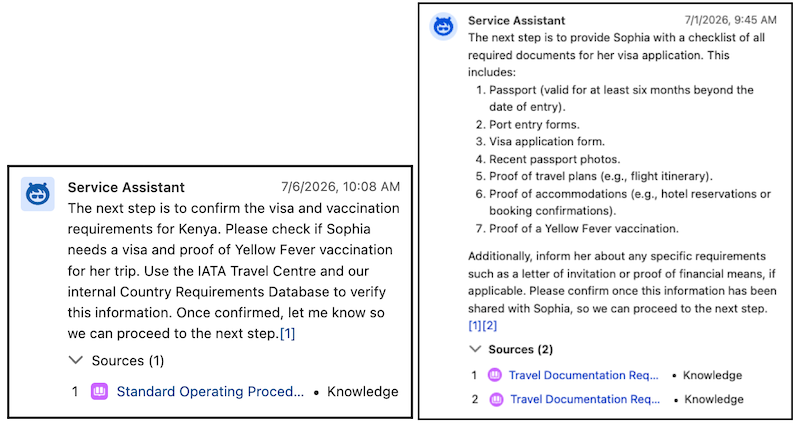
Find more details and best practices in these articles.
Agent Actions
Agent actions are an optional grounding source that serve two purposes. As a grounding source, they let Service Assistant automate the completion of a plan step: when a step's grounding calls for a task an action can perform, Service Assistant adds that action to the step. They also give service reps a way to complete tasks directly from the component, such as retrieving order history, drafting an email, or closing a case. Service Assistant supports both standard and custom Agentforce actions. We don't provide prebuilt actions, because actions depend on your specific business requirements.
When Service Assistant creates a plan step, it uses your action descriptions and input and output instructions to identify tasks that can be automated based on the record details, subagent instructions, and knowledge used to ground the step. When it finds a match, it adds the action to the step. Service Assistant matches actions to steps in two ways.
- Context matching: Service Assistant compares your action descriptions against the record details and grounding sources and adds the best match. This approach is best for situational steps that run only when specific conditions are met, so it depends on how well your action descriptions mirror the language in your subagent instructions and knowledge articles.
- Direct references: You name a specific action by its label in a subagent instruction, such as "As a first step, always verify the customer's identity using the Verify Customer Identity action." This approach is best for mandatory steps that must run regardless of context. Always use the action label, not the API name.
How actions execute depends on the plan type.
- In a dynamic plan, Service Assistant surfaces relevant actions as the plan adapts in real time, so reps can run an action from a plan step or from agent chat.
- In a guidance plan, reps run actions from agent chat. Agentforce Actions aren't surfaced in plan steps. For how reps run actions from the chat box and which standard subagents extend what Service Assistant can do, see Agent Chat for Service Assistant.
General Considerations
- Actions execute in the context of the ServicePlanner User. Grant the ServicePlanner User access to whatever the action relies on, such as Apex classes, flows, prompt templates, objects, and fields. See Action Permissions.
- Because actions rely on your specific business requirements, we don't provide prebuilt actions for Service Assistant.
- Service Assistant supports the use of custom Lightning types. Setup of custom Lightning types follows all configuration guidelines and best practices in Agent Action Custom Lightning Types.
- Custom Lightning types in Service Assistant don't support sending values or utterances back into the chat conversation from within the LWC.
- You can assign context variables to action inputs so Service Assistant automatically passes session information, such as the current record ID, into the action at session start. See Grounding with Context Variables.
Find more details and best practices in these articles.
Context Variables
Context variables are predefined values that Service Assistant reads automatically at the start of a session to generate more relevant plan steps. They pass the ID of the record the service rep has open into your actions, so an action can look up the current record and its related records, such as the associated account or contact, without the service rep entering that information manually.
Service Assistant uses these context variables.
- SeedPlanWithGuidance: Guides how Service Assistant generates the next plan step. It doesn't carry case grounding fields or messaging session or voice call transcript data. It's provided automatically, isn't shown on the Context tab in Agentforce Builder, and can't be modified—you'll see it only in a subagent's action inputs.
- currentRecordId: Passes the ID of the record on the rep's screen into plan steps and actions. Service Assistant doesn't automatically read the record's field values or related data. You create this variable manually.
By default, Service Assistant doesn't have access to the current record's data. To make record context available to actions and plan steps, create the currentRecordId context variable and assign it to your action inputs. An action can then work on behalf of that specific customer, such as looking up order history or updating a related record, without the rep entering the ID manually.
Context variables are session-scoped. Service Assistant sets them when the session starts, and they don't update mid-session.
Find more details and best practices in these articles.
Related Record Grounding
Related record grounding is an optional grounding source that adds data from records related to the one the service rep is working. It gives service reps more contextual and detailed plan steps. What Service Assistant grounds on depends on the record type, and you turn it on per object on the Service Assistant Setup page.
- Case: Service Assistant analyzes the transcripts of closed messaging sessions and voice calls attached to the case. The case summary and service plan include key details from the conversation. The service plan summary states what occurred and what resolution steps were completed, and the drafted plan starts the steps from where the conversation left off. Case supports both guidance and dynamic plans.
- Messaging: Service Assistant uses a standard prompt template we provide you to pull field data from related records, such as account, case, and contact fields, into the service plan.
- Voice: Service Assistant uses a standard prompt template and a flow we provide you that retrieves the related record details, such as account, case, and contact fields, and pulls them into the service plan.
For all three objects, related record grounding only supports grounding on text-based field data. Files and images included in the related records aren't used as grounding sources.
Find more details and setup steps in these articles.
Component Feed
The component feed is a live grounding source that builds as a service rep works the record. It holds the interaction history in the Service Assistant component: the plan summary, the plan steps, the agent chat, knowledge lookups, and any actions surfaced or run. Service Assistant is grounded in this feed, so it stays aware of everything that happened while working the record.
Unlike the other grounding sources, you don't configure the component feed. Service Assistant builds it in real time during the session. However, how much the feed grounds the plan depends on the plan type.
- Dynamic plans: On cases, messaging sessions, and voice calls, the feed is available automatically and actively grounds the plan. As the rep works the record, Service Assistant grounds each new step in the full feed history, so the plan builds on the steps completed, the chat, the knowledge looked up, and the actions run so far.
- Guidance plans: The feed is available only when you turn on agent chat for guidance plans from the Setup page. Even then, Service Assistant doesn't use the feed to generate or redraft the checklist steps. It uses the feed as context for the agent chat, so it can answer questions, look up knowledge, run actions, and summarize the work completed with awareness of what's already happened.
Find more details in Agent Chat for Service Assistant.