
Learn how Service Assistant consumption occurs and how you’re billed when you have the Einstein for Service license.
Required Editions
| View supported editions. |

.
Plan Processing and Consumption
After Service Assistant is turned on and you've configured eligibility criteria, plan processing happens automatically and consumption of your Einstein Requests and Data 360 credits begins. This behavior is the default and can't be modified.
Here's how and when Service Assistant consumption occurs.
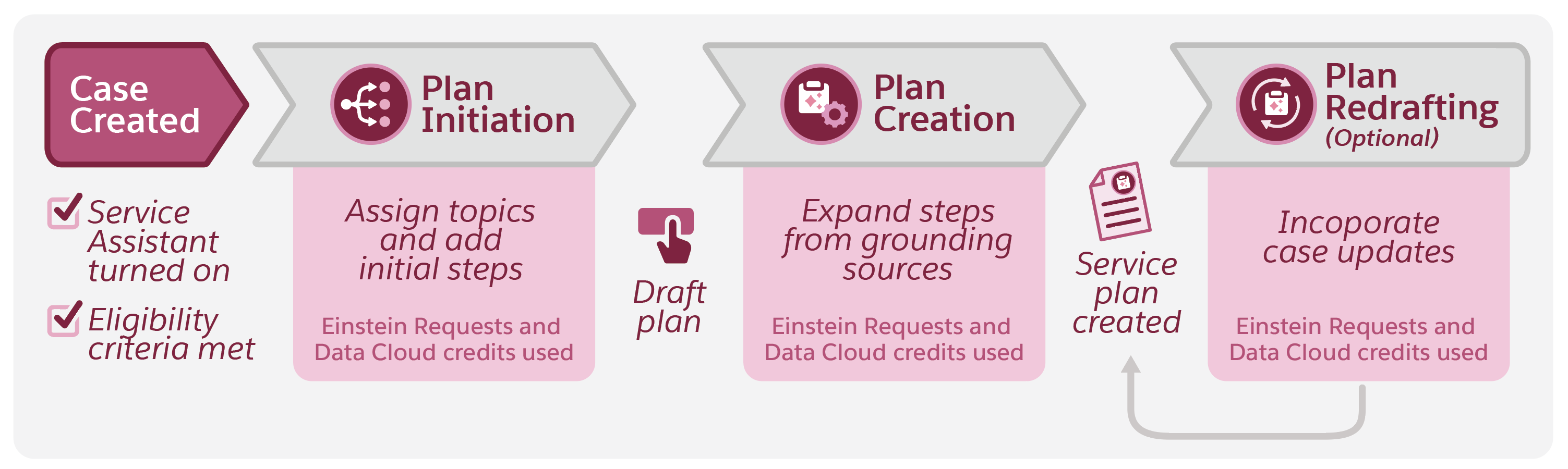
- With the feature turned on and the eligibility criteria met for the case, Service Assistant automatically begins to create a case summary and identify a topic and instructions to assign to the case. In addition, the agent starts creating initial plan steps. Your Einstein Requests and Data 360 credits are consumed in both processes.
- When a service rep clicks Draft Plan, Service Assistant generates a service plan using your topics and instructions and optional grounding sources, such as knowledge grounding through Agentforce Data Libraries. Your Einstein Requests and Data 360 credits are consumed.
- When a service rep redrafts a service plan, your Einstein Requests and Data 360 credits are consumed again.
Considerations
The described processing and consumption occur automatically for any new or in-progress cases immediately after you turn on Service Assistant and the eligibility criteria are met. The automatic behavior occurs even when:
- The case record page isn't opened.
- The case record page doesn't have the Service Assistant component installed.
- No users have the Service Planner User permission set assigned.
To limit your consumption, configure your eligibility criteria so that they're met only for a subset of your incoming cases. For example, exclude simple, repetitive cases and focus on more complex ones that require strict policy or guideline adherence. You can also set your eligibility criteria to make service plans available only for low-volume cases or only to users with the Service Planner User permission set.
In addition to the Data 360 credits consumed as outlined earlier, more Data 360 credits are consumed when you set up and use these optional features.
- Creation of plan steps from your knowledge articles through Agentforce Data Libraries (known as knowledge-based steps). See Knowledge Grounding.
- Search and retrieval of similar cases that are listed at the bottom of the component. See Similar Cases.
Billing Details
Here are the billing details for Service Assistant with the Einstein for Service license.
| Card | Type | How Usage Is Calculated | Notes |
|---|---|---|---|
| Agentforce Service Assistant | Agentforce Service Assistant |
Usage is calculated when an in-progress or new case meets the admin-configured eligibility criteria in Setup, even when:
Usage is also calculated anytime a plan is generated when a service rep clicks Draft Plan or Redraft Plan in the Service Assistant component. |
See Eligibility Criteria. |
| Einstein Requests | Einstein Requests |
Usage is calculated based on API calls to the LLM gateway and at service plan generation runtime. Request consumption automatically occurs when:
|
See Einstein Usage. |
|
Data Service |
Batch Data Pipeline |
Usage is calculated based on the amount of batch data processed by Data 360 data streams across all connectors. |
This usage applies to both the knowledge grounding and similar cases features. |
|
Data Services |
Data Queries |
Usage is calculated based on the number of records processed. The count of records processed depends on the structure of a query and other related factors, such as the total number of records in the objects being queried. |
This usage applies to both the knowledge grounding and similar cases features. |
| Data Service | Activate DMO - Streaming | Usage is calculated based on the number of records processed in the DMO. Records processed are based on the number of new records created or updated in the DMO per Activation. | This usage applies to both the knowledge grounding and similar cases features. |
| Data Service | Batch Calculated Insights | Usage is calculated based on the number of records in all underlying objects used in creating the Calculated Insight each time it runs. | This usage applies to the similar cases feature. |
| Data Storage | Storage Beyond Allocation | Usage is calculated based on the amount of storage used above the amount allocated. |
Storage refers to the amount of data stored in Data 360. Data you ingest into Data 360 for Service Assistant is counted toward your storage allocation. This includes your knowledge articles using Agentforce Data Libraries and case record data for the similar cases feature. If you use more data than is allocated, usage is charged. |