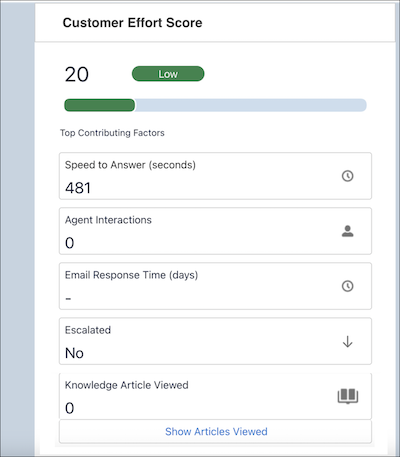
Add the Customer Effort Score insight component to your case page layouts so your
support reps can see how much effort the customer is putting into the case, at a glance.
Customer effort directly impacts customer satisfaction, so understanding this score helps level
up your customer service.
Required Editions
To use the Customer Effort Score insight, you need the Service Intelligence User permission
set. To manage the Customer Effort Score Insight, you need the Service Intelligence App Admin
permission set.
Use Lightning App Builder to drag the Customer Effort Score component to a case or custom
Lightning page.
The Customer Effort Score ranges from 1 to 100, with 100 indicating the highest effort. The
total of these factors calculates it, with each given an equal weight of 20: speed of initial
response, number of support rep interactions, email response time, whether the issue was
escalated, and the number of knowledge articles viewed by the customer.