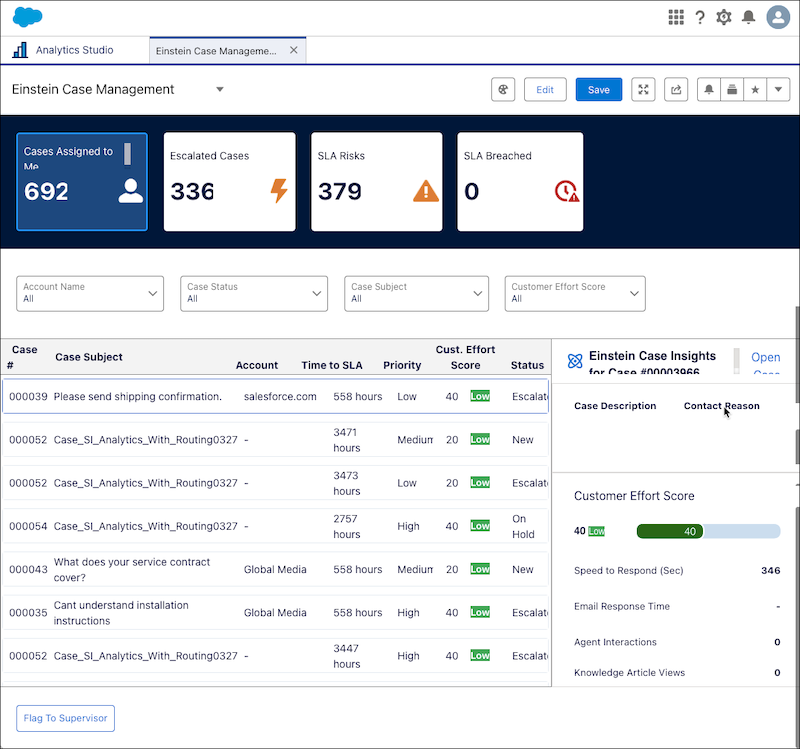
As a support rep, you can use this dashboard to get near real-time insights that help
you quickly identify and prioritize cases based on urgency, status, customer effort score, and
service level agreement (SLA) targets. If the Flag to Supervisor flow is set up by your admin,
you can instantly alert supervisors about case developments.
Required Editions
From Service Intelligence dashboards, you can see near-real time case metrics by clicking the
Open Analytics
Studio icon, and in Analytics Home, search for Einstein Case Management.
Use filters to sort by cases assigned to me, escalated cases, service level agreement (SLA)
risks, SLA breached, customer effort score, time to SLA, and so on.
| Einstein Case Management KPI |
CALCULATION |
| SLA Risks |
Total number of cases at risk of missing SLA targets, grouped by status. |
| SLA Breached |
Total number of cases that have missed SLA targets, grouped by status. |
| Customer Effort Score |
Measures customer effort per case, influencing satisfaction.
The Customer
Effort Score ranges from 1 to 100, with 100 indicating the highest effort. The total
of these factors calculates it, with each given an equal weight of 20: speed of
initial response, number of support rep interactions, email response time, whether
the issue was escalated, and the number of knowledge articles viewed by the
customer.
|
| Time to SLA |
Hours until a case meets or exceeds its SLA target. |