
As a support rep, you can use this dashboard to get a comprehensive view of your caseload. Spot high-level stats, such as total escalated cases, average time to close, percentage of first contact resolution, customer satisfaction scores (CSAT) by channel, and more.
Required Editions
| View supported editions. |
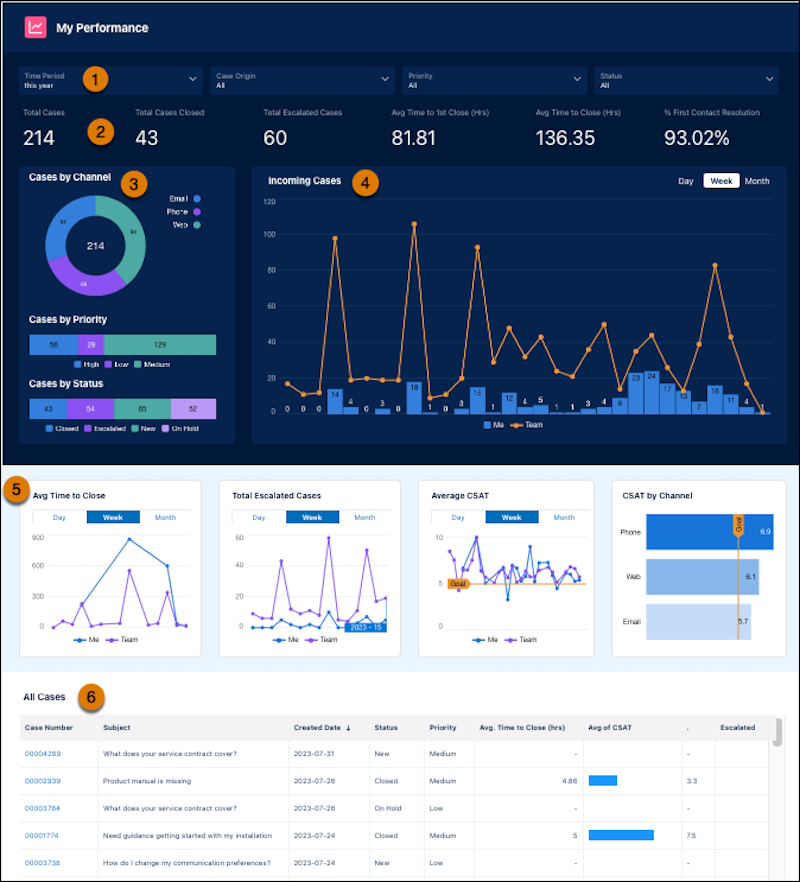
Use filters to identify the cases you’d like to review, such as high-priority, most recent, or case origin (1), and review the high-level statistics (2). In the charts, you can see your cases sorted by channel, priority, and status (3), along with incoming cases (4). Understand the average time to close, escalated cases average CSAT and CSAT by channels (5). Lastly, drill into details for work you’re interested in (6).
| My Performance KPI | CALCULATION |
|---|---|
| Total cases | Total number of cases created. |
| Total cases closed | Total number of cases closed. |
| Total escalated cases | The total number of cases escalated. |
| Avg time to first close (Hrs) | The amount of time between when the was case was created and when it was closed for the first time. This total excludes cases that are immediately closed upon opening. |
| Avg time to close (Hrs) | The amount of time between when the case was created and when it was closed for the last time. Includes when cases are reopened, and excludes cases that re immediately closed upon opening. |
| % First contact resolution | The percent of cases that were closed with only one response, such as one email, voice call, or messaging session. |
| Avg CSAT from surveys | The average customer satisfaction scores related to cases. |
| CSAT by Channel | The average customer satisfaction scores related to a specific channel, such as email or voice call. |