---
schema_version: "1"
id: ed0809a9bcf0a2acd3c8c8f0aa0e433bf581c85e538a073e37c085dc9fdc4f40
title: Configure Safety Cloud to Generate QR Codes Automatically
collection: admin
version: current
locale: en-us
portal_url: https://docs.salesforce.com/admin/current/en-us/service/264-0-0/safety_cloud_configure_qr_code_gen.md
canonical_url: https://help.salesforce.com/s/articleView?id=service.safety_cloud_configure_qr_code_gen.htm&release=264.0.0&type=5
source_site: help.salesforce.com
content_type: documentation
content_hash: 50314dc886664d8e23b2294f8d3ddfb2cc650d2137264d48365ef4767dbae497
description: You can configure Safety Cloud to generate QR codes automatically for Health Verification records that meet a defined criteria.
products:
- Salesforce Platform
release: "264"
---
# Configure Safety Cloud to Generate QR Codes Automatically
You can configure Safety Cloud to generate QR codes automatically for Health Verification records that meet a defined criteria.
### Required Editions
Available in: Enterprise and Unlimited Editions
User
Permissions Needed
To modify trigger settings:
Modify All Data
Safety Cloud generates QR codes for individuals’ Health Verification records based on the Occasion Access Settings.
The Set QR Code Logic trigger logic is activated by default. To view the Set QR Code Logic, complete these steps.
1. From Setup, in the Quick Find box, enter Custom Code, and then select **Custom Metadata Types**.
2. Select **Manage Records** for the Trigger Setting Custom Metadata object.
3. From the list of Trigger Settings, select **Set QR Code Logic**.
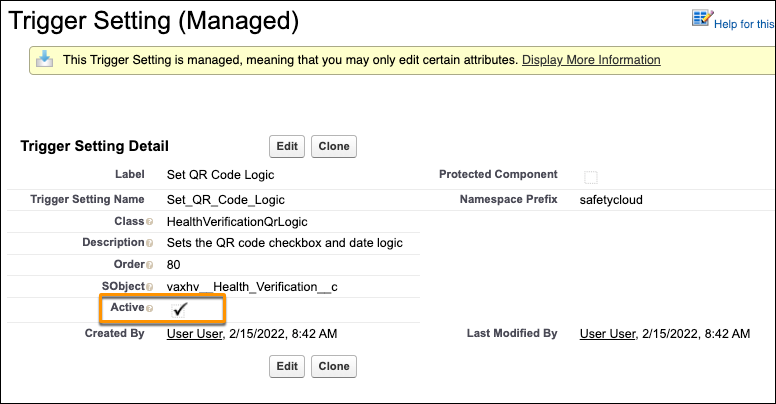
SetQRCodeLogic is the trigger module, which now runs on Occasion Access Settings.
#### See Also
- [Custom Triggers](https://help.salesforce.com/s/articleView?id=service.safety_cloud_custom_fields.htm&release=264.0.0&type=5 "Safety Cloud includes the custom triggers listed and described here.")
- [Email Templates and Notifications](https://help.salesforce.com/s/articleView?id=service.safety_cloud_email_notifications.htm&release=264.0.0&type=5 "Safety Cloud supports sending emails to Slack and using email templates to optimize communications.")
- [QR Code Generation](https://help.salesforce.com/s/articleView?id=service.safety_cloud_qr_code_gen.htm&release=264.0.0&type=5 "Safety Cloud generates QR codes when criteria on the Occasion Access Setting match data on an individual’s Health Verification record for the same Occasion.")
- [Safety Cloud Integrations](https://help.salesforce.com/s/articleView?id=service.safety_cloud_integrations.htm&release=264.0.0&type=5 "You can integrate Safety Cloud with other systems to help manage various aspects of your event, such as event attendance, testing, and communications. System integrations are optional. You can generate a Health Verification without any integrations.")
- [Person Accounts](https://help.salesforce.com/s/articleView?id=service.vaccine_packages_hv_person_accounts.htm&release=264.0.0&type=5 "If your org has the Person Account enabled, when a user submits a health verification, PersonAccount and visitor are created.")