
Draft an email response based on up to three knowledge articles that are relevant to a case.
Required Editions
| View supported editions. |
| User Permissions Needed | |
|---|---|
| For non-admin users to generate emails from articles: | Customize Application |
| To view the Draft Einstein Email from Multiple Articles option: | Use Agentforce Article Recommendations for Cases |
| For service reps to view, edit, and send knowledge-grounded responses: |
Allow users to share articles via public URLs |
| To send article content in emails: |
Edit access on cases AND Read access on knowledge articles |
| To share internal articles externally: |
Share internal Knowledge articles externally permission under Administrative Permissions |
To get relevant article recommendations in the Knowledge section, make sure Agentforce Article Recommendations for Cases is set up in your org.
-
On the Case record page, review the recommended articles in the Knowledge section and
select up to three articles that are relevant to the case.
If no relevant articles are listed, search for them manually.
Make sure that each knowledge article you plan to use has fewer than 131,000 characters.
- Click Draft Einstein Email from Multiple Articles from the relevant article's action menu.
-
Select up to three articles that are relevant to the case, and then click
Draft Email.
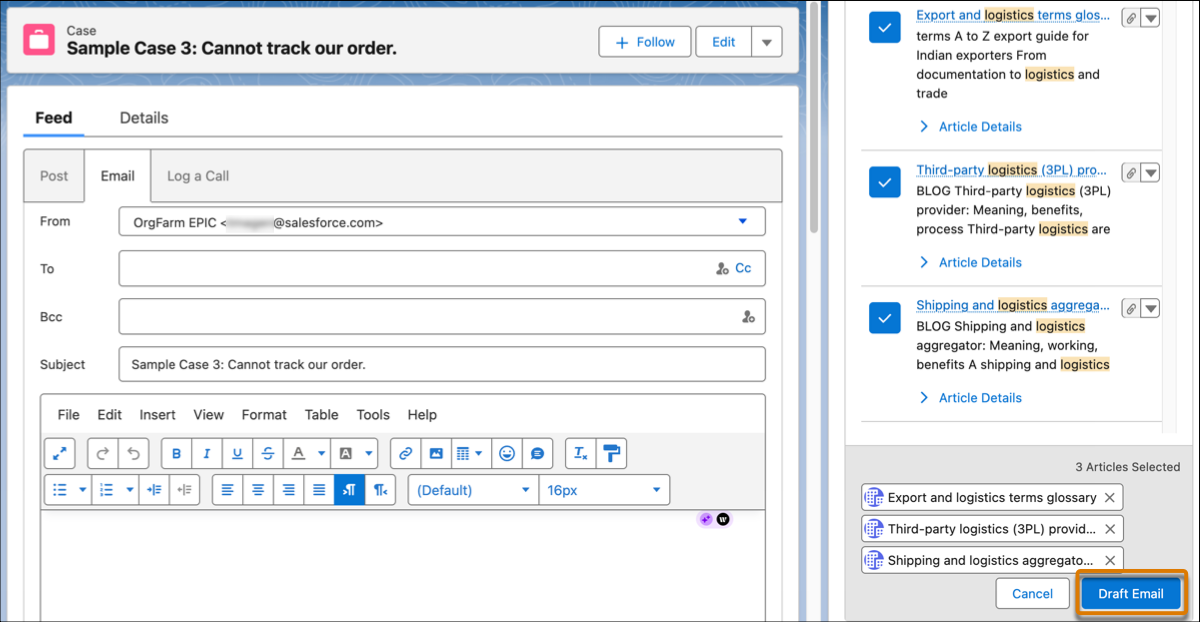
A draft is created in the email composer, where you can review, edit, and send it. The draft merges the recipient's name from the associated case.