---
schema_version: "1"
id: 8eab2829c3681cefd11692a8cf1e23bcd555b2a130a28a90c881c298c532a0c6
title: Multi-Language Support
collection: admin
version: current
locale: en-us
portal_url: https://docs.salesforce.com/admin/current/en-us/service/264-0-0/reply_recs_multi_language.md
canonical_url: https://help.salesforce.com/s/articleView?id=service.reply_recs_multi_language.htm&release=264.0.0&type=5
source_site: help.salesforce.com
content_type: documentation
content_hash: 67785b9f8ffa087e3df27b4e655a8d5515f09d078f653a0e62d3fb7bed9bc55b
description: "With Einstein Reply Recommendations, you can show service reps common replies in 16 languages during chat and messaging sessions: Arabic, Chinese-simplified, Chinese-traditional, Dutch, English, French, German, Italian, Japanese, Korean, Polish, Portuguese, Russian, Spanish, Thai, and Turkish."
products:
- Service Cloud
- Service Intelligence
release: "264"
---
# Multi-Language Support
With Einstein Reply Recommendations, you can show service reps common replies in 16 languages during chat and messaging sessions: Arabic, Chinese-simplified, Chinese-traditional, Dutch, English, French, German, Italian, Japanese, Korean, Polish, Portuguese, Russian, Spanish, Thai, and Turkish.
### Required Editions
To build the Einstein Reply Recommendations model:
Customize Application
## View and Enable Your Available Languages
Follow the steps in [Set Up Reply Recommendations](https://help.salesforce.com/s/articleView?id=service.reply_rec_set_up.htm&type=5&language=en_US) for Enable Reply Recommendations and Build Your Recommendation Model. Replies are based on a model that Einstein generates by analyzing your closed chat transcripts. Einstein requires at least 1,000 closed chat transcripts per language to deliver replies in that language. If you have insufficient closed chats in all languages or if the chats are too short, you’re alerted when you try to build the model.

Note If you already have a Reply Recommendations model, you must upgrade to the [Hyperforce platform](https://www.salesforce.com/products/platform/hyperforce/). Upgrades will take place on a rolling basis starting June ‘22. During the upgrade Einstein trains and activates a new Reply Recommendations model without any downtime or interruption to service rep experience, and everything works as usual. Along with the retrained model, you receive a new batch of reply templates to review, polish, and publish.
All languages detected by Einstein are listed in the Languages section of the setup page.
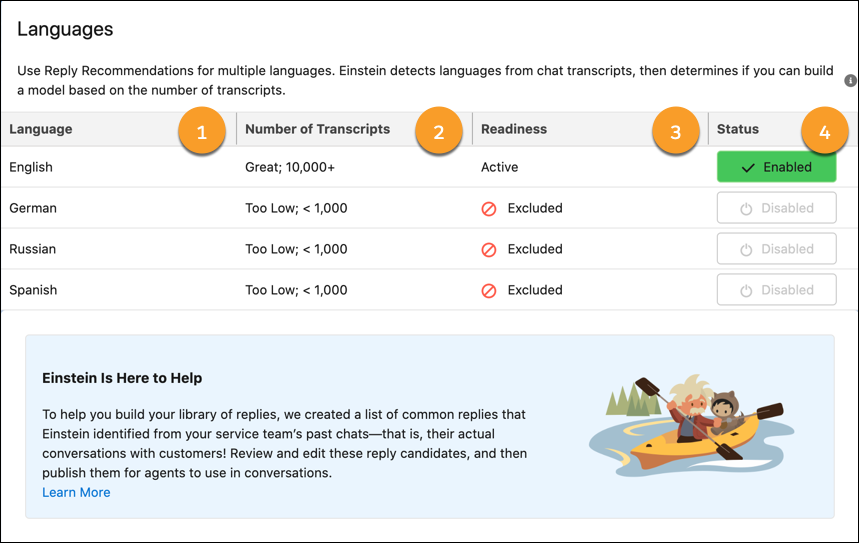
The Languages section shows the languages detected (1), the number of transcripts detected in that language (2), whether the model is ready to activate (3), and the model status (4).
To activate a model, select **Disabled/Enabled**. Then follow these steps to [review and publish your replies](https://help.salesforce.com/s/articleView?id=service.reply_rec_publish.htm&type=5&language=en_US).