
When you’re managing multiple chats or helping a customer in need, having the correct reply available makes your job easier. Einstein Reply Recommendations suggests relevant replies during chat and messaging sessions so that you can insert them into your conversations with customers.
Required Editions
| View supported editions. |
| User Permissions Needed | |
|---|---|
| To view and act on Einstein Reply Recommendations: | Einstein Reply Recommendations User permission set AND Read access to the Quick Text folder containing the published replies |
Where and when do reply recommendations show up?
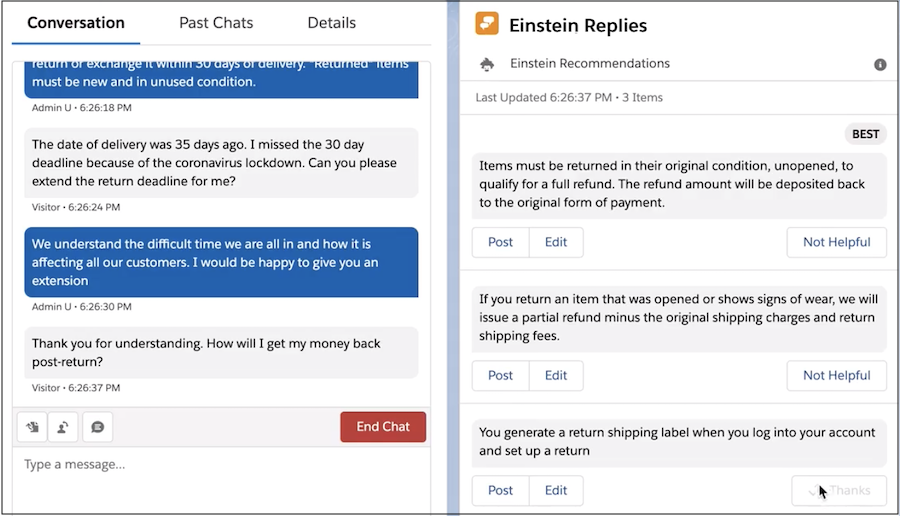
Recommended replies appear in the Einstein Replies component of the Chat and Messaging tabs in the Lightning Service Console. Einstein recommends replies as soon as your customer sends the first message in a chat or messaging session. The recommendations are refreshed each time the customer sends a new message. You don’t need to click the chat window to refresh the recommendations.
The top of the Einstein Replies component shows you when the recommendations were last refreshed. The reply that’s estimated to work best appears at the top of the list. When you end the chat, replies stop appearing.
How do I use the recommended replies?
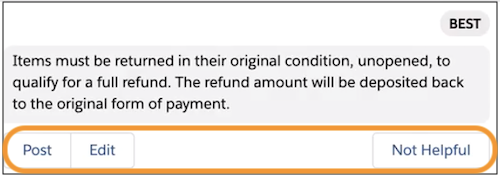
- To use a reply that fits your situation, click to send it to the customer in your chat. Make sure to click it only one time.
- To modify the reply, click Edit, make your changes, and click Post.
- To reject a reply, click Not Helpful to help Einstein Reply Recommendations learn when to recommend it.
What happens when I’m switching between multiple chats or messaging sessions?
When working with multiple chats, click the top-right icon to dock or pin the Einstein Replies component in the corner of the console.

When it’s docked, you can send replies from any console subtab. The docked component shows replies for the current tab’s open chat or messaging session.
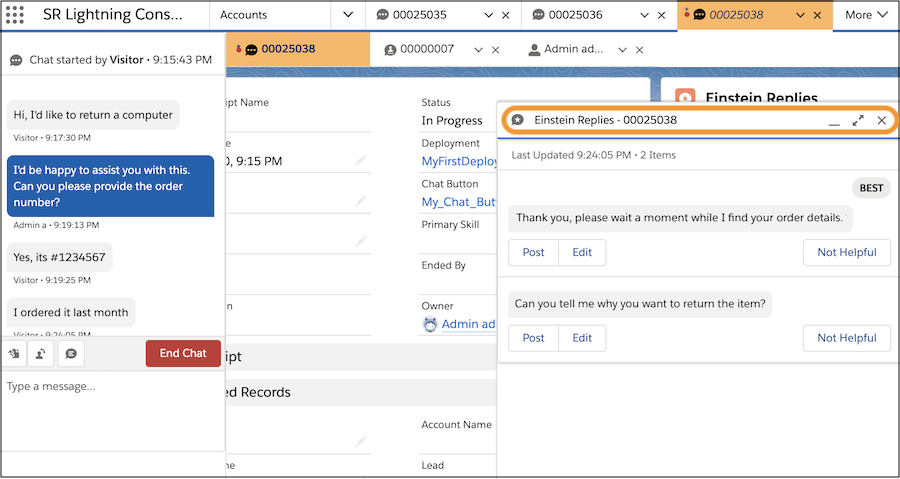

In docked mode, you can interact with recommended replies even if the conversation isn’t visible from your current subtab.
I don’t see the Einstein Replies component.
Check with your admin. Make sure that:
- Einstein Reply Recommendations is enabled
- You have access to the Quick Text folder containing the replies
- You have the Einstein Reply Recommendations User permission set
- Your console layout includes the Einstein Replies component, which is added automatically to the Chat and Messaging tabs
The Einstein Replies component isn’t recommending replies.
Check with your admin. Replies are recommended only if:
- Replies were published to Quick Text
- Your Einstein Reply Recommendations model is active
- Recommendations aren’t paused
- A chat or messaging session is open
- The responses score above the confidence threshold
I see duplicate replies.
Let your admin know so that the admin can remove or edit the duplicates. Duplicates can occur if:
- A reply was published to quick text more than once
- Highly similar replies weren’t edited or removed during publishing
- Your admin created a new quick text reply for Einstein to recommend and it’s similar to one that was already published
- You have access to multiple quick text folders with matching replies