
After your Einstein Reply Recommendations model is activated, you can pause recommendations if you need to. You can also update, delete, and customize access to your published replies so they continue to meet your needs.
Required Editions
| View supported editions. |
| User Permissions Needed | |
|---|---|
| To publish and manage replies, you need: | Create on quick text AND Manage Replies for Einstein Reply Recommendations AND View Setup and Configuration |
Manage Published Replies and Create Replies
Edit or delete published replies on the Quick Text tab. From the App Launcher, click Quick Text in the items list. Your changes take effect when you save them.
You don’t need to pause recommendations to publish replies or manage published replies. See Review and Publish Replies.
After the initial build, you can check for new reply templates on-demand. On your model’s settings page, select the Reply Candidates tab, and then select Check for New Replies. Einstein analyzes your latest chat transcripts and suggests new replies.
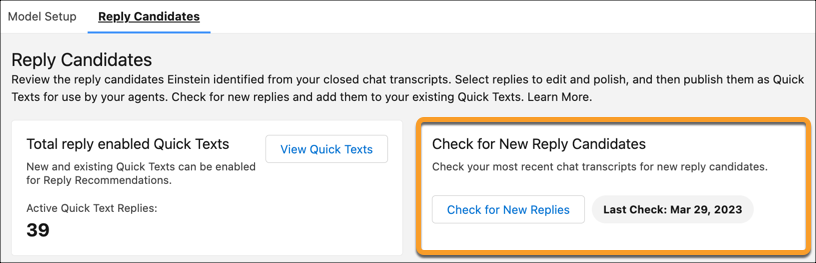
You can also edit or add replies from the Quick Text tab at any time.
Select Include in reply recommendations on the quick text record, and share the quick text folder with service reps for them to see it as a recommended reply.
Address Duplicate Replies
Duplicate replies can occur if:
- A reply was published to quick text multiple times.
- Highly similar replies weren’t edited or removed during publishing.
- You created a new quick text reply for Einstein to recommend, and it’s similar to one that was published.
- A service rep has access to multiple quick text folders with matching replies.
To address duplicate replies, delete or edit the duplicates from the Quick Text tab. If you save your replies in multiple quick text folders and intentionally add the same reply to two folders, verify that the service rep seeing duplicate replies doesn’t have access to both folders.
Pause Reply Recommendations
To stop showing recommendations to service reps for any reason, click Pause Recommendations on the Einstein Reply Recommendations Setup page.
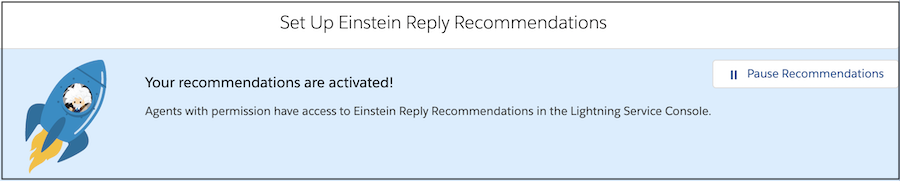
For example, if you update a business policy, pause recommendations to remove or update replies that reflect your old policy. During this time, the Einstein Replies component in the console indicates that recommendations are paused. Changes to quick text records go into effect immediately, so if the updates you’re making are minor, you probably don’t need to pause recommendations.
