---
schema_version: "1"
id: 5b60ecdee8d281b431cbe92ee90a59ac737d1bd7a62659837db7ab5ebbf626b8
title: Activate Your Reply Recommendation Model
collection: admin
version: current
locale: en-us
portal_url: https://docs.salesforce.com/admin/current/en-us/service/264-0-0/reply_rec_activate.md
canonical_url: https://help.salesforce.com/s/articleView?id=service.reply_rec_activate.htm&release=264.0.0&type=5
source_site: help.salesforce.com
content_type: documentation
content_hash: 9f74b71477550b97364fc2958aebc4eaf5b92c29de25fd5525e426b0b1609435
description: After you publish Einstein’s replies to Quick Text and give your service reps access to replies, activate your model to show recommendations during chat and messaging sessions.
products:
- Service Cloud
- Service Intelligence
release: "264"
---
# Activate Your Reply Recommendation Model
After you publish Einstein’s replies to Quick Text and give your service reps access to replies, activate your model to show recommendations during chat and messaging sessions.
### Required Editions
To activate an Einstein Reply Recommendations model:
Customize Application
1. On the Einstein Reply Recommendations page in Setup, confirm that the status of the replies that you want to use is Published to Quick Text.
2. To make the model available to your service reps, click **Activate**.
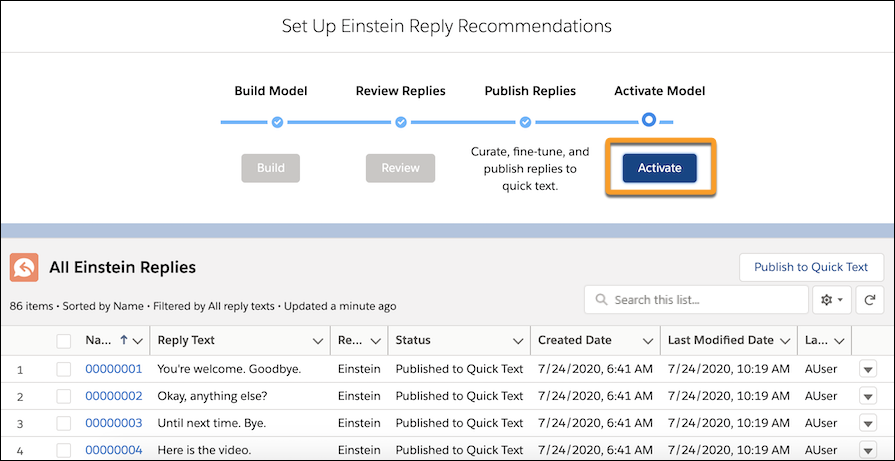
Service service reps can now see recommended replies in the console.
To pause recommendations or edit your published replies, see [Maintain Your Recommended Replies](https://help.salesforce.com/s/articleView?id=service.reply_rec_maintain.htm&release=264.0.0&type=5 "After your Einstein Reply Recommendations model is activated, you can pause recommendations if you need to. You can also update, delete, and customize access to your published replies so they continue to meet your needs.").