
Create travel modes per territory, resource, or both so that routing calculations are accurate based on the transportation type, whether the resource can drive through toll roads, and whether the resource is carrying hazardous materials.
Required Editions
| Available in: Available in Lightning Experience and Salesforce Classic in these editions where Field Service is enabled: Enterprise, Unlimited, and Developer Editions |
| User Permissions Needed | |
|---|---|
| To view travel modes: | Read on travel modes |
| To create, update, or delete travel modes: | Edit on travel modes |
 This is a Field Service managed package feature.
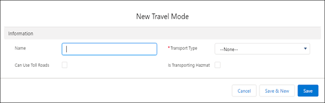
- From the Travel Modes tab, click New.
-
Select a travel mode name.
-
Select the transport type: Car (default), Light Truck, Heavy Truck, Bicycle, or Walking.
The truck category that you select is based on the truck’s measurements and maximum load
capacity.
Transport Type Weight (kg) Height (m) Length (m) Width (m) Light Truck 8,500 4.3 12.5 2.5 Heavy Truck 15,000 4.6 19 3.5 -
Indicate whether the travel mode can use toll roads and whether it’s transporting
hazmat, and then save your changes. The default is using toll roads, and not carrying
hazardous materials.
 Note When you select walking or bicycle, the hazmat and toll roads settings are ignored during calculation.