Assign a travel mode to a service territory or to a service territory member so that
the Enhanced Scheduling and Optimization engine can consider the resource’s routing and travel
preferences. Routing requests are based on the travel mode selected at the service territory
level unless specified otherwise at the resource level. In this case, the resource territory
membership setting overrides the territory-level setting. Only primary territory members can
have a travel mode assigned to them. The primary service territory member's assigned travel mode
determines the travel mode for all service appointments for that resource, regardless of the
service territory of the appointment.
Required Editions
| Available in: Available in Lightning Experience and Salesforce Classic in these
editions where Field Service is enabled: Enterprise, Unlimited, and
Developer Editions
|
| User Permissions Needed |
| To view travel modes: |
Read on travel modes |
| To create, update, or delete travel modes: |
Edit on travel modes |
| To assign a travel mode to a service territory or service territory member: |
Edit on service territory and/or service territory member |
 This is a Field Service managed package feature.
-
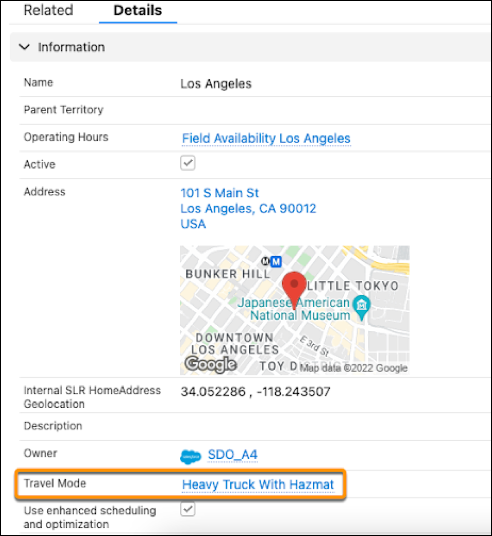
From the Service Territories tab, click a service territory, and then edit the Travel Mode
field.
-
Select a travel mode, and then save your changes.
-
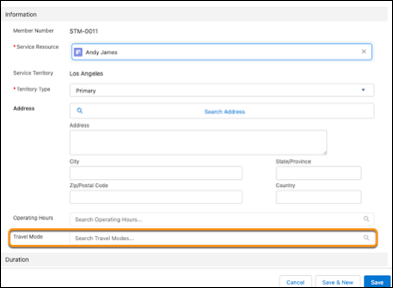
To select a travel mode for a particular service territory member, click the service
territory Related tab, and then click the required service resource name under Service
Territory Members. The service resource must be a primary territory member.
-
Edit the resource’s service territory.
-
Select the travel mode for that resource and save.