
Keep track of changes made to service appointments with Service Appointment Lifecycle. This makes it easy to see what happened to an appointment and to quickly resolve any related issues.
Required Editions
| Available in: Lightning Experience |
| The Field Service core features, managed package, and mobile app are available in Enterprise, Unlimited, and Developer Editions. |
 This is a Field Service managed package feature.
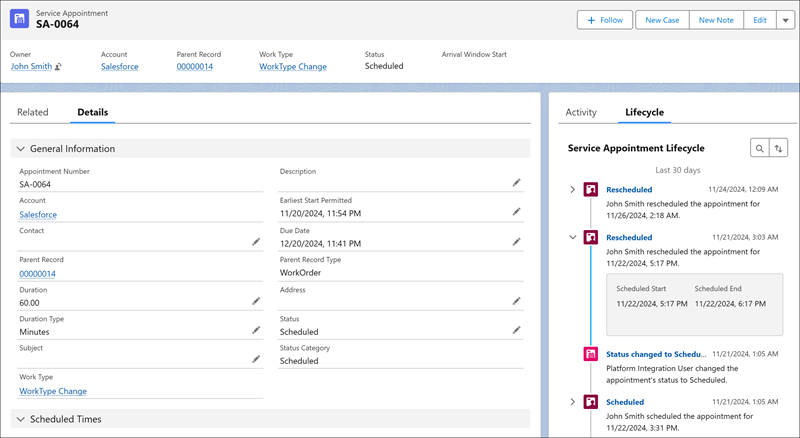
Service Appointment Lifecycle lets dispatchers, service managers, and Salesforce admins have a clear view of service appointment scheduling history. It helps you track changes to key service appointment details related to scheduling, such as service resource, duration, and scheduled start and end times, and see who made them.
This information shows on the service appointment record page and helps you easily spot and review scheduling issues. Each change is also saved to the Field Service object change record page where you can see additional information related to the change.
For example, if a scheduled service appointment is unscheduled, Service Appointment Lifecycle shows you who made the change and what scheduling details were changed. If the change was made by optimization and you want to know why the appointment was unscheduled, you can find the reason under Activity Details on the Field Service Object Change record page.
With Service Appointment Lifecycle, service managers and Salesforce admins can also gain valuable insights into how dispatchers, optimization services, and Agentforce agents manage service appointments. By reviewing the information in the Field Service object changes list view and using the platform’s capabilities to create charts, you can identify and analyze patterns and trends and create reports to better manage the scheduling process. For example, you can identify who makes mostly manual updates versus who accepts the optimization’s scheduling, and how many scheduling activities and detail updates exist for each service appointment.
- Set Up Service Appointment Lifecycle
Configure your Service Appointment Lifecycle settings. - Access Service Appointment Lifecycle
View the scheduling history of a service appointment.