
Track the improvements that optimization made to the scheduling of service appointments across multiple territories, and learn how to get the best results from optimization.
Required Editions
| Available in: Lightning Experience |
| The Field Service core features, managed package, and mobile app are available in Enterprise, Unlimited, and Developer Editions. |
 This is a Field Service managed package feature.

Watch the video to see how to use the Optimization Hub dashboard to gain insights into how scheduling optimization improves your business metrics.
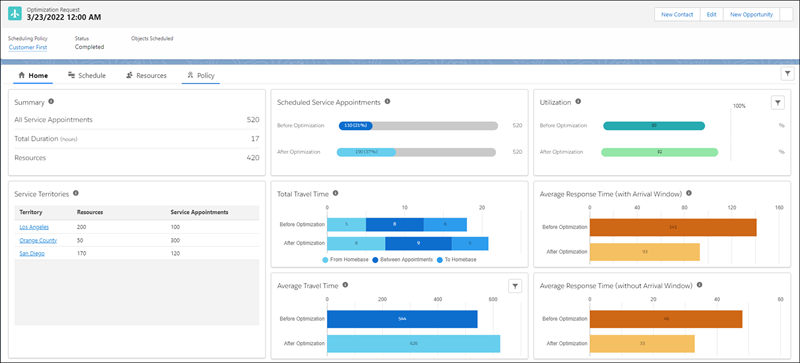
Optimization Hub is a centralized dashboard where operation managers and business analysts can view and track all optimization information related to an optimization request. It gives you visibility into how scheduling optimization affects your business.
Optimization Hub updates the scheduling results after every optimization run and gives you a comprehensive comparison of different metrics before and after optimization and across multiple territories. It shows you what improvements optimization has made, and it provides guidance on how to get more out of your optimization settings. By adjusting your scheduling policy and prioritizing your business objectives, you can get even better scheduling results compared to your last optimization run.
Optimization Hub considers only the service appointments that have territories. Service appointments without a territory don’t affect metrics and key performance indicators.
Optimization Hub includes information relevant to scheduling, service resources, and the scheduling policy. For example, it tracks the improvement of travel time, service resource utilization, and response time.
- Limitations for Optimization Hub
All Enhanced Scheduling and Optimization limitations apply to Optimization Hub. - Set Up Optimization Hub
Assign user permissions and add the Optimization Hub Lightning web component to the optimization request record page. - Access Optimization Hub
View Optimization Hub to get a snapshot of different metrics before and after optimization and across multiple territories.