When initiating resource schedule optimization, in-day optimization, or global
optimization, Field Service checks for other such optimization requests that are being
processed simultaneously for the same territory or service resources with at least 1 day of
overlap in the optimization horizon. For example, a dispatcher activates resource schedule
optimization for a resource that’s part of a dataset being optimized through in-day
optimization. If an overlap is detected, a message is shown and the newly initiated
optimization request is aborted. Similarly, when a dispatcher tries to make changes to the
Gantt, which is being processed by a background optimization request such as in-day
optimization, a message is shown notifying the dispatcher that their changes can create
unwanted results. The dispatcher can choose whether to continue with the manual changes or
not.
Required Editions
| Available in: both Salesforce Classic (not available in all orgs) and Lightning
Experience |
| The Agentforce Field Service and Operations core features, managed package, and
mobile app are available in Enterprise, Unlimited, and Developer
Editions. |
| User
Permissions Needed |
| To enable optimization overlaps prevention: |
Custom permission set: FSL Admin Permissions |
| To run Resource Schedule Optimization (RSO), in-day, or global
optimization: |
One of these custom permission sets:
- Field Service Admin Permissions
- Field Service Dispatcher Permissions
|
 This is a Field Service managed package feature.
-
In Setup, go to Field Service Settings and verify that Field Service Enhanced
Scheduling and Optimization is enabled.
-
In the Field Service Admin app, go to Field Service Settings. Select
Optimization, and then select the Logic tab.
-
Verify that Enable optimization overlaps prevention is enabled (default
on).
If Enable optimization overlaps prevention is selected and you try to run an
optimization request while an overlapping optimization request is being processed,
the new optimization request fails. An overlapping request occurs when there’s an
overlap of optimized resources (caused by running on the same territory, or resource
schedule optimization) and a time horizon overlap. A message is shown stating which
request ID has overlapping service territories and which territories overlap, for
easy troubleshooting. If the overlapping optimization request is running for a
timeout period defined for the operation and isn't responding, the system aborts
this request, and the new optimization request runs instead. The timeout for in-day
and resource schedule optimization is 15 minutes. The timeout for global
optimization is 5 hours if the optimization is in progress or queued, or 1 hour if
the optimization request is new.
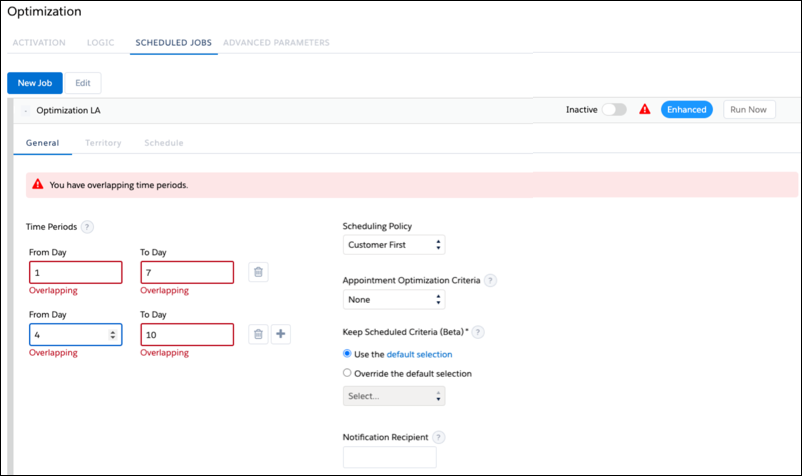
For enhanced scheduled jobs, if you try to
create a scheduled job with multiple time periods that overlap for the same service
territory, the parallel requests with overlapping data can conflict and result in
incorrect schedules. When using Enhanced Scheduling and Optimization, ensure that
Enable optimization overlaps prevention is selected in Field Service Settings
(enabled by default) to avoid saving an enhanced scheduled job with overlapping time
periods.