---
schema_version: "1"
id: 7695d7808d7da1c95b43abba4fc199617c6611d1438fa63b3a410c18593854fc
title: Customize the Classic Dispatch Console with Field Sets
collection: admin
version: current
locale: en-us
portal_url: https://docs.salesforce.com/admin/current/en-us/service/264-0-0/pfs_fieldsets.md
canonical_url: https://help.salesforce.com/s/articleView?id=service.pfs_fieldsets.htm&release=264.0.0&type=5
source_site: help.salesforce.com
content_type: documentation
content_hash: 1fe11af28dea064c8b71278afaa44ad60631ff7c2bb9a3d05264ec32580ffe44
description: Use field sets to control which fields appear in different sections of the Field Service Classic Dispatch Console. For example, choose which fields appear as columns in the appointment list.
products:
  - Field Service
release: "264"
---
# Customize the Classic Dispatch Console with Field Sets

Use field sets to control which fields appear in different sections of the Field Service Classic Dispatch Console. For example, choose which fields appear as columns in the appointment list.

### Required Editions

<table class="slds-table slds-table_bordered slds-max-medium-table_stacked slds-m-bottom_small edition"><colgroup><col></colgroup><tbody><tr class=""><td class="slds-cell-wrap" style="vertical-align:top;">Available in: both Salesforce Classic (not available in all orgs) and Lightning Experience</td></tr><tr class=""><td class="slds-cell-wrap" style="vertical-align:top;">The Agentforce Field Service and Operations core features, managed package, and mobile app are available in <strong>Enterprise</strong>, <strong>Unlimited</strong>, and <strong>Developer</strong> Editions.</td></tr></tbody></table>

![Package icon](https://sf-zdocs-cdn-prod.zoominsoftware.com/tdta-service-support_field_service-264-0-0-production-enus/3f7dceb9-dd70-454a-b49e-bbb4526a158d/support_field_service/images/fs_package.png) _This is a Field Service managed package feature._

To manage a field set, from the Object Manager, find the object whose field set you want to edit—for example, Service Resource. Then, click **Field Sets**.

Field sets support the following field types: Number, Text, Date, Date/Time, Currency, and Reference (lookup fields). The Field Service managed package also provides additional field sets not included in this article.

Only fields related to the object that you’re editing are shown in the Classic Dispatch Console. For example, if you’re editing the Service Appointment object, only service appointment fields are shown. Fields related to a service appointment’s account aren’t shown.

## Service Appointment Field Sets

<table class="slds-table slds-table_bordered slds-max-medium-table_stacked slds-m-bottom_small ">
        <colgroup>
          <col style="width:12.300123001230014%">
          <col style="width:23.247232472324725%">
          <col style="width:64.45264452644528%">
        </colgroup>
        <thead class="slds-text-title_caps ">
          <tr class="">
            <th scope="col" class="slds-cell-wrap" style="vertical-align:top;" id="d26532e109">Field Set</th>
            <th scope="col" class="slds-cell-wrap" style="vertical-align:top;" id="d26532e112">Description</th>
            <th scope="col" class="slds-cell-wrap" style="vertical-align:top;" id="d26532e115">Location in Classic Dispatch Console</th>
          </tr>
        </thead>
        <tbody>
          <tr class="">
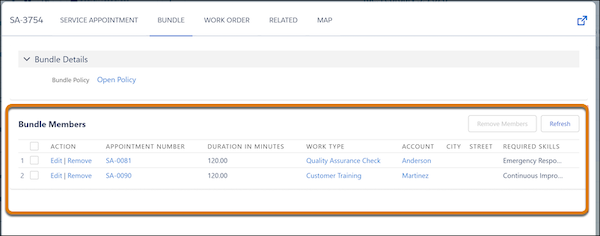
            <td data-label="Field Set" class="slds-cell-wrap" style="vertical-align:top;" headers="d26532e109 ">Bundle Members</td>

            <td data-label="Description" class="slds-cell-wrap" style="vertical-align:top;" headers="d26532e112 ">Controls which fields are displayed in the Bundle Members section of the Bundle
              tab for the bundle service appointment.</td>

            <td data-label="Location in Classic Dispatch Console" class="slds-cell-wrap" style="vertical-align:top;" headers="d26532e115 ">
              <div style="text-align:left;"><img src="https://sf-zdocs-cdn-prod.zoominsoftware.com/tdta-service-support_field_service-264-0-0-production-enus/3f7dceb9-dd70-454a-b49e-bbb4526a158d/support_field_service/images/pfs_bundle_members.png" alt="Bundle members field set"></div>
            </td>

          </tr>
          <tr class="">
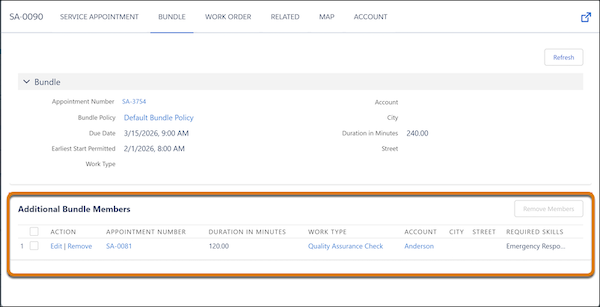
            <td data-label="Field Set" class="slds-cell-wrap" style="vertical-align:top;" headers="d26532e109 ">Bundle Members Siblings</td>

            <td data-label="Description" class="slds-cell-wrap" style="vertical-align:top;" headers="d26532e112 ">Controls which fields are displayed in the Additional Bundle Members section of
              the Bundle tab for a bundle member service appointment.</td>

            <td data-label="Location in Classic Dispatch Console" class="slds-cell-wrap" style="vertical-align:top;" headers="d26532e115 ">
              <div style="text-align:left;"><img src="https://sf-zdocs-cdn-prod.zoominsoftware.com/tdta-service-support_field_service-264-0-0-production-enus/3f7dceb9-dd70-454a-b49e-bbb4526a158d/support_field_service/images/pfs_bundle_members_siblings.png" alt="Bundle member siblings field set"></div>
            </td>

          </tr>
          <tr class="">
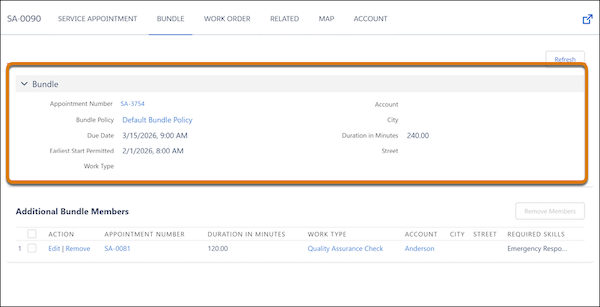
            <td data-label="Field Set" class="slds-cell-wrap" style="vertical-align:top;" headers="d26532e109 ">Bundle Lightbox</td>

            <td data-label="Description" class="slds-cell-wrap" style="vertical-align:top;" headers="d26532e112 ">Controls which fields are displayed in the Bundle section of the Bundle tab for
              a bundle member service appointment.</td>

            <td data-label="Location in Classic Dispatch Console" class="slds-cell-wrap" style="vertical-align:top;" headers="d26532e115 ">
              <div style="text-align:left;"><img src="https://sf-zdocs-cdn-prod.zoominsoftware.com/tdta-service-support_field_service-264-0-0-production-enus/3f7dceb9-dd70-454a-b49e-bbb4526a158d/support_field_service/images/pfs_bundle_lightbox.png" alt="Bundle lightbox field set"></div>
            </td>

          </tr>
          <tr class="">
            <td data-label="Field Set" class="slds-cell-wrap" style="vertical-align:top;" headers="d26532e109 ">Capacity Service Columns</td>

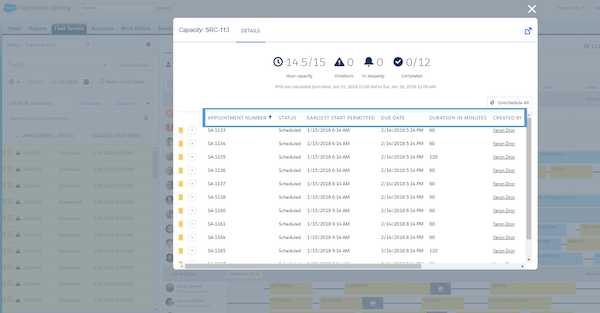
            <td data-label="Description" class="slds-cell-wrap" style="vertical-align:top;" headers="d26532e112 ">Controls the columns on the dialog screen shown when a user double-clicks a capacity
              record on the Gantt. This field set supports up to 9 fields.</td>

            <td data-label="Location in Classic Dispatch Console" class="slds-cell-wrap" style="vertical-align:top;" headers="d26532e115 ">
              <span style="vertical-align:text-bottom;display:inline-block;"><img style="margin-bottom:0;" src="https://sf-zdocs-cdn-prod.zoominsoftware.com/tdta-service-support_field_service-264-0-0-production-enus/3f7dceb9-dd70-454a-b49e-bbb4526a158d/support_field_service/images/fsl_capacity_service_columns.png" alt="Capacity Service Columns"></span>
            </td>

          </tr>
          <tr class="">
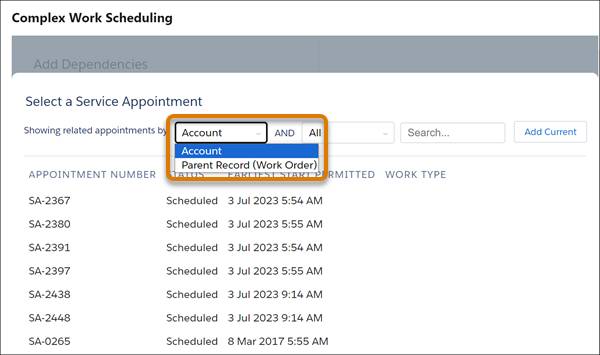
            <td data-label="Field Set" class="slds-cell-wrap" style="vertical-align:top;" headers="d26532e109 ">Complex Work Lookup Fields</td>

            <td data-label="Description" class="slds-cell-wrap" style="vertical-align:top;" headers="d26532e112 ">Controls which lookup fields are available for selecting service appointments when
              users create dependencies.</td>

            <td data-label="Location in Classic Dispatch Console" class="slds-cell-wrap" style="vertical-align:top;" headers="d26532e115 ">
              <div style="text-align:left;"><img src="https://sf-zdocs-cdn-prod.zoominsoftware.com/tdta-service-support_field_service-264-0-0-production-enus/3f7dceb9-dd70-454a-b49e-bbb4526a158d/support_field_service/images/pfs_complex_work_lookup_filter_options.png" alt="Dependency Lookup Filter Options"></div>
            </td>

          </tr>
          <tr class="">
            <td data-label="Field Set" class="slds-cell-wrap" style="vertical-align:top;" headers="d26532e109 ">Crew Management</td>

            <td data-label="Description" class="slds-cell-wrap" style="vertical-align:top;" headers="d26532e112 ">Controls which fields are shown when a user double-clicks a service appointment from
              the Crew Schedule row in the Crew Management Gantt.</td>

            <td data-label="Location in Classic Dispatch Console" class="slds-cell-wrap" style="vertical-align:top;" headers="d26532e115 ">
              <div><img style="width:600px;" src="https://sf-zdocs-cdn-prod.zoominsoftware.com/tdta-service-support_field_service-264-0-0-production-enus/3f7dceb9-dd70-454a-b49e-bbb4526a158d/support_field_service/images/fsl_crew_management_fieldset.png" alt="Crew Management Field Set"></div>
            </td>

          </tr>
          <tr class="">
            <td data-label="Field Set" class="slds-cell-wrap" style="vertical-align:top;" headers="d26532e109 ">Crew Management Tooltip</td>

            <td data-label="Description" class="slds-cell-wrap" style="vertical-align:top;" headers="d26532e112 ">
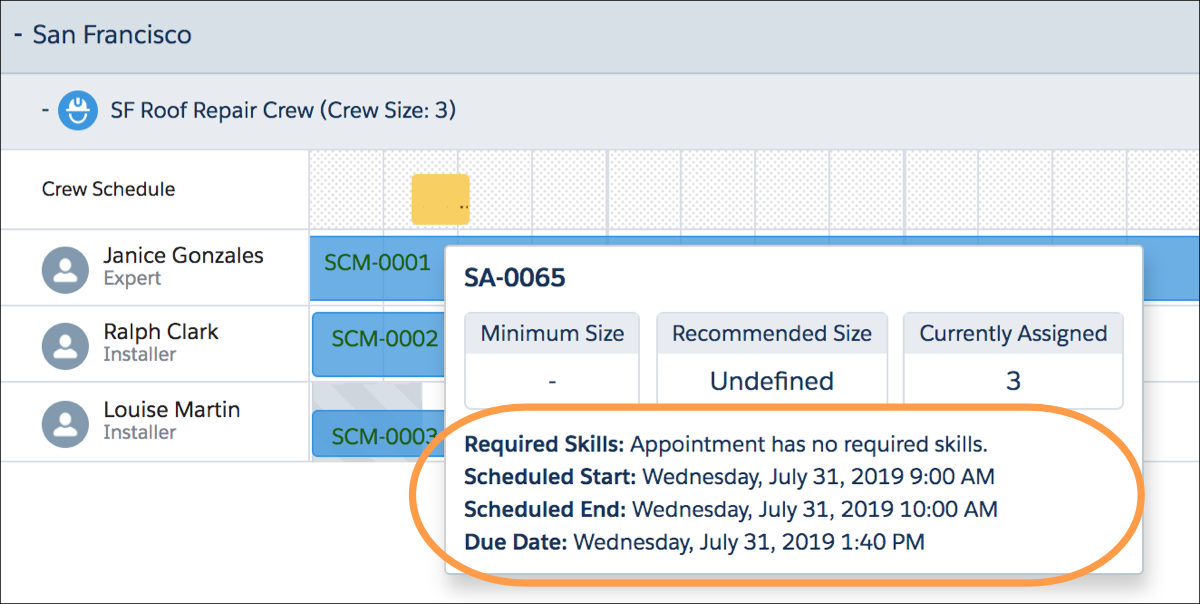
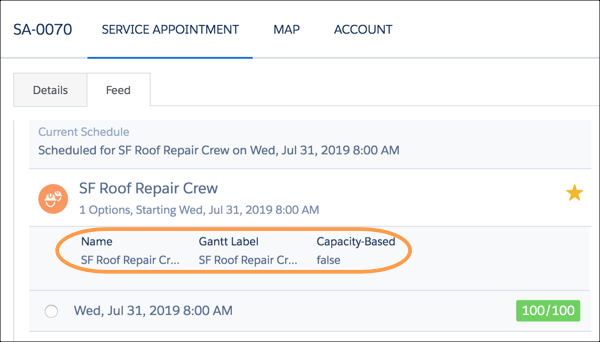
              <p>Controls which fields are shown when a user hovers over an appointment in the Crew
                Management Gantt. </p>
              <div class="slds-box slds-box_x-small slds-theme_shade slds-m-top_medium slds-m-bottom_medium">
                <div class="slds-media slds-media_responsive">
                  <div class="slds-media__figure"><span class="slds-icon_container slds-icon_container_circle slds-icon-note-note"><img style="margin-bottom:0;" src="https://sf-zdocs-cdn-prod.zoominsoftware.com/tdta-service-support_field_service-264-0-0-production-enus/3f7dceb9-dd70-454a-b49e-bbb4526a158d/images/icon_note.png" alt="Note"></span></div>
                  <div class="slds-media__body" style="padding-top:.5rem;padding-bottom:.5rem;"><span class="slds-text-title_caps">Note</span> Lookup fields and fields without values aren't displayed. The
                    Required Skills field is always shown.</div>
                </div>
              </div>
            </td>

            <td data-label="Location in Classic Dispatch Console" class="slds-cell-wrap" style="vertical-align:top;" headers="d26532e115 ">
              <span style="vertical-align:text-bottom;display:inline-block;"><img style="width:600px;margin-bottom:0;" src="https://sf-zdocs-cdn-prod.zoominsoftware.com/tdta-service-support_field_service-264-0-0-production-enus/3f7dceb9-dd70-454a-b49e-bbb4526a158d/support_field_service/images/fs_crew_management_tooltip_fieldset.png" alt="View fields for service appointments on the Crew Management Gantt."></span>
            </td>

          </tr>
          <tr class="">
            <td data-label="Field Set" class="slds-cell-wrap" style="vertical-align:top;" headers="d26532e109 ">Designated Work Fields</td>

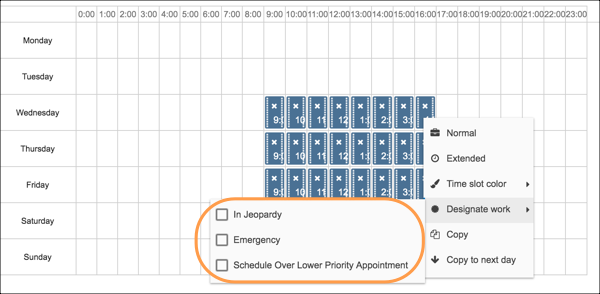
            <td data-label="Description" class="slds-cell-wrap" style="vertical-align:top;" headers="d26532e112 ">Controls which fields are available when a user is creating a designated time slot
              from the time slots editor Visualforce page on the operating hours record.</td>

            <td data-label="Location in Classic Dispatch Console" class="slds-cell-wrap" style="vertical-align:top;" headers="d26532e115 ">
              <span style="vertical-align:text-bottom;display:inline-block;"><img style="width:600px;margin-bottom:0;" src="https://sf-zdocs-cdn-prod.zoominsoftware.com/tdta-service-support_field_service-264-0-0-production-enus/3f7dceb9-dd70-454a-b49e-bbb4526a158d/support_field_service/images/fs_designated_work_fieldset.png" alt="View fields for designated work time slots."></span>
            </td>

          </tr>
          <tr class="">
            <td data-label="Field Set" class="slds-cell-wrap" style="vertical-align:top;" headers="d26532e109 ">Gantt Filter</td>

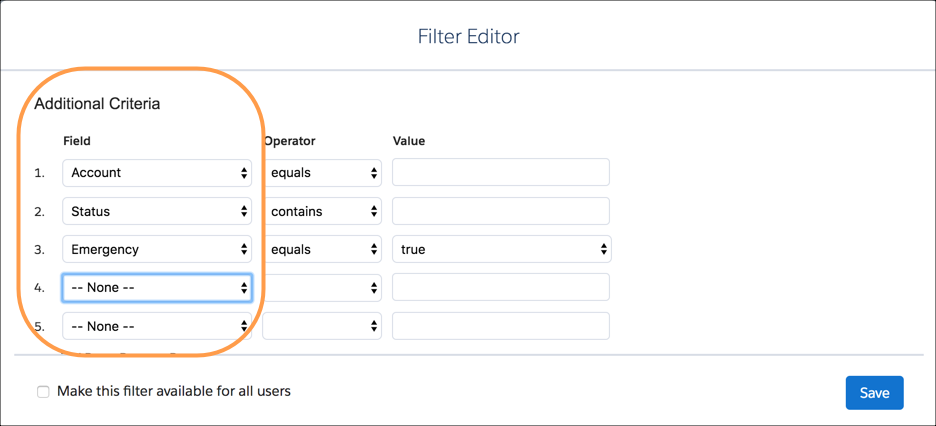
            <td data-label="Description" class="slds-cell-wrap" style="vertical-align:top;" headers="d26532e112 ">Controls the Additional Criteria fields shown when creating a custom Gantt
              filter.</td>

            <td data-label="Location in Classic Dispatch Console" class="slds-cell-wrap" style="vertical-align:top;" headers="d26532e115 ">
              <span style="vertical-align:text-bottom;display:inline-block;"><img style="width:600px;margin-bottom:0;" src="https://sf-zdocs-cdn-prod.zoominsoftware.com/tdta-service-support_field_service-264-0-0-production-enus/3f7dceb9-dd70-454a-b49e-bbb4526a158d/support_field_service/images/fs_gantt_filter_fieldset.png" alt="Filter the Gantt using additional fields."></span>
            </td>

          </tr>
          <tr class="">
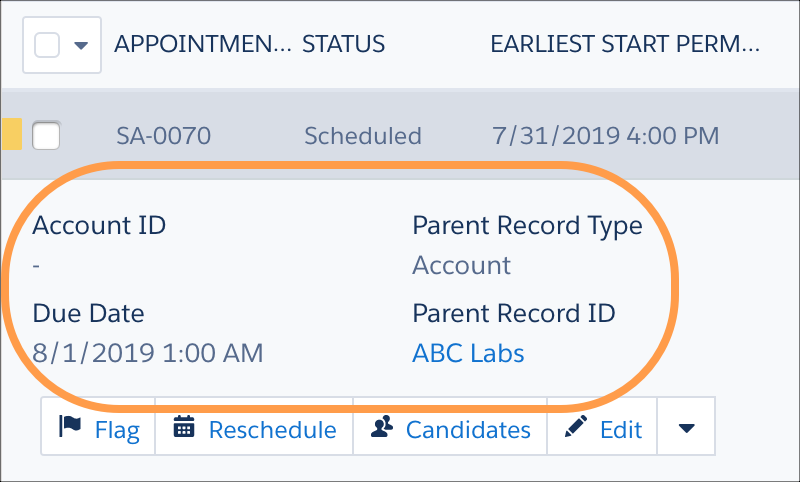
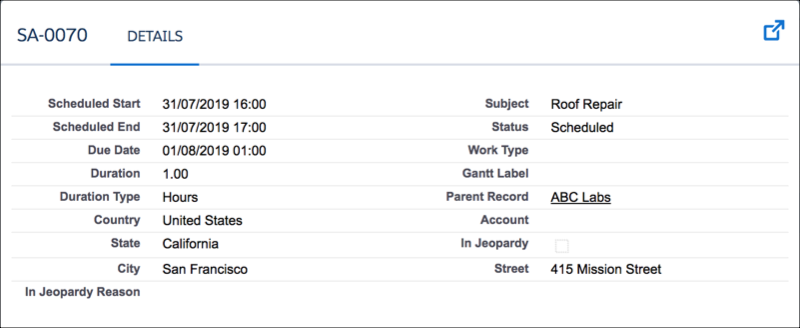
            <td data-label="Field Set" class="slds-cell-wrap" style="vertical-align:top;" headers="d26532e109 ">Service Appointment Expanded</td>

            <td data-label="Description" class="slds-cell-wrap" style="vertical-align:top;" headers="d26532e112 ">Controls the mini layout displayed when the user clicks an appointment in the
              appointment list. The mini layout supports up to 12 fields.</td>

            <td data-label="Location in Classic Dispatch Console" class="slds-cell-wrap" style="vertical-align:top;" headers="d26532e115 ">
              <span style="vertical-align:text-bottom;display:inline-block;"><img style="width:400px;margin-bottom:0;" src="https://sf-zdocs-cdn-prod.zoominsoftware.com/tdta-service-support_field_service-264-0-0-production-enus/3f7dceb9-dd70-454a-b49e-bbb4526a158d/support_field_service/images/fs_service_appt_expanded_fieldset.png" alt="Service appointment fields in the appointment list."></span>
            </td>

          </tr>
          <tr class="">
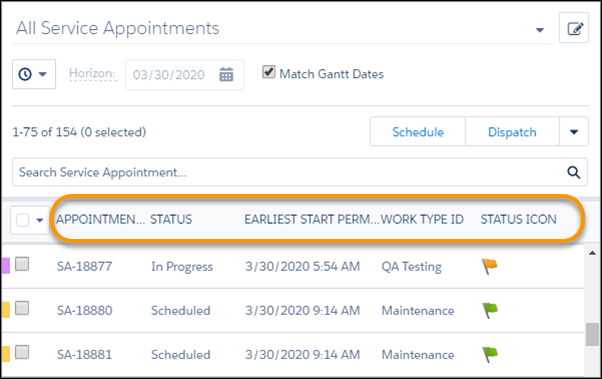
            <td data-label="Field Set" class="slds-cell-wrap" style="vertical-align:top;" headers="d26532e109 ">Service Appointment List Columns</td>

            <td data-label="Description" class="slds-cell-wrap" style="vertical-align:top;" headers="d26532e112 ">
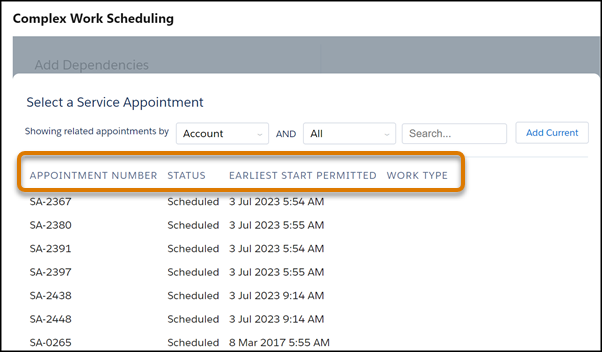
              <p>Controls the fields that appear as columns in the appointment list and in the complex
                work dependencies lookup filter. We recommend that the appointment list includes up to six
                columns. Additional columns are supported but can affect the performance of the Classic Dispatch Console. The number of columns shown depends on the screen resolution. You can include Gantt
                or custom icon fields in columns. </p>
              <div class="slds-box slds-box_x-small slds-theme_shade slds-m-top_medium slds-m-bottom_medium">
                <div class="slds-media slds-media_responsive">
                  <div class="slds-media__figure"><span class="slds-icon_container slds-icon_container_circle slds-icon-note-note"><img style="margin-bottom:0;" src="https://sf-zdocs-cdn-prod.zoominsoftware.com/tdta-service-support_field_service-264-0-0-production-enus/3f7dceb9-dd70-454a-b49e-bbb4526a158d/images/icon_note.png" alt="Note"></span></div>
                  <div class="slds-media__body" style="padding-top:.5rem;padding-bottom:.5rem;"><span class="slds-text-title_caps">Note</span> Custom appointment list filters include appointment
                    list column settings. If such a filter is applied, it overrides this field
                    set.</div>
                </div>
              </div>
            </td>

            <td data-label="Location in Classic Dispatch Console" class="slds-cell-wrap" style="vertical-align:top;" headers="d26532e115 ">
              <p>
                <span style="vertical-align:text-bottom;display:inline-block;"><img style="width:400px;margin-bottom:0;" src="https://sf-zdocs-cdn-prod.zoominsoftware.com/tdta-service-support_field_service-264-0-0-production-enus/3f7dceb9-dd70-454a-b49e-bbb4526a158d/support_field_service/images/fs_service_appt_list_columns_fieldset.png" alt="Service appointment list view fields"></span>
              </p>
              <div style="text-align:left;"><img src="https://sf-zdocs-cdn-prod.zoominsoftware.com/tdta-service-support_field_service-264-0-0-production-enus/3f7dceb9-dd70-454a-b49e-bbb4526a158d/support_field_service/images/pfs_complex_work_lookup_filter_columns.png" alt="Dependency Lookup Filter Columns"></div>
            </td>

          </tr>
          <tr class="">
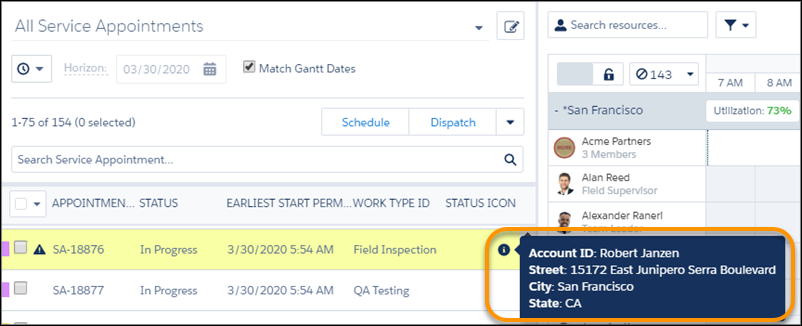
            <td data-label="Field Set" class="slds-cell-wrap" style="vertical-align:top;" headers="d26532e109 ">Service Appointment List Preview</td>

            <td data-label="Description" class="slds-cell-wrap" style="vertical-align:top;" headers="d26532e112 ">Controls the fields that appear when a user hovers on the appointment information
              icon.</td>

            <td data-label="Location in Classic Dispatch Console" class="slds-cell-wrap" style="vertical-align:top;" headers="d26532e115 ">
              <span style="vertical-align:text-bottom;display:inline-block;"><img style="width:450px;margin-bottom:0;" src="https://sf-zdocs-cdn-prod.zoominsoftware.com/tdta-service-support_field_service-264-0-0-production-enus/3f7dceb9-dd70-454a-b49e-bbb4526a158d/support_field_service/images/fs_service_appt_list_preview_fieldset.png" alt="Service appointment list preview fields"></span>
            </td>

          </tr>
          <tr class="">
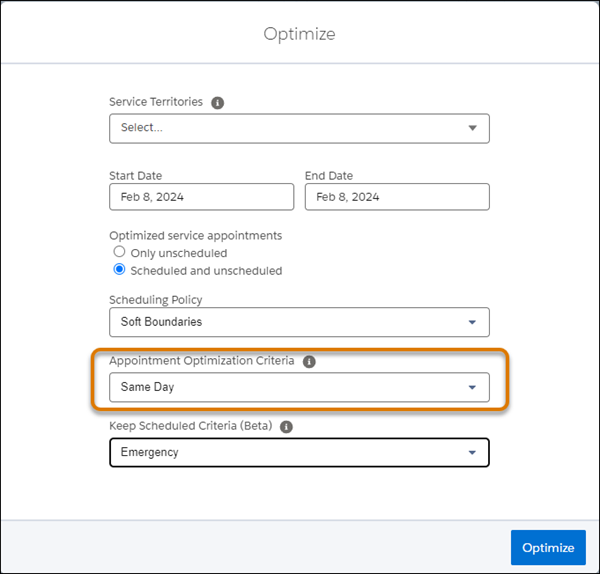
            <td data-label="Field Set" class="slds-cell-wrap" style="vertical-align:top;" headers="d26532e109 ">Service Appointment Optimization Criteria</td>

            <td data-label="Description" class="slds-cell-wrap" style="vertical-align:top;" headers="d26532e112 "> Controls the values shown in the Appointment Optimization Criteria field in the
              Optimize window. </td>

            <td data-label="Location in Classic Dispatch Console" class="slds-cell-wrap" style="vertical-align:top;" headers="d26532e115 ">
              <span style="vertical-align:text-bottom;display:inline-block;"><img style="width:400px;margin-bottom:0;" src="https://sf-zdocs-cdn-prod.zoominsoftware.com/tdta-service-support_field_service-264-0-0-production-enus/3f7dceb9-dd70-454a-b49e-bbb4526a158d/support_field_service/images/pfs_optimize-appoint-opt-criteria.png" alt="Optimize window Appointment Optmization Criterea"></span>
            </td>

          </tr>
          <tr class="">
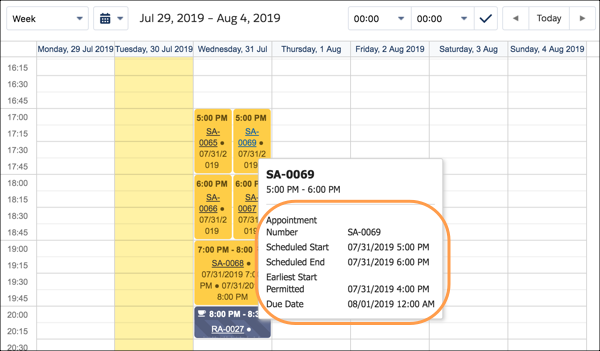
            <td data-label="Field Set" class="slds-cell-wrap" style="vertical-align:top;" headers="d26532e109 ">Service Appointment Resource Calendar Tooltip</td>

            <td data-label="Description" class="slds-cell-wrap" style="vertical-align:top;" headers="d26532e112 ">Controls the fields displayed on the tooltip when a user hovers over an appointment on
              the service resource.</td>

            <td data-label="Location in Classic Dispatch Console" class="slds-cell-wrap" style="vertical-align:top;" headers="d26532e115 ">
              <span style="vertical-align:text-bottom;display:inline-block;"><img style="width:600px;margin-bottom:0;" src="https://sf-zdocs-cdn-prod.zoominsoftware.com/tdta-service-support_field_service-264-0-0-production-enus/3f7dceb9-dd70-454a-b49e-bbb4526a158d/support_field_service/images/fs_sa_resource_calendar_tooltip_fieldset.png" alt="View fields for service appointments on a resource's calendar."></span>
            </td>

          </tr>
          <tr class="">
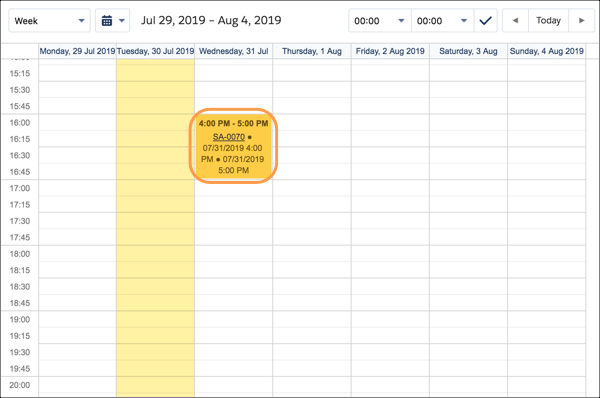
            <td data-label="Field Set" class="slds-cell-wrap" style="vertical-align:top;" headers="d26532e109 ">Service Appt Resource Calendar Display</td>

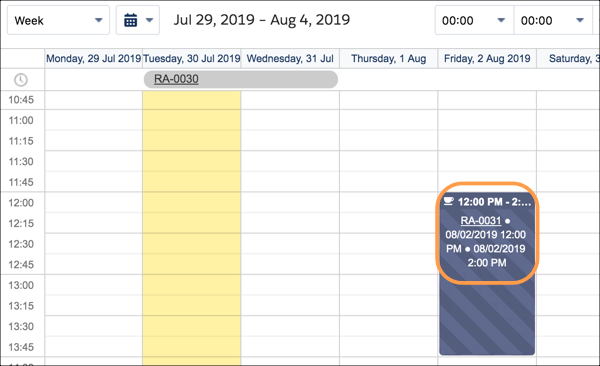
            <td data-label="Description" class="slds-cell-wrap" style="vertical-align:top;" headers="d26532e112 ">Controls the fields displayed on appointments on the service resource calendar
              Visualforce page.</td>

            <td data-label="Location in Classic Dispatch Console" class="slds-cell-wrap" style="vertical-align:top;" headers="d26532e115 ">
              <span style="vertical-align:text-bottom;display:inline-block;"><img style="margin-bottom:0;" src="https://sf-zdocs-cdn-prod.zoominsoftware.com/tdta-service-support_field_service-264-0-0-production-enus/3f7dceb9-dd70-454a-b49e-bbb4526a158d/support_field_service/images/fsl_sa_resource_calendar_display.png" alt="View fields for appointments on a service resource's calendar."></span>
            </td>

          </tr>
          <tr class="">
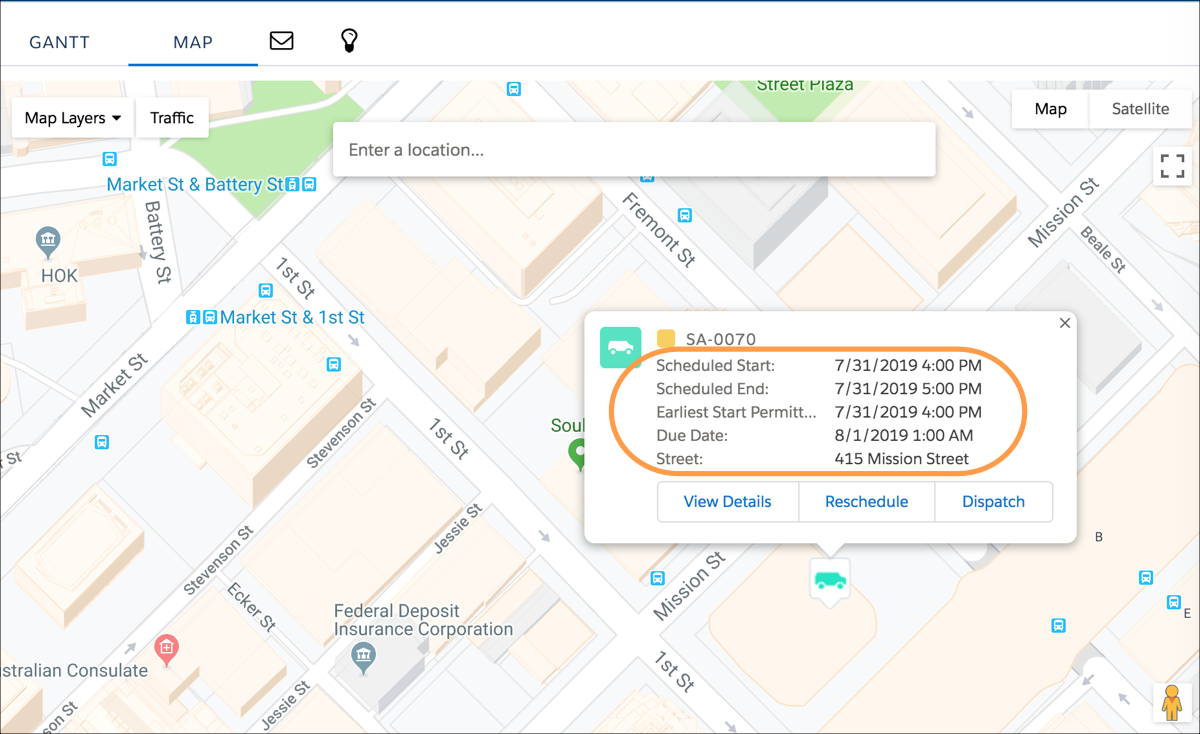
            <td data-label="Field Set" class="slds-cell-wrap" style="vertical-align:top;" headers="d26532e109 ">Service Info Window Map</td>

            <td data-label="Description" class="slds-cell-wrap" style="vertical-align:top;" headers="d26532e112 ">Controls the layout of the dialog screen displayed when the user double-clicks an
              appointment on the map.</td>

            <td data-label="Location in Classic Dispatch Console" class="slds-cell-wrap" style="vertical-align:top;" headers="d26532e115 ">
              <span style="vertical-align:text-bottom;display:inline-block;"><img style="width:600px;margin-bottom:0;" src="https://sf-zdocs-cdn-prod.zoominsoftware.com/tdta-service-support_field_service-264-0-0-production-enus/3f7dceb9-dd70-454a-b49e-bbb4526a158d/support_field_service/images/fs_service_info_window_map.png" alt="View fields for appointments on the Gantt map."></span>
            </td>

          </tr>
          <tr class="">
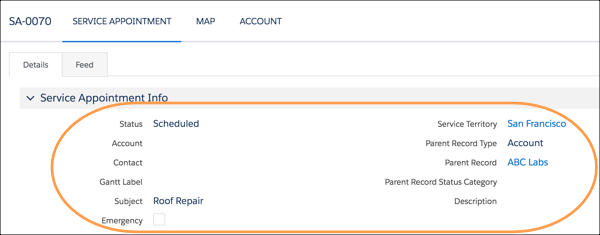
            <td data-label="Field Set" class="slds-cell-wrap" style="vertical-align:top;" headers="d26532e109 ">Service Lightbox </td>

            <td data-label="Description" class="slds-cell-wrap" style="vertical-align:top;" headers="d26532e112 ">Controls the layout of the dialog screen displayed when the user double-clicks an
              appointment on the Gantt.</td>

            <td data-label="Location in Classic Dispatch Console" class="slds-cell-wrap" style="vertical-align:top;" headers="d26532e115 ">
              <span style="vertical-align:text-bottom;display:inline-block;"><img style="margin-bottom:0;" src="https://sf-zdocs-cdn-prod.zoominsoftware.com/tdta-service-support_field_service-264-0-0-production-enus/3f7dceb9-dd70-454a-b49e-bbb4526a158d/support_field_service/images/fs_service_lightbox_fieldset.png" alt="VIew service appointment fields on the Gantt."></span>
            </td>

          </tr>
          <tr class="">
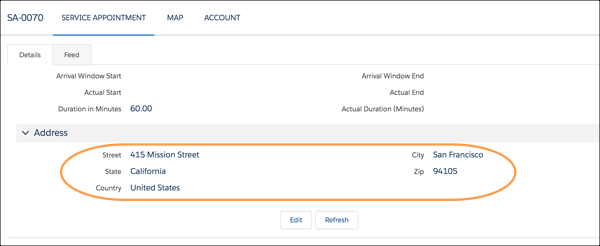
            <td data-label="Field Set" class="slds-cell-wrap" style="vertical-align:top;" headers="d26532e109 ">Service Lightbox Address</td>

            <td data-label="Description" class="slds-cell-wrap" style="vertical-align:top;" headers="d26532e112 ">Controls which fields are displayed under Address when a user double-clicks a service
              appointment in the Gantt.</td>

            <td data-label="Location in Classic Dispatch Console" class="slds-cell-wrap" style="vertical-align:top;" headers="d26532e115 ">
              <span style="vertical-align:text-bottom;display:inline-block;"><img style="width:600px;margin-bottom:0;" src="https://sf-zdocs-cdn-prod.zoominsoftware.com/tdta-service-support_field_service-264-0-0-production-enus/3f7dceb9-dd70-454a-b49e-bbb4526a158d/support_field_service/images/fs_service_lightbox_address_fieldset.png" alt="Control which fields are shown under Address."></span>
            </td>

          </tr>
          <tr class="">
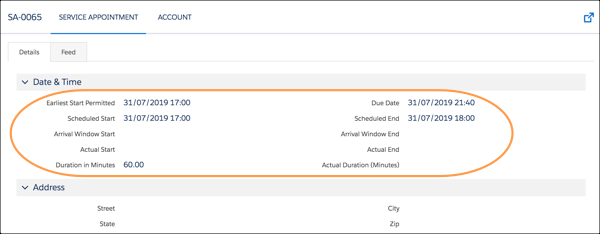
            <td data-label="Field Set" class="slds-cell-wrap" style="vertical-align:top;" headers="d26532e109 ">Service Lightbox Time</td>

            <td data-label="Description" class="slds-cell-wrap" style="vertical-align:top;" headers="d26532e112 ">Controls which fields are displayed under Date &amp; Time when a user double-clicks a
              service appointment in the Gantt.</td>

            <td data-label="Location in Classic Dispatch Console" class="slds-cell-wrap" style="vertical-align:top;" headers="d26532e115 ">
              <span style="vertical-align:text-bottom;display:inline-block;"><img style="width:600px;margin-bottom:0;" src="https://sf-zdocs-cdn-prod.zoominsoftware.com/tdta-service-support_field_service-264-0-0-production-enus/3f7dceb9-dd70-454a-b49e-bbb4526a158d/support_field_service/images/fs_service_lightbox_time_fieldset.png" alt="Control which fields are shown under Date &amp; Time."></span>
            </td>

          </tr>
          <tr class="">
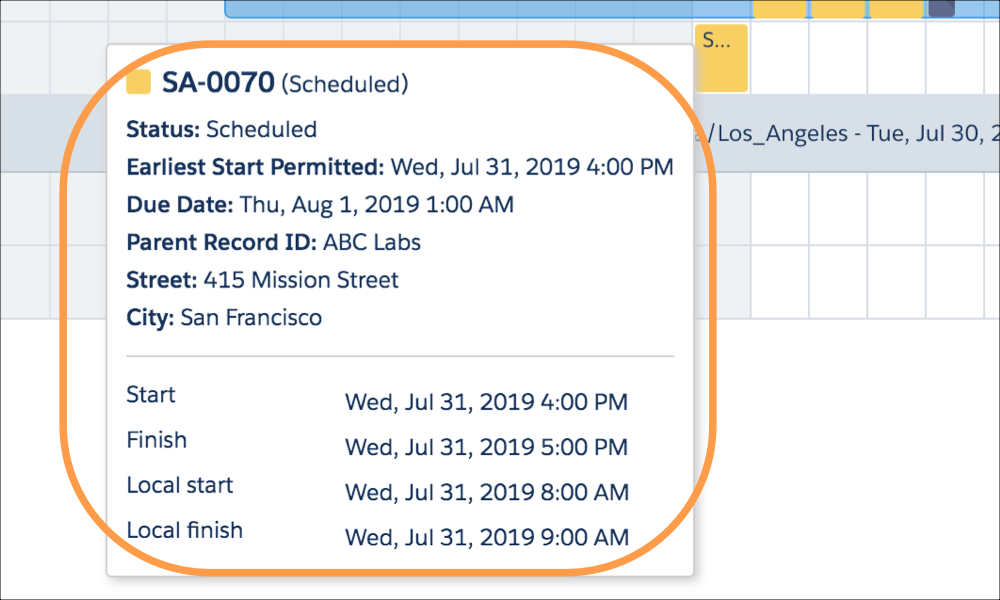
            <td data-label="Field Set" class="slds-cell-wrap" style="vertical-align:top;" headers="d26532e109 ">Service Tooltip Gantt</td>

            <td data-label="Description" class="slds-cell-wrap" style="vertical-align:top;" headers="d26532e112 ">Controls the tooltip layout shown when hovering over an appointment on the Gantt. This
              field set supports up to 10 fields.</td>

            <td data-label="Location in Classic Dispatch Console" class="slds-cell-wrap" style="vertical-align:top;" headers="d26532e115 ">
              <span style="vertical-align:text-bottom;display:inline-block;"><img style="width:500px;margin-bottom:0;" src="https://sf-zdocs-cdn-prod.zoominsoftware.com/tdta-service-support_field_service-264-0-0-production-enus/3f7dceb9-dd70-454a-b49e-bbb4526a158d/support_field_service/images/fs_service_tooltip_gantt_fieldset.png" alt="Hover to view fields for service appointments on the Gantt."></span>
            </td>

          </tr>
        </tbody>
      </table>

## Service Resource Field Sets

<table class="slds-table slds-table_bordered slds-max-medium-table_stacked slds-m-bottom_small ">
        <colgroup>
          <col style="width:12.004801920768307%">
          <col style="width:21.968787515006003%">
          <col style="width:66.02641056422569%">
        </colgroup>
        <thead class="slds-text-title_caps ">
          <tr class="">
            <th scope="col" class="slds-cell-wrap" style="vertical-align:top;" id="d26532e518">Field Set</th>
            <th scope="col" class="slds-cell-wrap" style="vertical-align:top;" id="d26532e521">Description</th>
            <th scope="col" class="slds-cell-wrap" style="vertical-align:top;" id="d26532e524">Placement in Classic Dispatch Console</th>
          </tr>
        </thead>
        <tbody>
          <tr class="">
            <td data-label="Field Set" class="slds-cell-wrap" style="vertical-align:top;" headers="d26532e518 ">Crew Management Resource Lightbox</td>

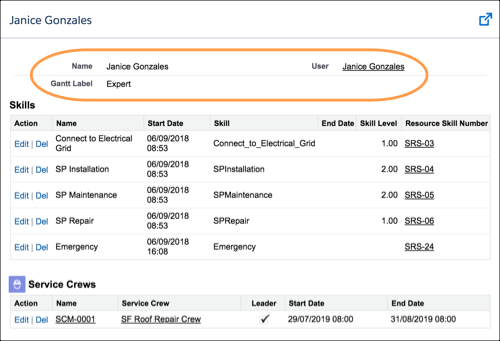
            <td data-label="Description" class="slds-cell-wrap" style="vertical-align:top;" headers="d26532e521 ">Controls the fields shown when a user double-clicks a service resource in the Crew
              Management Gantt.</td>

            <td data-label="Placement in Classic Dispatch Console" class="slds-cell-wrap" style="vertical-align:top;" headers="d26532e524 ">
              <span style="vertical-align:text-bottom;display:inline-block;"><img style="margin-bottom:0;" src="https://sf-zdocs-cdn-prod.zoominsoftware.com/tdta-service-support_field_service-264-0-0-production-enus/3f7dceb9-dd70-454a-b49e-bbb4526a158d/support_field_service/images/fs_crew_resource_lightbox_fieldset.png" alt="Control which fields are shown for service resources in the Crew Management Gantt."></span>
            </td>

          </tr>
          <tr class="">
            <td data-label="Field Set" class="slds-cell-wrap" style="vertical-align:top;" headers="d26532e518 ">Emergency Fields</td>

            <td data-label="Description" class="slds-cell-wrap" style="vertical-align:top;" headers="d26532e521 ">Controls the fields displayed for a service resource in the Emergency Chatter
              action.</td>

            <td data-label="Placement in Classic Dispatch Console" class="slds-cell-wrap" style="vertical-align:top;" headers="d26532e524 ">
              <span style="vertical-align:text-bottom;display:inline-block;"><img style="margin-bottom:0;" src="https://sf-zdocs-cdn-prod.zoominsoftware.com/tdta-service-support_field_service-264-0-0-production-enus/3f7dceb9-dd70-454a-b49e-bbb4526a158d/support_field_service/images/fsl_emergency_fields_sr.png" alt="Emergency Fields"></span>
            </td>

          </tr>
          <tr class="">
            <td data-label="Field Set" class="slds-cell-wrap" style="vertical-align:top;" headers="d26532e518 ">Get Candidates Resource Details</td>

            <td data-label="Description" class="slds-cell-wrap" style="vertical-align:top;" headers="d26532e521 ">Controls the fields shown when expanding a resource row on the Candidates Chatter
              action.</td>

            <td data-label="Placement in Classic Dispatch Console" class="slds-cell-wrap" style="vertical-align:top;" headers="d26532e524 ">
              <span style="vertical-align:text-bottom;display:inline-block;"><img style="margin-bottom:0;" src="https://sf-zdocs-cdn-prod.zoominsoftware.com/tdta-service-support_field_service-264-0-0-production-enus/3f7dceb9-dd70-454a-b49e-bbb4526a158d/support_field_service/images/get_candidates_resource_fieldset.png" alt="View fields for the Get Candidates quick action."></span>
            </td>

          </tr>
          <tr class="">
            <td data-label="Field Set" class="slds-cell-wrap" style="vertical-align:top;" headers="d26532e518 ">Resource Gantt Filter</td>

            <td data-label="Description" class="slds-cell-wrap" style="vertical-align:top;" headers="d26532e521 ">
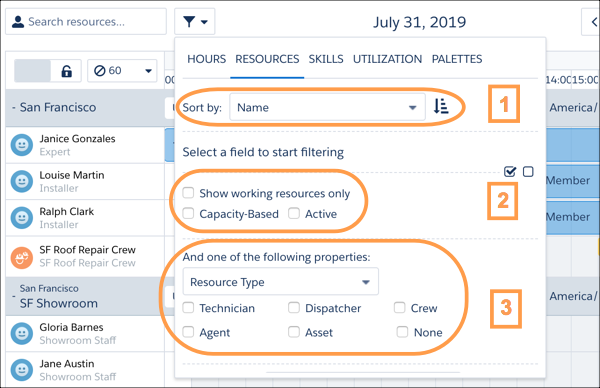
              <p>Controls the available fields in Gantt Resource Filters. The fields are shown in these sections:</p>
              <ul>
                <li><em>Sort by</em></li>
                <li>Checkbox filters (if the field is of type Checkbox)</li>
                <li><em>One of the following properties </em>picklist (if the field is of type Picklist)</li>
              </ul>
            </td>

            <td data-label="Placement in Classic Dispatch Console" class="slds-cell-wrap" style="vertical-align:top;" headers="d26532e524 ">
              <span style="vertical-align:text-bottom;display:inline-block;"><img style="margin-bottom:0;" src="https://sf-zdocs-cdn-prod.zoominsoftware.com/tdta-service-support_field_service-264-0-0-production-enus/3f7dceb9-dd70-454a-b49e-bbb4526a158d/support_field_service/images/resource_gantt_filter_fieldset.png" alt="View fields for the Resource filter on the Gantt."></span>
            </td>

          </tr>
          <tr class="">
            <td data-label="Field Set" class="slds-cell-wrap" style="vertical-align:top;" headers="d26532e518 ">Resource Lightbox</td>

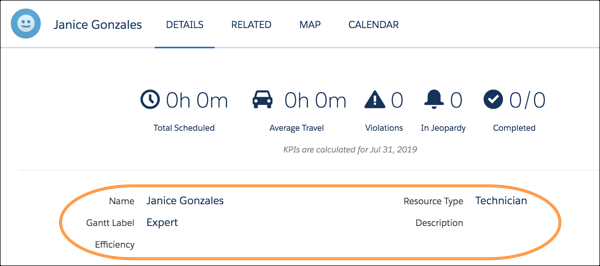
            <td data-label="Description" class="slds-cell-wrap" style="vertical-align:top;" headers="d26532e521 ">Controls the layout of the dialog screen displayed when the user double-clicks a
              service resource in the Gantt.</td>

            <td data-label="Placement in Classic Dispatch Console" class="slds-cell-wrap" style="vertical-align:top;" headers="d26532e524 ">
              <span style="vertical-align:text-bottom;display:inline-block;"><img style="width:600px;margin-bottom:0;" src="https://sf-zdocs-cdn-prod.zoominsoftware.com/tdta-service-support_field_service-264-0-0-production-enus/3f7dceb9-dd70-454a-b49e-bbb4526a158d/support_field_service/images/fs_resource_lightbox_fieldset.png" alt="View service resource fields in the Gantt."></span>
            </td>

          </tr>
        </tbody>
      </table>

## Gantt Lightbox

  
| Field Set | Description | Placement in Classic Dispatch Console |
| --- | --- | --- |
| Account | Controls the layout of the dialog screen displayed when a user double-clicks an appointment on the Gantt and clicks the Account tab. | ![View account fields on the Gantt.](https://sf-zdocs-cdn-prod.zoominsoftware.com/tdta-service-support_field_service-264-0-0-production-enus/3f7dceb9-dd70-454a-b49e-bbb4526a158d/support_field_service/images/fs_account_fieldset.png) |
| Work Order | Controls the layout of the dialog screen displayed when the user double-clicks an appointment on the Gantt, and then clicks the Work Order tab. Applies only to service appointments whose parent record is a work order. | ![View fields for parent work orders.](https://sf-zdocs-cdn-prod.zoominsoftware.com/tdta-service-support_field_service-264-0-0-production-enus/3f7dceb9-dd70-454a-b49e-bbb4526a158d/support_field_service/images/fs_work_order_fieldset.png) |
| Work Order Line Item | Controls the layout of the dialog screen displayed when the user double-clicks an appointment on the Gantt, and then clicks the WOLI tab. Applies only to service appointments whose parent record is a work order line item. | ![View fields for work order line items.](https://sf-zdocs-cdn-prod.zoominsoftware.com/tdta-service-support_field_service-264-0-0-production-enus/3f7dceb9-dd70-454a-b49e-bbb4526a158d/support_field_service/images/fs_woli_fieldset.png) |

## Resource Absence Field Sets

<table class="slds-table slds-table_bordered slds-max-medium-table_stacked slds-m-bottom_small ">
        <colgroup>
          <col style="width:21.338912133891213%">
          <col style="width:13.94700139470014%">
          <col style="width:64.71408647140863%">
        </colgroup>
        <thead class="slds-text-title_caps ">
          <tr class="">
            <th scope="col" class="slds-cell-wrap" style="vertical-align:top;" id="d26532e745">Field Set</th>
            <th scope="col" class="slds-cell-wrap" style="vertical-align:top;" id="d26532e748">Description</th>
            <th scope="col" class="slds-cell-wrap" style="vertical-align:top;" id="d26532e751">Placement in Classic Dispatch Console</th>
          </tr>
        </thead>
        <tbody>
          <tr class="">
            <td data-label="Field Set" class="slds-cell-wrap" style="vertical-align:top;" headers="d26532e745 ">Resource Absence Calendar Tooltip</td>

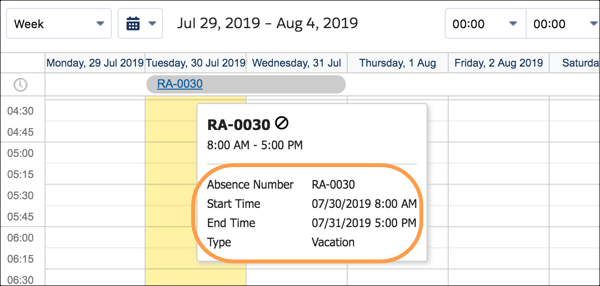
            <td data-label="Description" class="slds-cell-wrap" style="vertical-align:top;" headers="d26532e748 ">Controls the fields displayed on the tooltip when the user hovers over an absence on
              the service resource calendar Visualforce page on a service resource record.</td>

            <td data-label="Placement in Classic Dispatch Console" class="slds-cell-wrap" style="vertical-align:top;" headers="d26532e751 ">
              <span style="vertical-align:text-bottom;display:inline-block;"><img style="margin-bottom:0;" src="https://sf-zdocs-cdn-prod.zoominsoftware.com/tdta-service-support_field_service-264-0-0-production-enus/3f7dceb9-dd70-454a-b49e-bbb4526a158d/support_field_service/images/fs_resource_absence_calendar_fieldset.png" alt="View resource absence fields on the calendar."></span>
            </td>

          </tr>
          <tr class="">
            <td data-label="Field Set" class="slds-cell-wrap" style="vertical-align:top;" headers="d26532e745 ">Resource Absence Lightbox</td>

            <td data-label="Description" class="slds-cell-wrap" style="vertical-align:top;" headers="d26532e748 ">
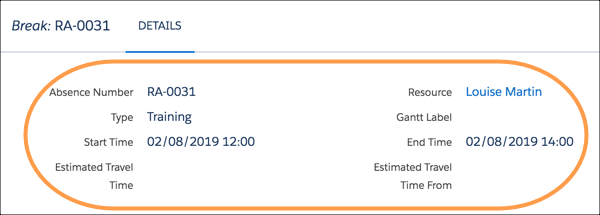
              <p style="margin-bottom:0;">Controls the layout of the dialog screen displayed when a user double-clicks a resource
                absence on the Gantt.</p>
            </td>

            <td data-label="Placement in Classic Dispatch Console" class="slds-cell-wrap" style="vertical-align:top;" headers="d26532e751 ">
              <span style="vertical-align:text-bottom;display:inline-block;"><img style="margin-bottom:0;" src="https://sf-zdocs-cdn-prod.zoominsoftware.com/tdta-service-support_field_service-264-0-0-production-enus/3f7dceb9-dd70-454a-b49e-bbb4526a158d/support_field_service/images/fs_resource_absence_gantt_fieldset.png" alt="View resource absence details on the Gantt."></span>
            </td>

          </tr>
          <tr class="">
            <td data-label="Field Set" class="slds-cell-wrap" style="vertical-align:top;" headers="d26532e745 ">Resource Absence Resource Calendar</td>

            <td data-label="Description" class="slds-cell-wrap" style="vertical-align:top;" headers="d26532e748 ">Controls the fields displayed on absences on the service resource calendar Visualforce
              page.</td>

            <td data-label="Placement in Classic Dispatch Console" class="slds-cell-wrap" style="vertical-align:top;" headers="d26532e751 ">
              <span style="vertical-align:text-bottom;display:inline-block;"><img style="margin-bottom:0;" src="https://sf-zdocs-cdn-prod.zoominsoftware.com/tdta-service-support_field_service-264-0-0-production-enus/3f7dceb9-dd70-454a-b49e-bbb4526a158d/support_field_service/images/fs_resource_absence_cal_fieldset.png" alt="View resource absence fields on the calendar."></span>
            </td>

          </tr>
        </tbody>
      </table>

#### See Also

- [Color-Code the Gantt](https://help.salesforce.com/s/articleView?id=service.pfs_create_gantt_palettes.htm&release=264.0.0&type=5 "Help dispatchers compare service appointments in the Field Service Classic Dispatch Console Gantt and map by creating custom color palettes based on a service appointment field. For example, create a palette that displays appointments in a custom color spectrum based on the proximity of the due date.")