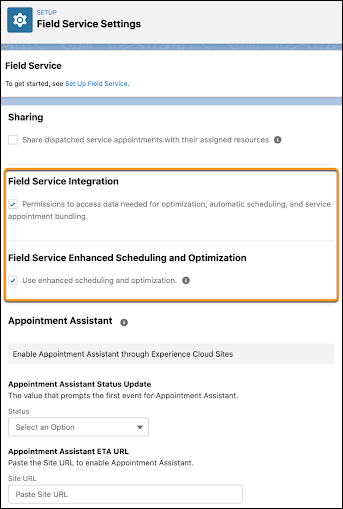
Enhanced Scheduling and Optimization must be enabled to start using its features. As of
Summer ’23, new Salesforce orgs have Enhanced Scheduling and Optimization enabled by default for
all service territories. Existing orgs can opt in and enable the enhanced engine for all or
selected service territories. The enhanced engine is an improvement of the optimization
functionality and associated manual and semiautomatic scheduling services you’ve been using. The
enhanced architecture and services are more efficient and improve scalability, performance, and
schedule quality. Make sure you examine the Enhanced Scheduling and Optimization considerations
and limitations before using the enhanced engine.
Required Editions
| Available in: Available in Lightning Experience and Salesforce Classic in these
editions where Field Service is enabled: Enterprise, Unlimited, and
Developer Editions
|
| User Permissions
Needed |
| To enable Field Service: |
Customize Application |
| To install the Field Service managed package: |
Customize Application |
| To assign a permission set license: |
Manage Users |
| To create a permission set: |
Manage Profiles and Permission Sets |
| To enable Enhanced Scheduling and Optimization: |
Customize Application |
 This is a Field Service managed package feature.
Make sure that you meet these requirements.
- Field Service is enabled.
- The latest version of the Salesforce Field Service managed package is installed.
-
From Setup, in the Quick Find box, enter Field Service, and then
select Field Service Settings.
-
To use the enhanced features, select Field Service Enhanced Scheduling and
Optimization and then save your changes.