Agentforce enables you to get an immediate overview of all of the critical service
appointments that require your attention today. The summary includes unscheduled appointments
due today, emergencies, and in-jeopardy appointments. When Enhanced Scheduling and Optimization
is enabled, the overview also includes appointments with rule violations and overlapping
appointments.
Required Editions
| Available in: Lightning Experience |
| Available in: Enterprise, Performance, Unlimited, and
Developer Editions, with an Agentforce for Field Service license. Also
available with Einstein 1 Field Service Edition or Agentforce 1 Field
Service Edition.
|
| User Permissions
Needed |
| To access Field service agent actions: |
Access Agent Topics and Actions for Field Service |
| To use Agentforce: |
Use Agentforce Default Agent |
 This is a Field Service managed package feature.
-
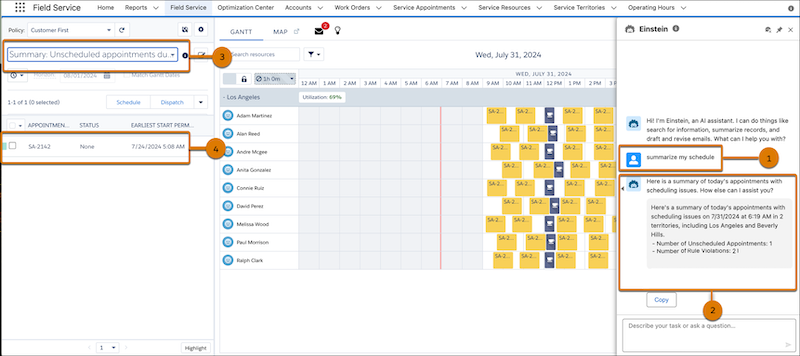
To use the AI agent, open the Agentforce panel and ask to create a schedule summary by
using a phrase such as “Summarize my schedule” (1). For example utterances, see Recommended Agentforce Utterances for Dispatchers.
The AI agent shows the summary (2) for each category.
-
In addition to displaying the overview, the AI agent creates filters for each category
for you in the filters list (3). You can access these filters from the My Agentforce
Summaries section of the filter list to take immediate action. You can use the tooltip to
view a description of each filter. To show the appointments in the appointment list,
select one of the filters (4).