
After bundling appointments together, you can still add appointments as bundle members to a bundle from the Field Service Classic Dispatch Console.
Required Editions
| Available in: both Salesforce Classic (not available in all orgs) and Lightning Experience |
| The Agentforce Field Service and Operations core features, managed package, and mobile app are available in Enterprise, Unlimited, and Developer Editions. |
| User Permissions Needed | |
|---|---|
| To manage bundles: | Field Service Dispatcher |
- To go to the Field Service Classic Dispatch Console, click the Field Service tab.
-
In the appointment list or on the Gantt, select one or more service appointments that you
want to add to a bundle.
The service appointments must be on the same day, can’t be part of a complex work chain, and can’t be pinned. See Appointment Bundling Limitations.
- From the global actions in the appointment list, select Bundle. Or, if you’re selecting appointments on the Gantt, right-click the appointments and select Bundle.
-
In the Bundle Appointments window, select Add to existing bundle and
then select a bundle.
If the selected bundle is pinned, you can’t add bundle members to it.
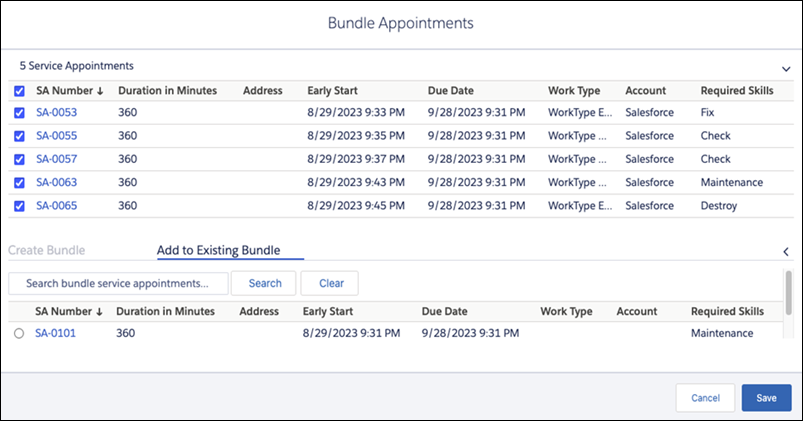
- Save the bundle.
If the bundle service appointment and members are already scheduled, adding a bundle member unschedules the bundle. This is because the backend bundling logic needs to consider new variables with the additional members, such as added duration, skill requirements, or other factors. When you reschedule the bundle appointment, the backend logic recalculates the bundle service appointment attributes based on configured bundle policies, aggregation policies, and more.