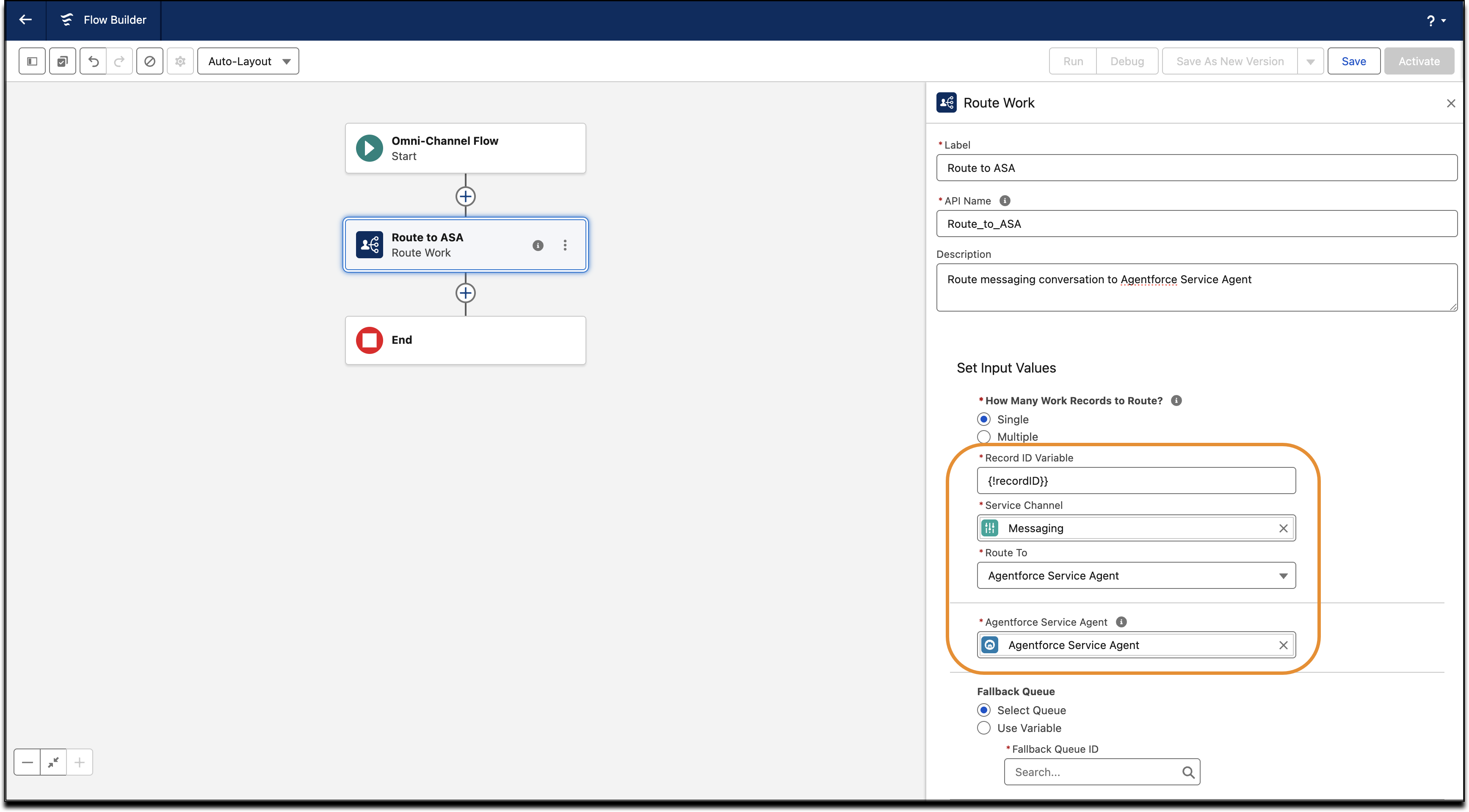
Route Enhanced Messaging and Voice calls to an Agentforce Service Agent that uses
autonomous AI to handle a wide range of common support tasks efficiently. This routing helps
your service reps focus on strategic, high-value work, such as complex problem-solving and
building deeper customer relationships.
Required Editions
Create an Omni-Channel Flow to Route to an Agentforce Service Agent:
- From Setup, in the Quick Find box, enter
Flows, and then select Flows.
- Select an existing Omni-Channel flow to edit, or follow the steps to create an Omni-Channel flow from scratch.
- Open the flow in Flow Builder. Drag the Route Work action onto the
canvas.
- Enter a Label name and API name for the action, and optionally, a description.
- In Set Input Values, set the Record ID Variable.
- To route conversations to the respective service channels:
- For voice conversations, select Phone in the Service Channel
dropdown.
- For messaging conversations, select Messaging in the Service
Channel dropdown.
- In the Route To dropdown, select Agentforce Service Agent.
- In the Agentforce Service Agent dropdown, select the ASA Agent.
- Save the flow and activate it.