Change a User’s Queues and Skills with an AI Agent

To quickly change an Omni-Channel user’s queues or skills, use the Agentforce (Default) conversational interface on a desktop or the Salesforce mobile app. Using the Update Omni-Channel User Configuration agent action, you can add or remove queue assignments, add or remove skill assignments, and change skill levels for these users. For example, to decrease wait time, increase customer satisfaction, and increase operational efficiency, you can assign idle reps to the busiest queues. You can modify only the reps, queues, and skills that are visible to you based on your supervisor configuration.

Required Editions

Available in: Lightning Experience
Available in: Enterprise, Performance, Unlimited, and Developer editions with the Einstein for Sales, Einstein for Service, or Einstein Platform add-on.
User Permissions Needed
To use Agentforce (Default):

Manage Agentforce Default Agent

OR

Use Agentforce Default Agent

  1. To open Agentforce (Default) and change an assignment, click Agent icon.
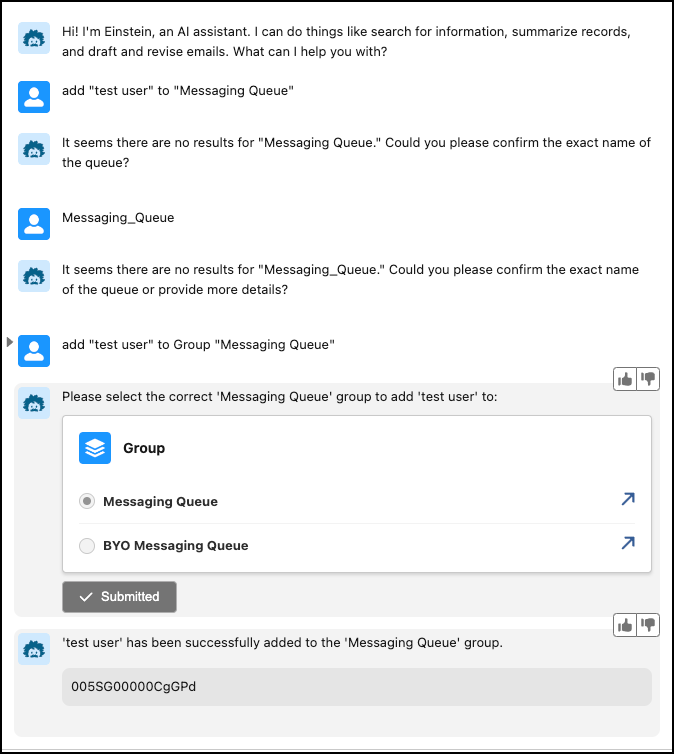
  2. Enter your question or request. For example, enter Add Craig Tarin and Anelly Jackson to the Phone and Chat queues.
    Supervisor request to add user to a queue