Create authentication methods to authenticate mobile workers, and to authenticate the
connector when syncing records with ArcGIS. You can either have a single authentication method for
both your mobile workers and the connector, or you can define different authentication methods for
each.
Required Editions
| Available in: Lightning Experience. |
| Available in: Enterprise Edition with the Asset Service Lifecycle
Management add-on license, or in Performance, Unlimited, and
Developer Editions.
|
| User Permissions Needed |
| To set up authentication: |
Customize Application |
-
From Setup, find and select Field Maps Settings.
-
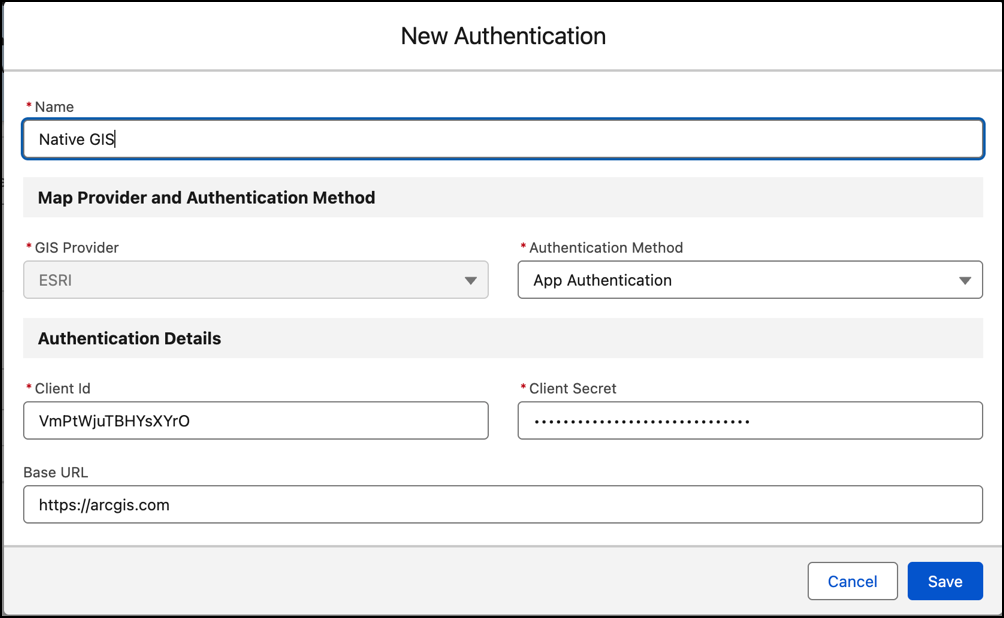
From the Authentication tab, click New Authentication.
-
Enter the authentication details.
-
Enter a unique name.
-
Select the Authentication Method. The method should be the same as
what you defined in ArcGIS.
-
For Client ID and Client Secret, use the ArcGIS developer credentials that you created.
See Set Up ArcGIS for
Native GIS.
-
For the Base URL, enter the ArcGIS portal’s domain.
-
Save your changes.
-
For the authentication method that you defined for mobile workers, assign their profile to
the authentication record. If you created an authentication method for the connector, you don’t
need to assign it to a profile.
-
From the Actions dropdown, select Assign to Profile.
-
Find and select the mobile workers’ profile, and move it to Selected Profiles.
-
Save your changes.