
In new Salesforce orgs, the Bundle Member Service Appointments related list appears in the service appointment’s Related tab. In existing orgs, you add the Bundle Member Service Appointments related list and its properties to the service appointment layout.
Required Editions
| Available in: both Salesforce Classic (not available in all orgs) and Lightning Experience |
| The Field Service core features, managed package, and mobile app are available in Enterprise, Unlimited, and Developer Editions. |
| To access the Field Service mobile app, users need the Field Service Mobile user license. |
| User Permissions Needed | |
|---|---|
| To customize layouts: | Customize Application |
- From Setup, open the Object Manager.
- Search for and open the Service Appointment object.
- Click Page Layouts.
- Open the relevant layout.
- Click Related Lists.
-
Drag Bundle Member Service Appointments into the Related
Lists.

-
To configure the properties of the related list, click
 .
.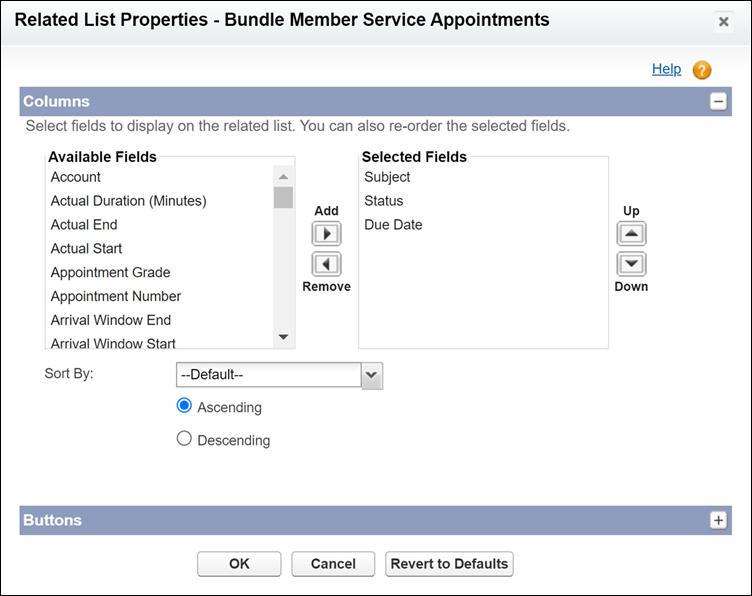
 Note The Sort By option isn’t currently supported.Note In the Field Service mobile app, a maximum of three fields from this related list is displayed for each bundled service appointment card, and the address field is always shown.
 - Save your changes.
-
To see the Bundle Member Service Appointments list, in a bundle service appointment, open
the Related tab. The appointments appear in the order determined by the
Appointment Bundle Sort Policy, if configured.
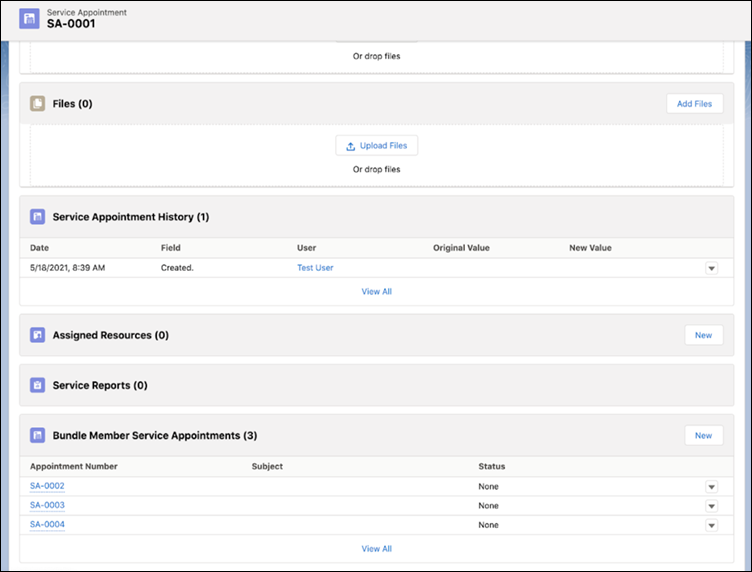 Note The expanded view of the related list indicates that the appointments are sorted by due date, even if the order is determined by the Appointment Bundle Sort Policy.
Note Don’t use the arrow that changes the order of the appointments according
to a specific column. The arrow overrides the order determined in the Appointment Bundle Sort
Policy.