You can use this permission set for the Field Service mobile workers and the Field
Service admins. For Appointment Assistant Real-Time Location, each mobile worker needs the
Appointment Assistant license to share their location with customers when they’re on their way to
the appointment.
Required Editions
| Available in: both Salesforce Classic (not available in all orgs) and Lightning
Experience |
| The Field Service core features, managed package, and mobile app are available in
Enterprise, Unlimited, and Developer Editions.
|
| The Field Service Appointment Assistant managed package and permission set
license are required. |
| User Permissions Needed |
| To create permission sets: |
Manage Profiles and Permission Sets |
-
From Setup, in the Quick Find box, enter Users, and then select
Permission Sets.
-
Create a permission set.
-
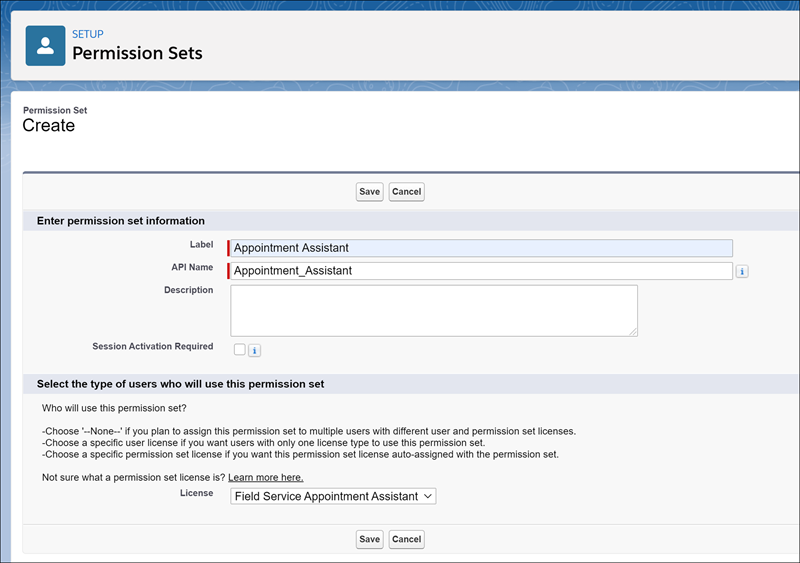
Click New.
-
For Label, enter the name of the permission set, for example, Appointment
Assistant.
-
Click the API Name field to populate it.
-
For License, select Field Service Appointment Assistant.
The Field Service Appointment Assistant license is an add-on license. If the license
isn’t available for selection, ask your account executive for help.
-
Save the permission set.
-
Enable the permission set.
-
From Setup, in the Quick Find box, enter Users, and then select
Permission Sets.
-
Open the Appointment Assistant permission set that you created.
-
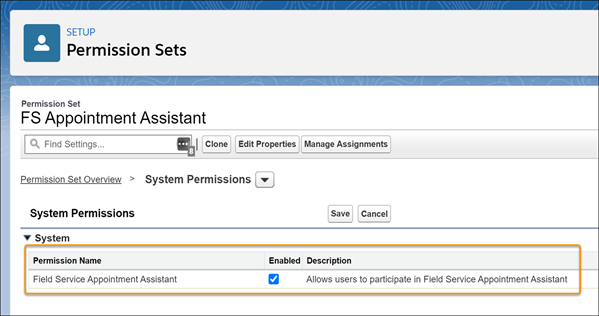
In System, click System Permissions.
-
Click Edit and enable the Field Service Appointment Assistant
permission.
-
Save your changes.
-
Assign this permission set to each mobile worker.

 The Field Service Appointment Assistant license is an add-on license. If the license isn’t available for selection, ask your account executive for help.