
Use short code phone numbers to send recurring messages and one-time alerts to your US and Canadian customers. When customers respond, they can have two-way conversations with service reps. Short codes have high throughput, which means you can send high volumes of one-to-one messages.
Required Editions
| View supported editions. | |
 This article applies to:
|
Standard and Enhanced SMS channels |
 This article doesn’t apply to:
|
Enhanced In-App Chat, Enhanced Web Chat v1, Enhanced Web Chat v2, Enhanced WhatsApp, Enhanced Facebook Messenger, Enhanced Apple Messages for Business, Enhanced LINE, and Bring Your Own Channel |
| User Permissions Needed | |
|---|---|
| To set up Messaging: | Configure Messaging |
| To view SMS channels: | View Setup and Configuration |
| To create SMS channels: |
System Administrator AND Configure Messaging OR Configure Messaging AND Customize Application AND Manage Auth. Providers AND View Setup and Configuration AND Modify All Data |

Want to see short codes in action? Watch our video.

Setting up a standard or enhanced short code SMS channel involves a multi-step application process. Approving and provisioning a short code can take 10–16 weeks. Here’s what to expect from the setup process:
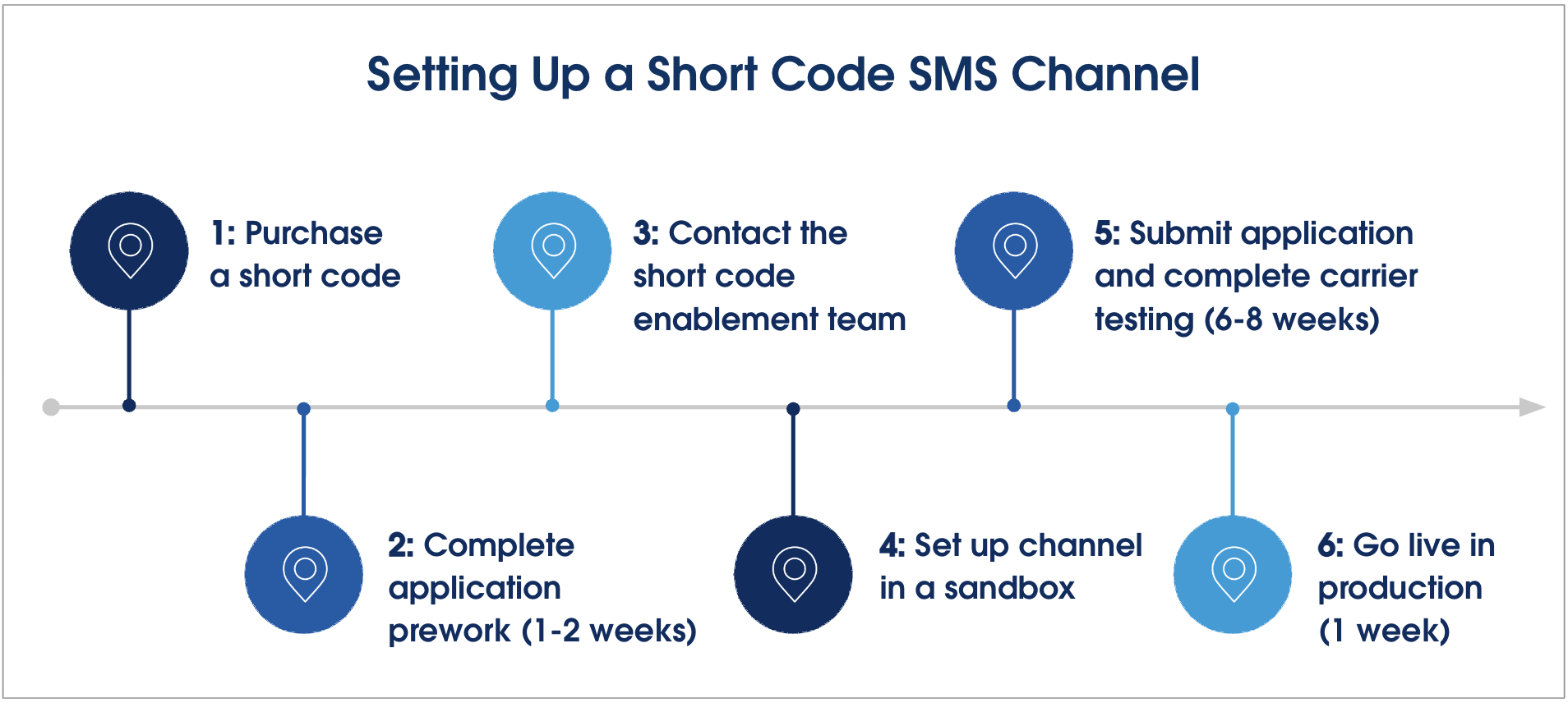
To get started, go to Service-Digital Engagement Messaging: Short Code Application Process.
- Considerations for Short Codes
When you use short codes, your business is required to follow carrier compliance requirements, industry standards, and applicable laws. Short codes are only supported in the US and Canada.