---
schema_version: "1"
id: 7623f624e27745c6f72fc32797d78aa0461be15a4f125ad1b4a8fcc3430b295d
title: Create a Flow to Link Individuals to Messaging Sessions
collection: admin
version: current
locale: en-us
portal_url: https://docs.salesforce.com/admin/current/en-us/service/264-0-0/messaging_object_linking_flow_template.md
canonical_url: https://help.salesforce.com/s/articleView?id=service.messaging_object_linking_flow_template.htm&release=264.0.0&type=5
source_site: help.salesforce.com
content_type: documentation
content_hash: 5fc619fca261b91a6a450c91dafa3403f0e377a3e770b321ef90fc302f12ae5e
description: Learn more about the person you’re messaging with. Use a flow template to auto-link contacts, leads, employees, or person accounts to your messaging session.
products:
- Service Cloud
release: "264"
---
# Create a Flow to Link Individuals to Messaging Sessions
Learn more about the person you’re messaging with. Use a flow template to auto-link contacts, leads, employees, or person accounts to your messaging session.
### Required Editions
| User Permissions
Needed |
| To run flows |
Run Flows
OR
Manage Flow
|
Set your flow to auto-launch or let support reps run it from the Actions & Recommendations component.
1. If you don’t use Channel-Object Linking, skip to step 3. If you do use it, turn it off before adding Individual-Object Linking. From Setup, in the Quick Find box, enter Channel-Object Linking, and then select **Channel-Object Linking**.
2. Turn off **Channel-Object Linking**.
3. From Setup, in the Quick Find box, enter Flows, and then select **Flows** under Process Automation.
4. Click **New Flow**.
5. Click **All + Templates**.
6. Click **Individual-Object Linking Flow**.
7. Select the **Find Contact Associated with Messaging Session** flow template.
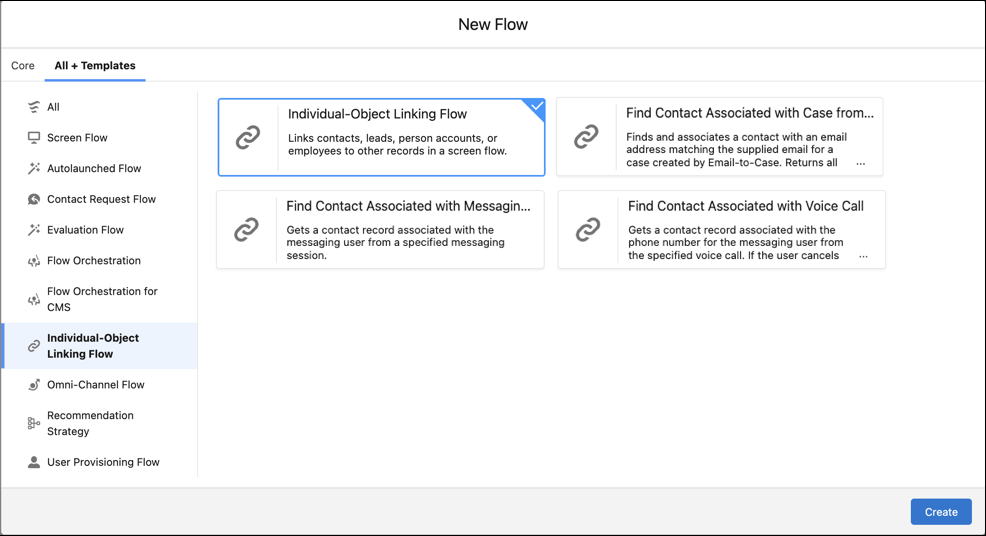
8. Click **Create**.
9. To search for a lead, employee, or person account instead of contacts, click the **Find Matching Contacts Flow** flow action, and then select **Edit Action**. Make a selection in the Search Object dropdown menu.
10. To narrow your search to a specific field on the individual record, make your selection from the Search Fields dropdown menu.
11. To search for a specific term or variable, replace what’s in the Search Term field.
12. Click **Done**.
13. Click **Save**.
14. Test and update the flow, and then activate it.
When a support rep runs the flow, it displays contacts with the same email address as the case’s Web Email field. To link a contact to the case, the support rep selects a matching contact.
#### See Also
- [_Trailhead_: Build Flows with Flow Builder](https://trailhead.salesforce.com/content/learn/trails/build-flows-with-flow-builder)
- [_Salesforce Help_: Flow Builder](https://help.salesforce.com/s/articleView?id=platform.flow.htm&type=5&language=en_US)
- [_Salesforce Help_: Flow Builder for Service and the Actions and Recommendations Component](https://help.salesforce.com/s/articleView?id=service.console_lex_guided_action_list_component.htm&type=5&language=en_US)