
Author knowledge articles easily and more effectively with the new Lightning Article Editor. Give your knowledge authors and managers a more user-friendly and powerful authoring experience, so they can create and maintain high-quality articles to better serve your customers’ needs.
Required Editions
| Available in Lightning Experience. View supported editions. |
To use the Lightning Article Editor, you must enable the Lightning Article Editor release update. See Manage Release Updates for instructions about selecting and enabling a release update.

After you enable the release update, the new Lightning Article Editor replaces the previous version of the Knowledge editor.
The Lightning Article Editor is backward-compatible, meaning that all articles you authored in the old editor look the same in the new editor.
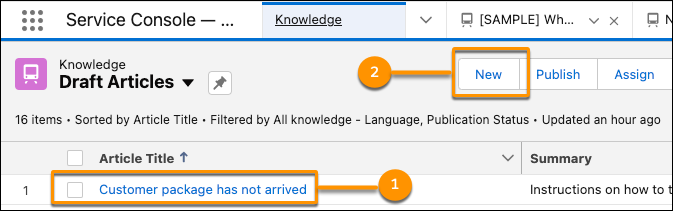
Users can select an existing article (1) and click Edit, or they can click New (2) to work in the Lightning Article Editor.
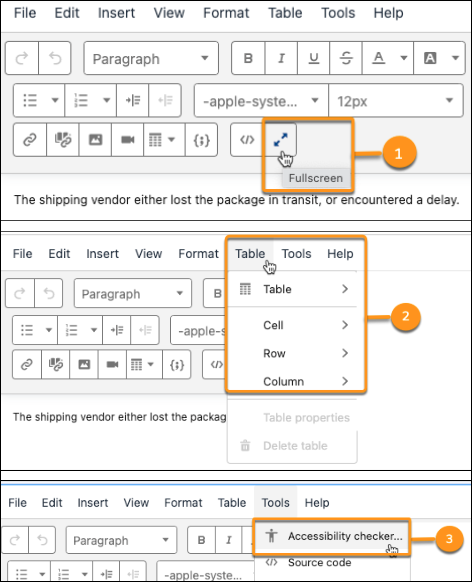
Some key features of the new Lightning article editor include a full-screen mode (1), advanced table editing support (2), an accessibility checker (3), and seamless copy/pasting from external sources.
Features Comparison
The tables that follow list the capabilities available in the previous Knowledge Article Editor and the Lightning Knowledge Article Editor.
| Capability | Available in the Lightning Editor | Available in the Previous Editor |
|---|---|---|
| Edit Font (size, family, color) | Yes | Yes |
| Text Alignment (left, right, center) | Yes | Yes |
| Text Direction (left-to-right and right-to-left) | Yes | Yes |
| Text Highlighting | Yes | Yes |
| List Creation (bulleted and numbered) | Yes | Yes |
| Hyperlinks to external URLs | Yes | Yes |
| Line Height (setting the vertical distance between two lines of type) | Yes | No |
| Clear Formatting | Yes | Yes |
| Intra-article Anchoring | Yes | Yes |
| Seamless Copy and Paste from External Sources | Yes | No |
| Capability | Available in the Lightning Editor | Available in the Previous Editor |
|---|---|---|
| Insert Tables | Yes | Yes |
| Add and Remove Table Rows and Columns | Yes | No |
| Resize Table Cells | Yes | No |
| Merge Table Cells | Yes | No |
| Format Table Border | Yes | No |
| Format Table Background | Yes | No |
| Capability | Available in the Lightning Editor | Available in the Previous Editor |
|---|---|---|
| Upload Images | Yes | Yes |
| Alternative Text (Alt Text) for Images | Yes | No |
| Capability | Available in the Lightning Editor | Available in the Previous Editor |
|---|---|---|
| HTML Editing | Yes | Yes |
| Code Snippet Support | Yes | Yes |
| Resizable Editor | Yes | No |
| Full-Screen Editing Mode | Yes | No |
| Text Search & Replace | Yes | No |
| Word Counter | Yes | No |
| Accessibility Checker | Yes | No |
| Smart Links | Yes | Yes |