---
schema_version: "1"
id: 09ee2da8abf2d5e8dd066e890da9d41aa2e721a101e2e2b4c61ea49e4785b00d
title: Map Einstein Knowledge Creation Responses to Knowledge Fields
collection: admin
version: current
locale: en-us
portal_url: https://docs.salesforce.com/admin/current/en-us/service/264-0-0/knowledge_creation_map_responses.md
canonical_url: https://help.salesforce.com/s/articleView?id=service.knowledge_creation_map_responses.htm&release=264.0.0&type=5
source_site: help.salesforce.com
content_type: documentation
content_hash: cdef224aa2d6745c7bfed167d3c9d8a0f2a4f693f1c99834c11265fa67cb6a2a
description: Map AI-generated responses to your Knowledge record type fields.
products:
- Service Cloud
- Service Intelligence
release: "264"
---
# Map Einstein Knowledge Creation Responses to Knowledge Fields
Map AI-generated responses to your Knowledge record type fields.
### Required Editions

Note If you set up Knowledge Creation with prompt templates, skip this step. Map responses to Knowledge fields only when you use Knowledge Creation without prompt templates.
1. To add or edit fields, from Map Responses to Knowledge Fields, on the Knowledge Creation setup page, select **Edit**.
2. To add and map fields, click **Add Field**. Select the Knowledge field and map it to a corresponding response.
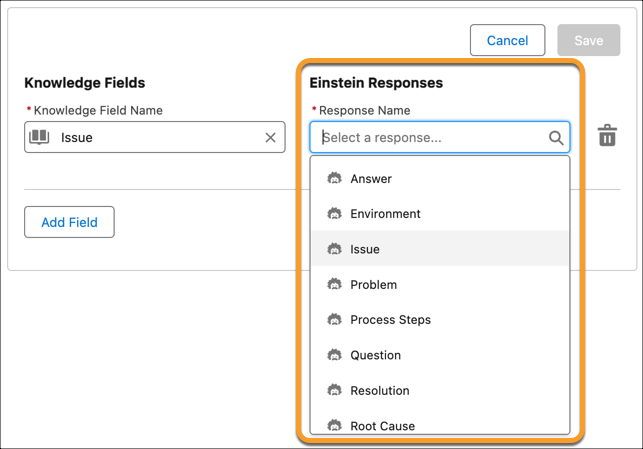
To remove fields, click **Delete**.

Important When you map your Knowledge fields, all Text Area Type and String Type fields — excluding LargeLanguageModel, Title, and URL Name — across Knowledge record types are available as long as you have access. If the user generating a knowledge article doesn’t have access to a field you've mapped, it isn’t populated when they generate a knowledge article.
3. Save your changes.
To improve Einstein’s responses with information from your case fields, set up Service AI Grounding for cases. To include case comments and emails for grounding with Knowledge Creation, they must be selected during grounding set up.
#### See Also
- [Knowledge Fields for Einstein Knowledge Creation](https://help.salesforce.com/s/articleView?id=service.knowledge_creation_learn_knowledge_fields.htm&release=264.0.0&type=5 "Learn how field mapping and response types affect your article drafts.")
- [Einstein Knowledge Creation Response Glossary](https://help.salesforce.com/s/articleView?id=service.knowledge_creation_glossary.htm&release=264.0.0&type=5 "Get an overview of each mapping option for knowledge article creation.")
- [Ground Einstein Responses with Your Service Data](https://help.salesforce.com/s/articleView?id=service.einstein_generative_ai_grounding_setup.htm&release=264.0.0&type=5 "Use grounding to draft AI responses from a defined data source. Grounding indexes your objects and fields so that Einstein knows which information to base recommendations on. When you use grounding, your unique knowledge articles and case history add context and personalization to customer communications.")