
View what's changed between two versions of an article. Content that is added, deleted, or changed is highlighted side by side in the Article Version Comparison component.
Required Editions
| Available in Lightning Experience. View supported editions. |
Article Version Comparison is a component you can add to your Lightning pages. We recommend creating a tab in your layout for this tool so it’s available for your team when they need it.
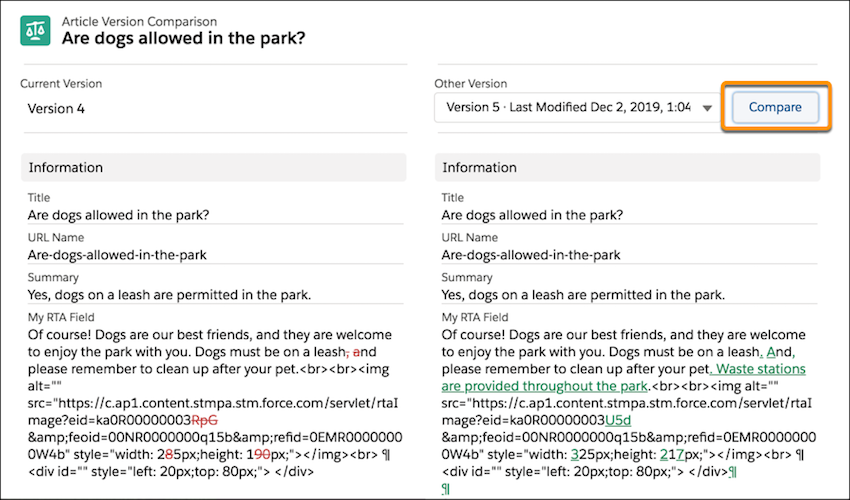
For the best experience, view an older version and then choose a newer version to compare. Content that's new in the compared version is green and underlined. Content deleted from the current version appears in red strikethrough text.
Considerations
Keep these considerations in mind when you compare articles.
- The HTML tags show because the source code is used in the comparison. By comparing the HTML source, you can see differences in formatting and image or video links, indicating content that changed.
- Articles are compared character by character. For instance, “Online” and
“Archived” share an ‘i’ and ‘e’.

- You can use the Article Comparison component only for versions with the same record type and language.
- In Lookup fields, the linked record’s 18-character ID appears, such as the ID to identify users in Modified By and Created By fields.
- If another version is modified, created, or deleted while you view an article, it doesn't appear in the version dropdown. You can refresh the page to see the latest list of article versions.
- Comparing articles isn’t supported in Microsoft IE11 or the Microsoft Edge browser.