---
schema_version: "1"
id: ed5a4ce77a70d8d82f46121492f19c084bf403d86acd6ffabbe79b088ca8c4dd
title: Create and Publish a Knowledge Block
collection: admin
version: current
locale: en-us
portal_url: https://docs.salesforce.com/admin/current/en-us/service/264-0-0/knowledge_blocks_create.md
canonical_url: https://help.salesforce.com/s/articleView?id=service.knowledge_blocks_create.htm&release=264.0.0&type=5
source_site: help.salesforce.com
content_type: documentation
content_hash: ac2e3b1b76c2fb7ddde32073387d3a55e0aae5ad56f3979af6ed42cdfd2c98e9
description: Create a reusable content block, save it as a draft, and publish it so it's available to insert into articles.
products:
- Service Cloud
release: "264"
---
# Create and Publish a Knowledge Block
Create a reusable content block, save it as a draft, and publish it so it's available to insert into articles.
### Required Editions
1. From the App Launcher, open **Knowledge Blocks**, and then click **New**.
2. Enter a **Name** and an optional **Description**, and select a **Default Language**.
When you create a new Knowledge Block, fields appear in a single column in a fixed order. The New Knowledge Block page doesn’t follow the field order or columns on the page layout. The edit page follows the page layout.
3. To update articles that use this block automatically, select **Auto update articles**.
4. To republish updated articles automatically, select **Auto publish articles**.
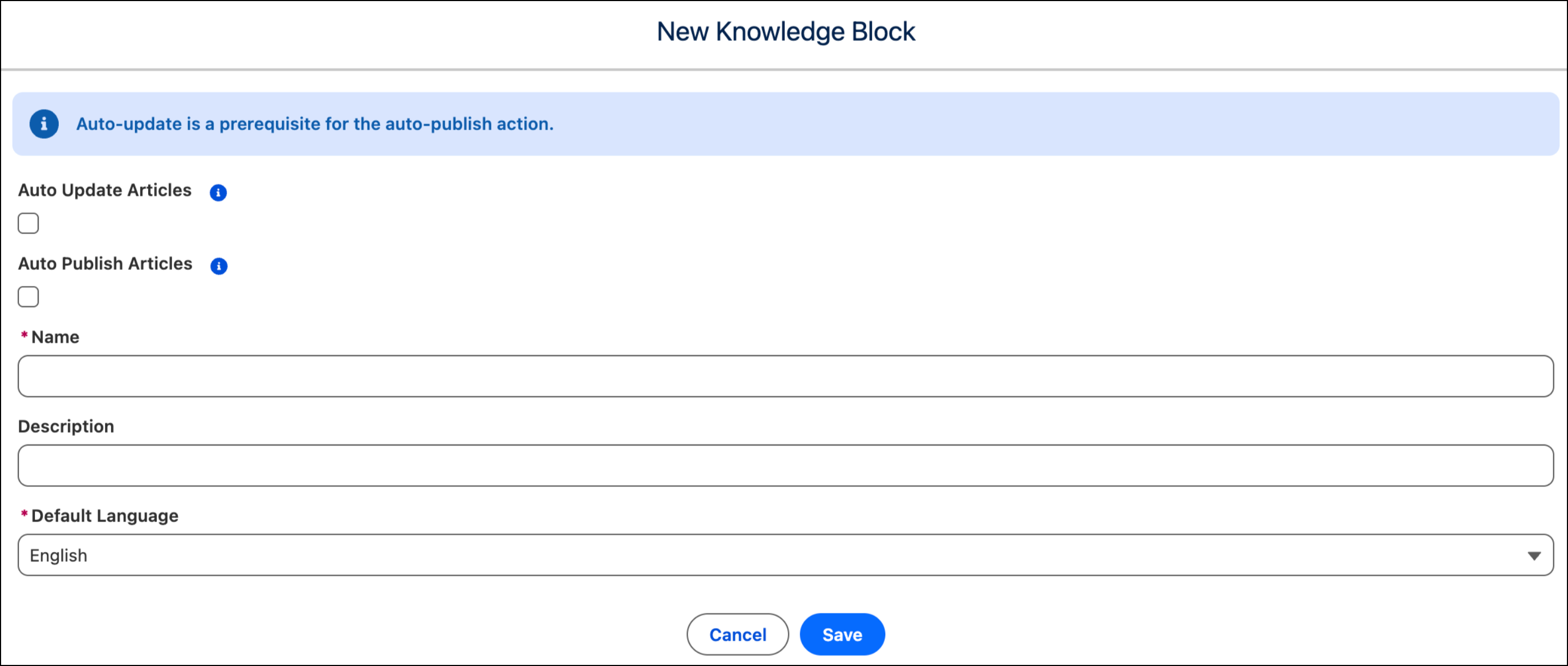
5. Save your changes.
6. Add an optional **Version Reason**, and enter your content in the **Body** section.
7. Save your changes.
The version is saved as a Draft.
8. Review the draft. When the content is ready, publish the version.
The Publish Status changes to Published, and the version becomes available to insert into articles.
Authors can now insert this block into Knowledge articles.

Tip Keep each block focused on a single, self-contained piece of content (one address, one disclaimer, one procedure). Smaller, focused blocks are easier to reuse.
#### See Also
- [Insert a Knowledge Block into an Article](https://help.salesforce.com/s/articleView?id=service.knowledge_blocks_insert.htm&release=264.0.0&type=5 "Embed a published knowledge block version into an article using the rich text editor's Insert menu.")
- [Track Knowledge Block Usage and Update Block Content](https://help.salesforce.com/s/articleView?id=service.knowledge_blocks_manage.htm&release=264.0.0&type=5 "Track a block's versions, see which articles use it, publish updates, and keep articles that reference the block up to date.")