---
schema_version: "1"
id: 4003f33cfbf245dc1d597aff8e1ed783eeefaf8a2e9d9dd558bbbd3f3279b683
title: Create Problems Automatically from Incidents with Einstein
collection: admin
version: current
locale: en-us
portal_url: https://docs.salesforce.com/admin/current/en-us/service/264-0-0/it_srvcs_einstein_prblm_creation.md
canonical_url: https://help.salesforce.com/s/articleView?id=service.it_srvcs_einstein_prblm_creation.htm&release=264.0.0&type=5
source_site: help.salesforce.com
content_type: documentation
content_hash: ffd54152e81aa3d6653b294da687b8be481ce630764ff98c2e173f7d68872374
description: IT fulfillers initiate can use Create Problem with Einstein action to efficiently generate a problem record from the related incident. Agentforce creates the draft problem record by analyzing the source incident and its associated data, including communication history, related tickets, and attached files. IT fulfillers can quickly review and save the problem.
products:
- Service Cloud
- Agentforce IT Service
release: "264"
---
# Create Problems Automatically from Incidents with Einstein
IT fulfillers initiate can use Create Problem with Einstein action to efficiently generate a problem record from the related incident. Agentforce creates the draft problem record by analyzing the source incident and its associated data, including communication history, related tickets, and attached files. IT fulfillers can quickly review and save the problem.
### Required Editions
Available in: Lightning Experience
Available in: Enterprise, and Unlimited Editions with Agentforce IT Service.
User Permissions Needed
To create problems using Einstein:
Prompt Template User permission set
1. From App Launcher, go to Agentic IT Service Desk.
2. On the Incidents tab, open a record from the All list view.
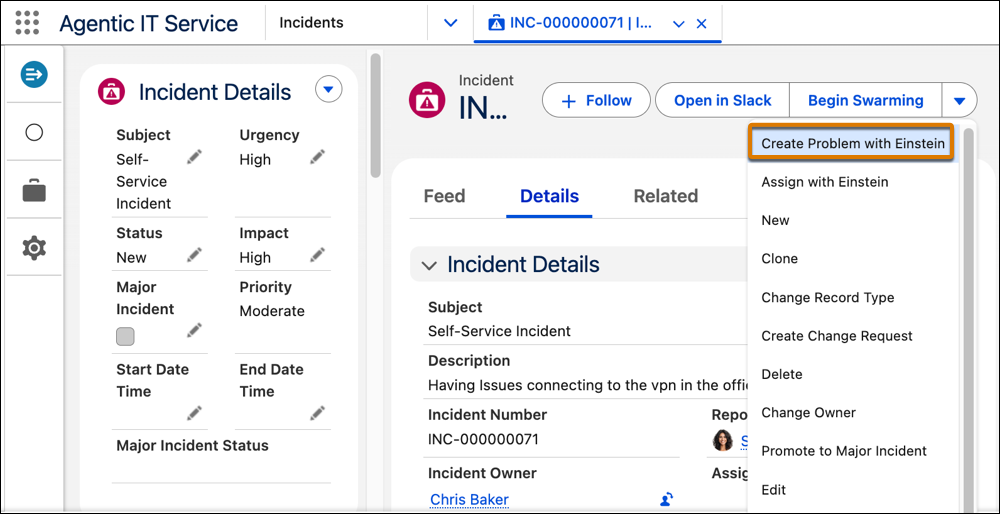
3. From the quick actions menu, select **Create Problem with Einstein** from quick actions menu.
Einstein analyzes the incident and its related records to automatically draft a problem record.
4. Review the problem record generated by Einstein to make sure the accuracy of key fields, including subject, category, description, impact, urgency, and priority.
5. Click **Save**.
The problem record is created successfully.

Example
Sarah is an IT Fulfiller at Cumulus Bank. An employee creates a record with these details:
- Incident Number: INC0002
- Subject: CRM Application is Unavailable
- Attachment: A screenshot showing a browser window with a "503 Service Unavailable" error banner.
Based on assignment rules set up by the admin, the incident INC-0002 is initially assigned to the IT Support group. Sarah, an IT fulfiller, reviews the incident, including the attached screenshot. She recognizes the incident as part of a larger related issue tied to recent CRM server maintenance, based on the recurring "Error 503 Service Unavailable" messages confirmed in the incident description and the attached file.
Sarah decides to initiate a formal problem investigation. She clicks **Create Problem with Einstein** on the incident record. Einstein analyzes the incident details and associated incidents, and attached files. Einstein gives particular weight to the description's error message, "CRM application is unavailable," and to the attached screenshot, which confirms the same 503 error signature across multiple reports.
Einstein drafts a new problem record automatically, which includes key details such as category, subject, description, impact, urgency, and priority summarized from incident details and attached file. The new problem record is created (PRB-0023), saving Sarah the manual effort of drafting it from scratch and helping her to immediately begin the investigation.