---
schema_version: "1"
id: c990bc74a216c6df7d7b528c64103db9e118b36694babccf9f0db669eba635ef
title: Assign Incidents Automatically to the Right Queue with Einstein
collection: admin
version: current
locale: en-us
portal_url: https://docs.salesforce.com/admin/current/en-us/service/264-0-0/it_srvcs_einstein_inc_assign.md
canonical_url: https://help.salesforce.com/s/articleView?id=service.it_srvcs_einstein_inc_assign.htm&release=264.0.0&type=5
source_site: help.salesforce.com
content_type: documentation
content_hash: 631372dc488a1bd2c2bf2d5a8481bbc222231b858e782349c997a65e1047174d
description: Speed up your IT managers' issue resolution time and assign incidents accurately with Einstein. Einstein uses the incident details and other insights from recent incidents to recommend the most suitable queue, even for incidents that are already assigned.
products:
- Service Cloud
- Agentforce IT Service
release: "264"
---
# Assign Incidents Automatically to the Right Queue with Einstein
Speed up your IT managers' issue resolution time and assign incidents accurately with Einstein. Einstein uses the incident details and other insights from recent incidents to recommend the most suitable queue, even for incidents that are already assigned.
### Required Editions
Available in: Lightning Experience
Available in: Enterprise, and Unlimited Editions with Agentforce IT Service.
User Permissions Needed
To assign incidents using Einstein:
Prompt Template User permission set
1. From the App Launcher, go to Agentic IT Service Desk.
2. On the Incidents tab, open a record from the All list view.
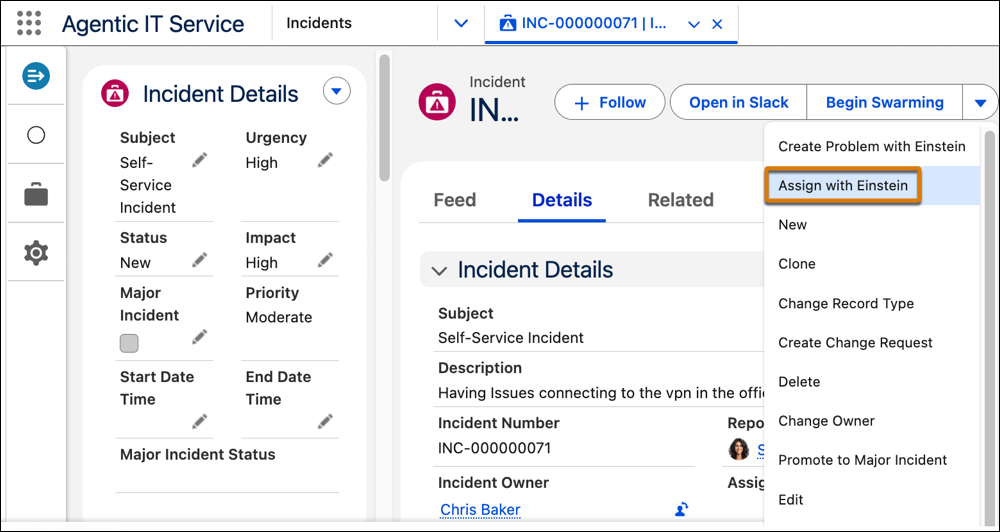
3. From the quick actions menu, select **Assign with Einstein**.
Einstein analyzes fields in the incident record (such as subject, description, and category) and assigns a fulfiller based on similar past records.
4. Click **Okay**.
On the Details tab, the Incident Owner field is updated.

Example
John is an Incident Manager at Cumulus Bank. Smith is an Incident Fulfiller in Network domain. An incident is created by an employee with these details.
- Incident Number: INC0001
- Subject: Can't Access Shared Drive
- Category: Network
Based on assignment rules setup by the admin, the incident is initially assigned to the group IT Support L1 Queue. John recognizes the issue as a complex network problem due to frequent VPN disconnections when working from home. He adds the description to the incident record to describe the root cause of the issue.
John clicks Assign with Einstein on the incident record. Einstein uses Data 360 to analyze key fields and historical incidents, giving more weight to the description, which mentions VPN disconnections and working from home. Einstein recommends reassigning INC-0001 to the appropriate queue of network specialists who have resolved 12 similar VPN-related incidents 40% faster than the total team average.
Incident owner automatically changes from IT Support L1 Queue to IT network resolution group.