
Discover and track IT assets across your hybrid environment. Use discovery to automatically identify infrastructure, software, and cloud resources. Keep your Configuration Management Database (CMDB) up to date with accurate, real-time asset data to improve service reliability and reduce manual effort.
Required Editions
| Available in: Lightning Experience |
| Available in: Enterprise, Performance, and Unlimited Editions with Agentforce IT Service that have Discovery enabled. |
Discovery collects structured asset data and sends it to CMDB, where the information is stored as configuration items. Together, Discovery and CMDB provide a reliable foundation for IT operations by improving visibility, reducing manual effort, and accelerating service workflows.
- Learn and Explore Discovery
Learn how discovery helps you scan assets, identify configuration items, and improve visibility across your IT environment. Explore key terms, understand core benefits, and see how discovery works end to end with an example. - Plan and Prepare for your Discovery Implementation
Learn how to set up your discovery and configure foundational settings to start automating your asset discovery. - Agentless Discovery for Scanning IT Assets
Use agentless discovery to identify assets across on-premises, virtual, and cloud environments without installing software agents on each device. Do agentless discovery by using discovery applications, targets, probes, and scan jobs to collect system data through secure network protocols. After each scan, the collected information is processed and updated in CMDB to maintain accurate configuration data. - Discover Devices from Microsoft Intune
Discover devices managed in Microsoft Intune and synchronize key inventory data into CMDB. Keep Windows and mobile configuration items accurate and current by aligning CMDB records with Intune device data. Use Intune discovery to support reliable asset tracking and downstream IT service workflows that depend on trusted device information. - Discover Devices from Jamf Pro
Discover Mac computers and mobile devices managed in Jamf Pro, and synchronize key inventory data into CMDB. Keep computer and mobile configuration items accurate and current by aligning CMDB records with Jamf Pro device data. Use Jamf discovery to support reliable asset tracking and IT service workflows that depend on trusted device information. - Agent-based Discovery for Extended Device Coverage
Use agent-based discovery to identify and track assets across environments that require installed monitoring. Discovery agents run on individual hosts to collect detailed hardware and software inventory, ensuring continuous and accurate updates to your Configuration Management Database (CMDB). - Process Manager for Analyzing Discovery Data
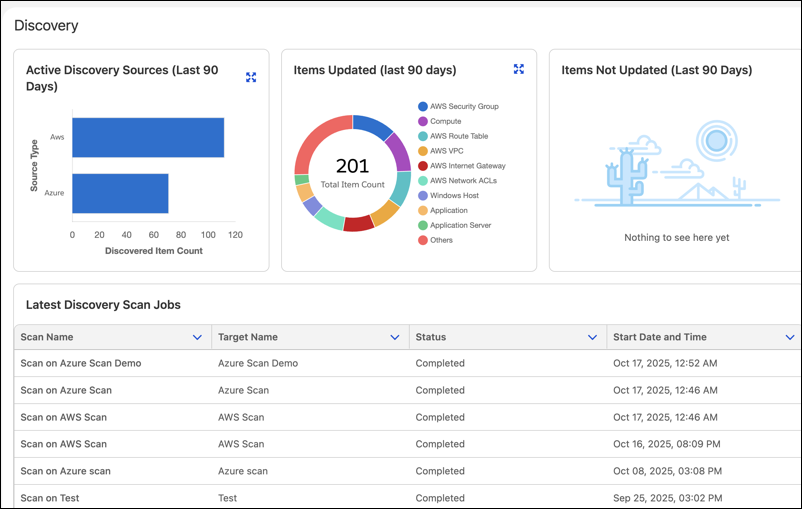
Turn discovered configuration items into dependency-aware views with Process Manager. Process jobs connect applications, infrastructure, cloud resources, software, and virtualized environments in Configuration Management Database (CMDB). - Get Insights into Discovery Activity with the Discovery Dashboard
Use the Discovery Dashboard to monitor scan performance, asset discovery trends, and data freshness across your organization. Gain visibility into scan coverage, active sources, and update frequency to improve discovery accuracy, identify gaps, and maintain a reliable CMDB.