---
schema_version: "1"
id: 149e1f26acd88292ae62030ba2e3f5f9073cf6c62b10a9044a53cb4078bb20c6
title: Provision CMDB and Service Graph for IT Services
collection: admin
version: current
locale: en-us
portal_url: https://docs.salesforce.com/admin/current/en-us/service/264-0-0/it_srvcs_cmdb_provisioning.md
canonical_url: https://help.salesforce.com/s/articleView?id=service.it_srvcs_cmdb_provisioning.htm&release=264.0.0&type=5
source_site: help.salesforce.com
content_type: documentation
content_hash: cdc2fb5f5374c57e29daf524697439867405d8a6537bd16b0496c9372aeb897c
description: Provision CMDB and Servicegraph to create the required CMDB environment and prepare your org for configuration. Provisioning creates a dedicated CMDB tenant and enables the required licenses, and services. Complete provisioning before configuring CMDB in Salesforce Go. Manual provisioning gives visibility into provisioning status and provides a clear recovery path if a previous attempt failed.
products:
- Service Cloud
- Agentforce IT Service
release: "264"
---
# Provision CMDB and Service Graph for IT Services
Provision CMDB and Servicegraph to create the required CMDB environment and prepare your org for configuration. Provisioning creates a dedicated CMDB tenant and enables the required licenses, and services. Complete provisioning before configuring CMDB in Salesforce Go. Manual provisioning gives visibility into provisioning status and provides a clear recovery path if a previous attempt failed.
### Required Editions
Available in: Lightning Experience
Available in: Enterprise, Performance, and Unlimited Editions with Agentforce IT Service.
User Permissions Needed
To provision CMDB:
View Setup and Configuration
Provisioning creates the CMDB tenant required for setup. Until provisioning completes, CMDB configuration and related features remain unavailable.
Provisioning runs in the background and you can leave the page while the job runs.
The page shows the current Provisioning Status and the stages of the job:
- Licenses Applied
- CMDB Services Enabled
If provisioning fails at any stage, the status shows Failed. You can rerun the provisioning job from this page.
1. From Setup, enter CMDB in the Quick Find box.
2. Select **CMDB and Service Graph** in Feature Settings.
3. Review the Provisioning Status section.
4. If the status is Not Provisioned or Failed, click **Provision CMDB**.
5. Wait until the status changes to Provisioned.
Provisioning can take a few minutes. You can leave the page while the job runs.
When the status shows Provisioned, the details are populated in the Provisioning Activity section.
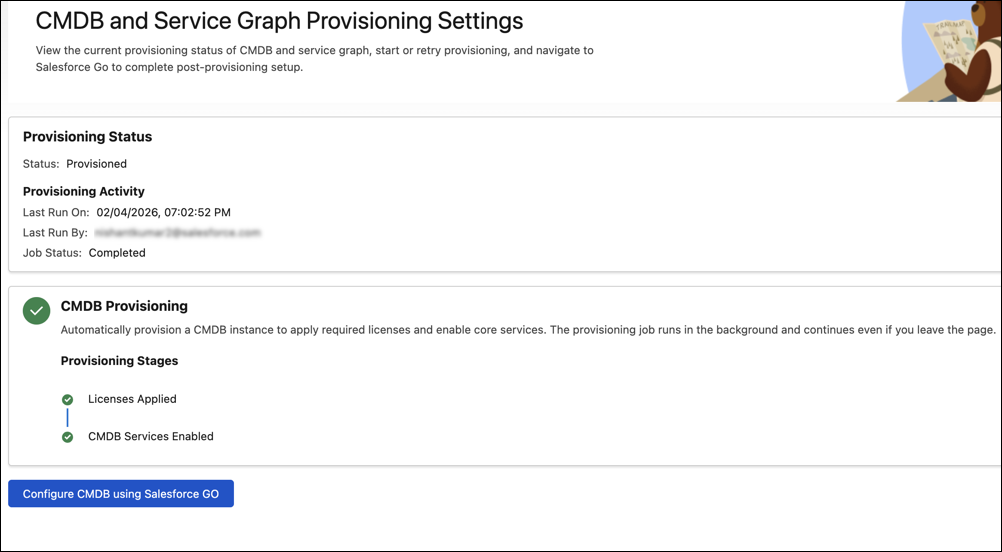
You can then click **Configure CMDB using Salesforce Go** to complete the CMDB setup. In Salesforce Go, you can turn on the CMDB feature, discovery options, and configure data population rules. Provisioning prepares the environment. Salesforce Go configures how your CMDB works. For more information, see [Set Up CMDB Using Salesforce Go](https://help.salesforce.com/s/articleView?id=service.it_srvcs_cmdb_salesforcego.htm&release=264.0.0&type=5 "Swiftly set up your CMDB in just a few steps by using Salesforce Go. Use the guided setup experience to turn on the CMDB feature, discovery options, and configure data population rules. Reduce manual setup and unlock core CMDB functionalities with single activation flows.").