
Maintain clean and reliable asset records in Configuration Management Database (CMDB) by using identification rules. Determine how the system identifies configuration items (CIs) when new data is added, either manually or through discovery. By matching key attributes like serial number or MAC address, identification rules prevent duplicates, reduce confusion, and ensure the right CI record gets updated.
Required Editions
| Available in: Lightning Experience |
| Available in: Enterprise, Performance, and Unlimited Editions with Agentforce IT Service that have CMDB and Service Graph enabled. |
Identification rules define how CMDB recognizes a configuration item based on specific attributes. When new asset data is added to CMDB, these rules help match it to an existing CI or create a new CI when no match exists. Admins configure these rules at the CI type level, selecting one or more attributes that uniquely identify a CI of that type.
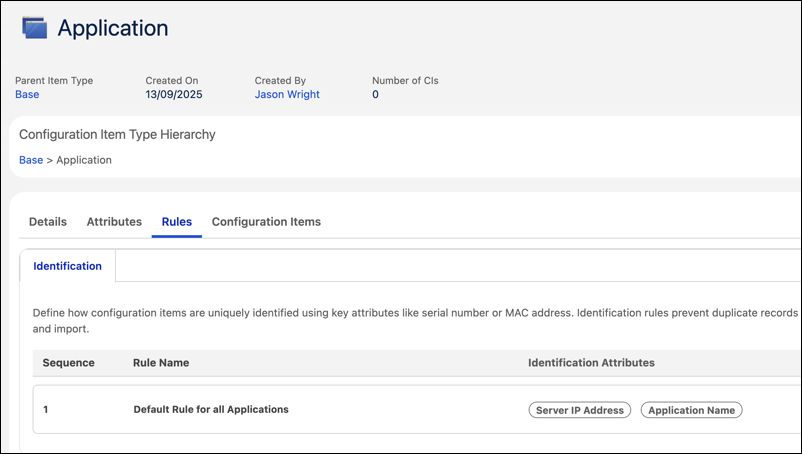
Identification rules are essential for environments where data is collected from multiple sources. If identification rules are not defined, CMDB could create duplicate records or update the wrong asset, leading to broken relationships and inaccurate reporting.

An organization uses discovery to scan workstations across multiple offices. Each scan collects data such as serial number, MAC address, hostname, and operating system. To avoid creating duplicate CIs every time a scan runs, the admin sets up an identification rule for the workstation CI type.
The rule specifies serial number and MAC address as the identifying attributes. When discovery sends data, CMDB uses this rule to compare new records with existing ones. If a match is found, the existing CI is updated. If no match is found, a new CI is created. This process ensures each workstation appears once in the system, with the latest information.
How Identification Rules Affect CI Import
Identification rules makes sure that Configuration Item (CI) imports update the correct records and prevent duplicate CIs by controlling how CMDB matches imported data to existing CIs.
When you import CIs, CMDB applies identification rules to determine whether to update an existing CI or create a new CI. If the imported data matches an existing CI based on the active identification rules, CMDB updates the existing record. If no match is found, CMDB creates a new configuration item.
- Edit an Identification Rule
Use identification rules to define how configuration items (CIs) are uniquely identified during discovery or import. Accurate matching helps prevent duplicate records and improves CMDB data quality.