
Generate work plans automatically on work orders and work order line items.
Required Editions
| Available in: Lightning Experience |
| The Field Service core features, managed package, and mobile app are available in Enterprise, Unlimited, and Developer Editions. |
| User Permissions Needed | |
|---|---|
| To generate work plans on a work order or work order line item: |
Edit and Read on work order or work order line item Read and View All Records on work plan templates and work step templates to use the Add Work Plan and Generate Work Plans actions Read on work plan selection rules |
After you define templates and rules, you can generate work plans on new or existing work.
Here’s how to generate work plans on a new work order or work order line item.
- In the app launcher, click Work Orders or Work Order Line Items.
- Click New.
-
To match the trigger in your selection rule, select one or more fields. For example, select
Work Type.
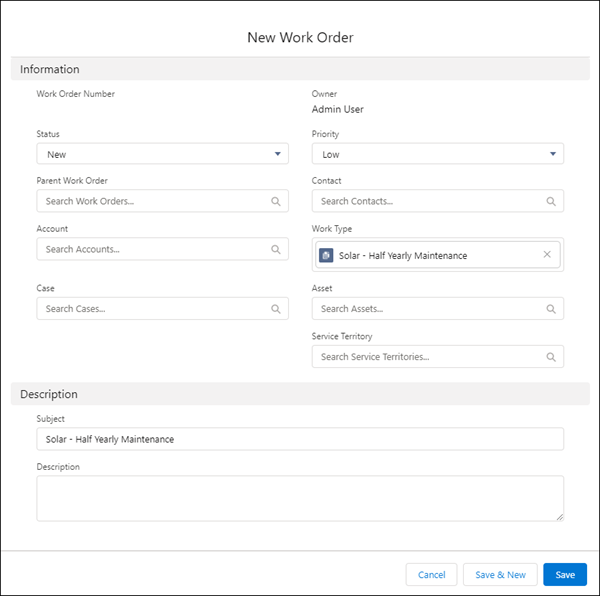
- Click Save.
-
To see the work steps and work plans that your rules generated, open the work order or work
order line item, and view the Work Plans Lightning web component.
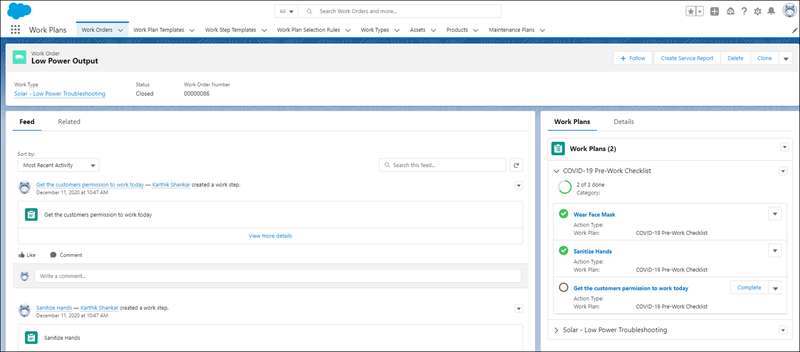
 Note If you have customizations such as validation rules or lookup filters that prevent the creation of a work step connected to a work plan, that work plan doesn’t auto-generate.
On a work order or work order line item, you can select Generate Work Plans from the action menu. When columns in a rule match a field in the work order or work order line item, the rule generates a work plan on that record. This action doesn’t change preexisting work plans, but it’s a handy way to add a plan.