---
schema_version: "1"
id: c97bbd30ef1db87e2032387b391c09c138c858ebf9ad139b194802469884bd92
title: Delete Work Plans and Steps
collection: admin
version: current
locale: en-us
portal_url: https://docs.salesforce.com/admin/current/en-us/service/264-0-0/fs_work_plans_delete_plans_and_steps.md
canonical_url: https://help.salesforce.com/s/articleView?id=service.fs_work_plans_delete_plans_and_steps.htm&release=264.0.0&type=5
source_site: help.salesforce.com
content_type: documentation
content_hash: d804a5820a50a3aca9e4c8932d669f5445a581de4fc35102c6550966477854ce
description: If you modify a work plan, you can delete the previous plan and its steps on an existing work order or work order line item.
products:
  - Field Service
release: "264"
---
# Delete Work Plans and Steps

If you modify a work plan, you can delete the previous plan and its steps on an existing work order or work order line item.

### Required Editions

<table class="slds-table slds-table_bordered slds-max-medium-table_stacked slds-m-bottom_small edition"><colgroup><col></colgroup><tbody><tr class=""><td class="slds-cell-wrap" style="vertical-align:top;">Available in: Lightning Experience</td></tr><tr class=""><td class="slds-cell-wrap" style="vertical-align:top;">The Field Service core features, managed package, and mobile app are available in <strong>Enterprise</strong>, <strong>Unlimited</strong>, and <strong>Developer</strong> Editions.</td></tr></tbody></table>

<table class="slds-table slds-table_bordered slds-max-medium-table_stacked slds-m-bottom_small permission">
        <colgroup>
          <col style="width:50%">
          <col style="width:50%">
        </colgroup>
        <thead class="slds-text-title_caps ">
          <tr class="">
            <th scope="colgroup" class="slds-cell-wrap" colspan="2" style="text-align:center;vertical-align:top;" id="d43746e69">User Permissions Needed</th>
          </tr>
        </thead>
        <tbody>
          <tr class="">
            <td data-label="User Permissions Needed" class="slds-cell-wrap" style="vertical-align:top;" headers="d43746e69 ">To delete work plans:</td>

            <td class="slds-cell-wrap" style="vertical-align:top;" headers="d43746e69 ">Delete and Read on work plans</td>

          </tr>
        </tbody>
      </table>

![Note](https://sf-zdocs-cdn-prod.zoominsoftware.com/tdta-service-support_field_service-264-0-0-production-enus/3f7dceb9-dd70-454a-b49e-bbb4526a158d/images/icon_note.png)

Note This action deletes all work plans on the work order or work order line item.

1. On the work order or work order line item, select **Delete Work Plans** from the action menu.
    
    ![Note](https://sf-zdocs-cdn-prod.zoominsoftware.com/tdta-service-support_field_service-264-0-0-production-enus/3f7dceb9-dd70-454a-b49e-bbb4526a158d/images/icon_note.png)
    
    Note If the work order includes a work order line item that has its own plans, we don’t delete the plans from the child work order line item.
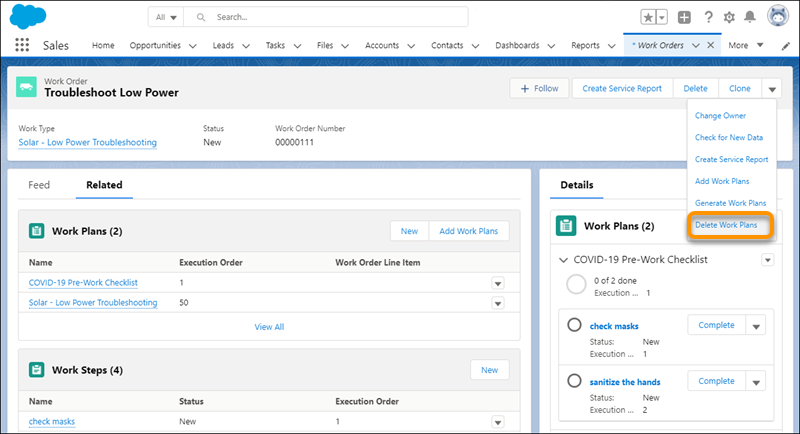
    
    ![Delete Work Plans Action](https://sf-zdocs-cdn-prod.zoominsoftware.com/tdta-service-support_field_service-264-0-0-production-enus/3f7dceb9-dd70-454a-b49e-bbb4526a158d/support_field_service/images/fs_work_plans_delete_work_plans.png)
2. To add the latest versions of your plans and steps, select **Generate Work Plans** from the action menu.