
Create and maintain work plans by defining templates for work steps and work plans, and create work plan selection rules.
Required Editions
| Available in: Lightning Experience |
| The Field Service core features, managed package, and mobile app are available in Enterprise, Unlimited, and Developer Editions. |
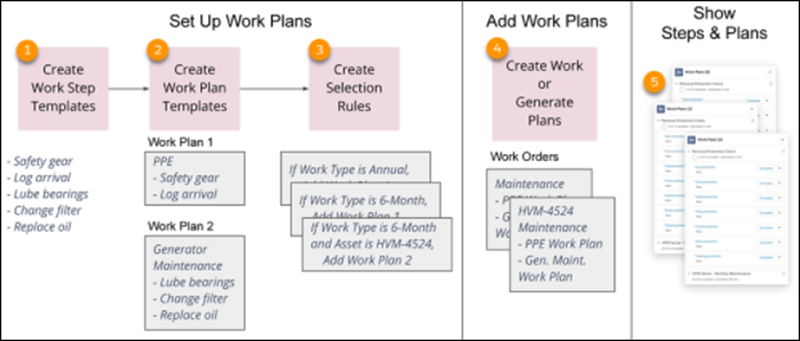
First, you'll create a library of work step templates for individual tasks (1). Organize those step templates into work plan templates. You can create a library of work plan templates, such as a library of asset maintenance procedures (2), and then define rules that select the right plans for work assignments (3).
When you create a work order or work order line item, your rules add a point-in-time copy of plans and their steps based on your rules. Also, you can generate work plans on existing work orders or work order line items (4).
Your workers can then see what to do in the work plans that appear. Front-line workers can view the work plans on-site on their mobile app and back-office workers can view them on their desktops. As they perform steps, they can mark them as completed (5).
- Prepare for Work Plans
Create and design sample work plans in Field Service. - Create Work Step Templates
Start by creating work step templates for the smallest individual units of work. - Create Work Plan Templates
Build work plan templates from your work step templates. - Manage Work Step Templates
Manage the work plan template entries that store the work step templates associated with your work plan template. - Create Work Plan Selection Rules
Add selection rules to automate how work plans are assigned to work orders. - Generate Work Plans
Generate work plans automatically on work orders and work order line items. - Adjust Plans and Steps on Work
Tweak work plans and work steps on a work order or work order line item. - Delete Work Plans and Steps
If you modify a work plan, you can delete the previous plan and its steps on an existing work order or work order line item.