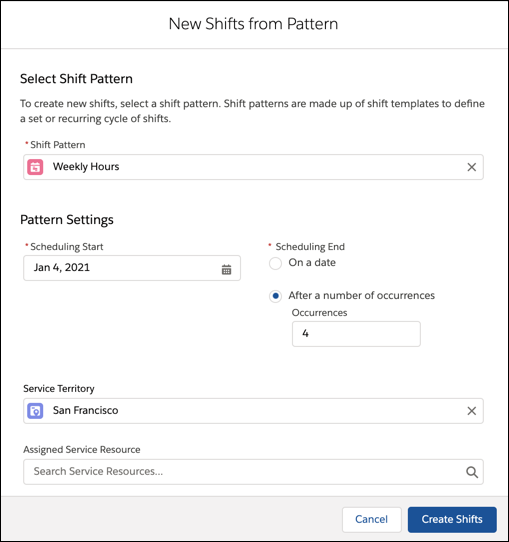
In Field Service, create a set of shifts from a predefined pattern of shift templates.
Assign a service territory and resource to quickly prepare the schedule.
Required Editions
| Available in: Lightning Experience |
| The Field Service core features, managed package, and mobile app are available in
Enterprise, Unlimited, and Developer Editions.
|
| User Permissions Needed |
| To view, create, and update shifts: |
View, create, and edit on Shifts, Job Profiles, Service Territories, Service
Resources, Service Territory Memberships |
-
From the App Launcher, click Shifts.
-
Click New from Pattern.
-
Select the shift pattern.
-
Select a start date.
-
Do one of the following:
-
To end the pattern on a specific date, choose On a date.
-
To repeat the pattern, choose After a number of occurrences and
enter the number of times to repeat it.
-
Optionally, select a service territory. If you select a territory, you can also assign a
service resource.
-
Click Create Shifts.