
Use the Agent Builder’s event logs to locate the name of the action that failed, or to view the last action that was triggered. Then use the Flow Builder to debug the flow that this action triggers.
Required Editions
| Available in: Lightning Experience |
| Available in: Enterprise, Performance, Unlimited, and Developer Editions with Field Service and Foundations. Also available with Einstein 1 Field Service Edition or Agentforce 1 Field Service Edition. |
| User Permissions Needed | |
|---|---|
| To open, edit, or create a flow in Flow Builder: | Manage Flow |
For more information about actions and flows, see Agent Template: Scheduling Agent for Field Service in the Legacy Agentforce Builder
- Open the Agent Builder and click Events.
-
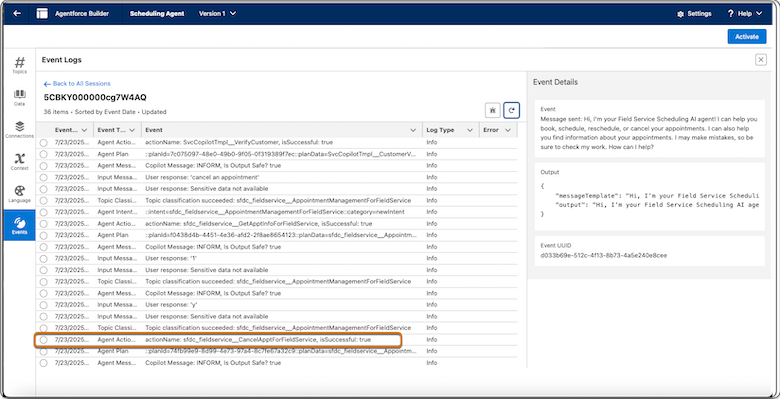
Open the latest session, scroll until you see the last event whose type is Agent Action and
note the name of the action that was triggered. It can take several minutes to see events of
type Agent Action. Refresh the window until you see all events. In this example, a problem
occurred while trying to cancel an appointment and the last action that was triggered is
fieldservice_CancelApptForFieldService.
- Access the Flow Builder and open the flow corresponding to the action that failed. In our example, the flow is called Field Service: Cancel Service Appointment.
- Click Debug, and then select Run flow as another user. See Debug a Flow in Flow Builder for information about enabling this option.
- Select the AI agent user, for example, EinsteinServiceAgent user, and run the flow.
-
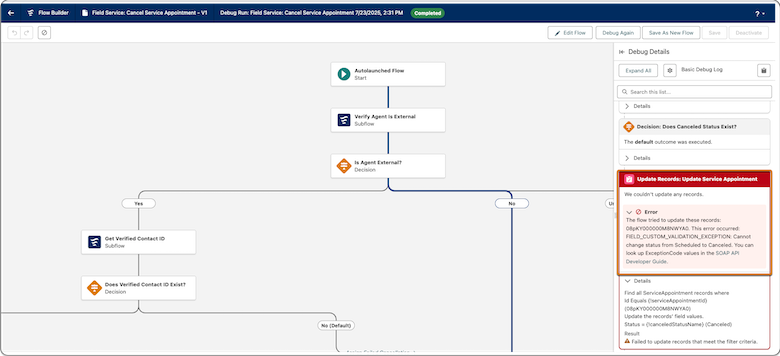
If the flow fails, check the error message for more information. If the error message
doesn’t help locate the issue, continue to the next step.
If the flow succeeds, the problem isn’t in this flow. In our example, the error shows that there was a problem changing the status from Scheduled to Canceled.
- Debug the flow again, but this time as the Admin user (this is the default). If the flow succeeds, investigate user permission errors. See Assign Permissions for Autonomous Scheduling in the Legacy Agentforce Builder. If it fails, investigate configuration and permission issues.