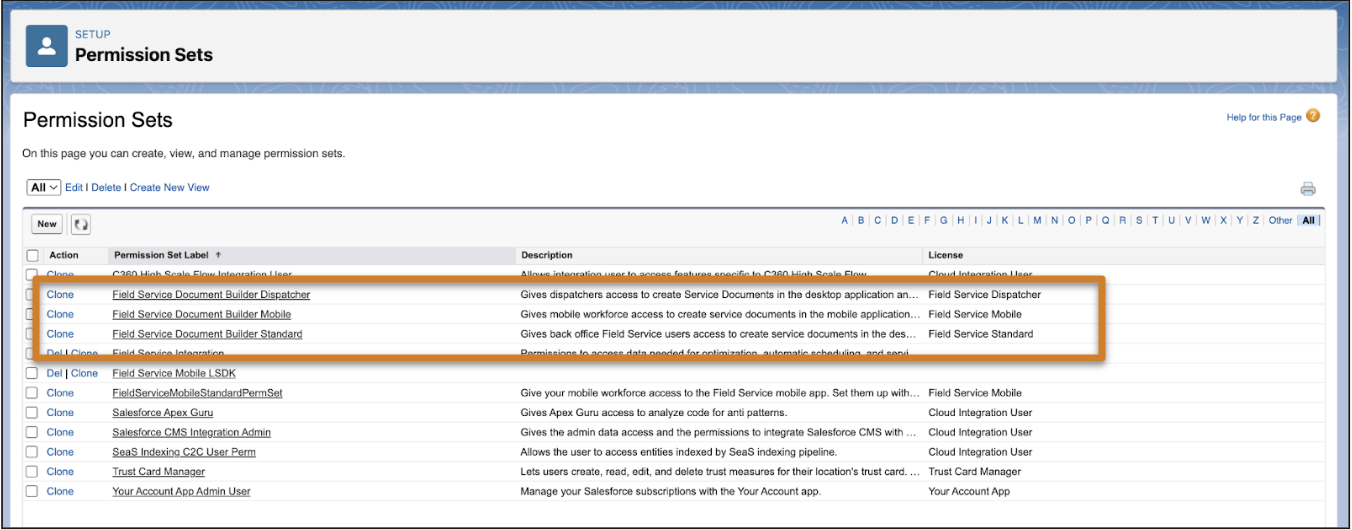
Assign users the standard permission sets for Document Builder, so they can create
service document PDFs.
Required Editions
| Available in: Lightning Experience. |
| The Field Service core features, managed package, and mobile app
are available in Enterprise, Unlimited, and
Developer Editions.
|
| User
Permissions Needed |
| To assign permission sets: |
Manage Users |
| To create service documents with Document Builder: |
Field Service Document Builder Dispatcher, Field Service Document
Builder Mobile, OR Field Service Document Builder Standard
permission sets |
-
From Setup, in the Quick Find box, enter Users, and then
select Permission Sets.
-
Select Field Service Document Builder Dispatcher,
Field Service Document Builder Mobile, or
Field Service Document Builder Standard for
permission sets to assign to Field Service technicians, dispatchers, and
admins.
-
To assign the permission sets to users, select Manage
Assignments.
Users who have been assigned these permission sets no longer have access
to Service Reports, and the Create Service Report button no longer appears for
them.