Create two flows, one for creating the resource absence, and the other for rescheduling the service appointments.
Required Editions
| Available in: Lightning Experience |
| Available in: Enterprise, Performance, Unlimited, and Developer Editions with Field Service and Foundations. Also available with Einstein 1 Field Service Edition or Agentforce 1 Field Service Edition. |
Resource Absence Flow
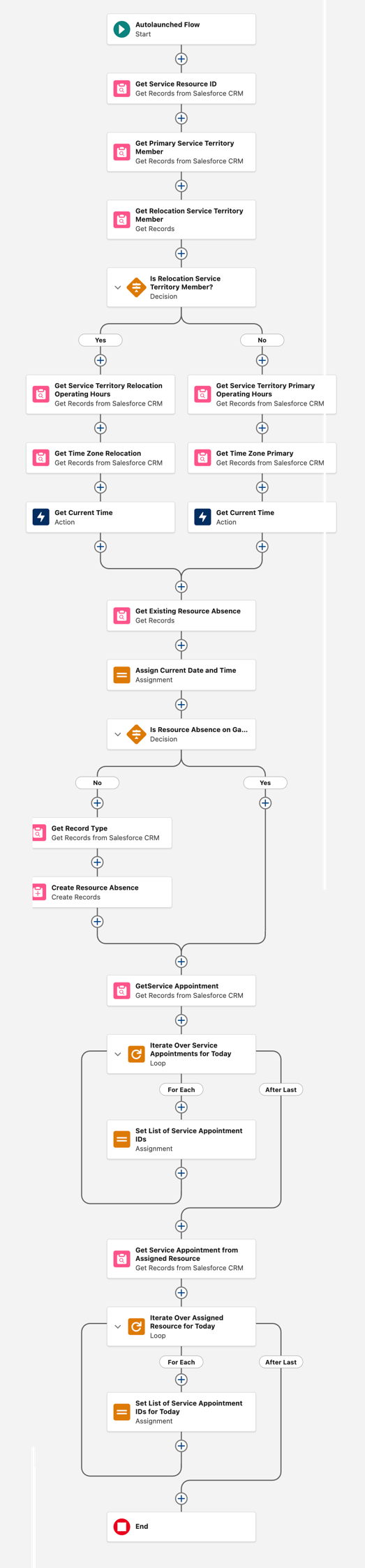
This flow returns a list of today’s service appointments that the service resource who requested the absence is assigned to, and creates a resource absence.
Create an Autolaunched Flow that performs the following:
- Gets the service resource’s ID
- Determines the time zone and the operating hours for the primary service territory
- Determines the time zone and the operating hours for the relocation service territory
- Prevents creating duplicate absence records if the flow runs multiple times on the same day
- Finds all of the appointments assigned to the mobile worker today
Variables
| API Name | Details |
|---|---|
| saIdsFromAssignedResource |
Text Select to allow multiple values (collection) |
| serviceResourceSAIds |
Text Select to allow multiple values (collection) Available for output |
| currentDateTimeTZ |
Data Type: Text |
| STMRelocation |
Data Type: Record Object: Service Territory Member |
| timeZone |
Note: This variable isn’t used in the flow, but it’s required for the input of the agent action. You can enter a default value here, such as UTC. Data Type: Text Default Value: “” Available for input |
| varEnd |
Data Type: Date/Time |
| varRecordTypeId |
Data Type: Text |
| varResourceId |
Data Type: Text |
| varStart |
Data Type: Date/Time |
Formulas
| API Name | Data Type | Formula |
|---|---|---|
| LocalDateTimeEndOfDayFormula | Date/Time | DATETIMEVALUE(TEXT(DATEVALUE({!currentDateTimeTZ})) + " 23:59:59") |
| LocalDateTimeNowFormula | Date/Time | DATETIMEVALUE(TEXT(DATEVALUE({!currentDateTimeTZ})) + " 00:00:00") |
| TodayEndFormula | Date/Time | DATETIMEVALUE(TEXT(DATEVALUE({!currentDateTimeTZ})) + " 23:59:59") |
| TodayStartFormula | Date/Time | NOW() |
Elements
| Flow Element | Configuration |
|---|---|
| Get Records |
Label: Get Service Resource ID Salesforce Object: Service Resource Filter: All Conditions Are Met (AND) Field: User ID, Operator: Equals, Value: Running User > id |
| Get Records |
Label: Get Primary Service Territory Member Salesforce Object: Service Territory Member Filter: Custom Condition Logic Is Met 1. Field: Resource ID, Operator: Equals, Value: Service Resource from Get Service Resource ID > Resource ID 2. Field: Territory Type, Operator: Equals, Value: Primary 3. Field: Start Date, Operator: Less Than or Equal, Value: TodayStartFormula 4. Field: End Date, Operator: Greater Than, Value: TodayStartFormula 5. Field: End Date, Operator: Is Null, Value: True Condition Logic: 1 AND 2 AND 3 AND (4 OR 5) |
| Get Records |
Label: Get Relocation Service Territory Member Salesforce Object: Service Territory Member Filter: Custom Condition Logic Is Met 1. Field: Resource ID, Operator: Equals, Value: Service Resource from Get Service Resource ID > Resource ID 2. Field: Territory Type, Operator: Equals, Value: Relocation 3. Field: Start Date, Operator: Less Than or Equal, Value: TodayStartFormula 4. Field: End Date, Operator: Greater Than or Equal, Value: TodayStartFormula 5. Field: End Date, Operator: Is Null, Value: True Condition Logic: 1 AND 2 AND 3 AND (4 OR 5) How to Store Record Data: Choose fields and assign variables (advanced) Record: STMRelocation |
| Decision |
Label: Is Relocation Service Territory Member? Outcome Label: Yes Default Outcome Label: No Filter: All Conditions Are Met (AND) Resource: STMRelocation, Operator: Is Blank, Value: False Default Outcome Label: No (Default) |
| No > Get Records |
Label: Get Service Territory Primary Operating Hours Salesforce Object: Service Territory Filter: All Conditions Are Met (AND) Field: Territory ID, Operator: Equals, Value: Service Territory Member from Get Primary Service Territory Member > Territory ID How to Store Record Data: Choose fields and let Salesforce do the rest Field: OperatingHoursId |
| Get Records |
Label: Get Time Zone Primary Salesforce Object: Operating Hours Filter: All Conditions Are Met (AND) Field: Operating Hour ID, Operator: Equals, Value: Service Territory from Get Service Territory Primary Operating Hours > Operating Hour ID |
| Action |
Action: Get Current Time Label: Get Current Time Primary TimeZone: Operating Hours from Get Time Zone Primary > Time Zone Manually assign variables (advanced) Store Output Values: currentDateTimeTZ |
| Yes > Get Records |
Label: Get Service Territory Relocation Operating Hours Salesforce Object: Service Territory Filter: All Conditions Are Met (AND) Field: Territory ID, Operator: Equals, Value: STMRelocation > Resource Territory ID How to Store Record Data: Choose fields and let Salesforce do the rest Field: OperatingHoursId |
| Get Records |
Label: Get Time Zone Relocation Salesforce Object: Operating Hours Filter: All Conditions Are Met (AND) Field: Operating Hour ID, Operator: Equals, Value: Service Territory from Get Service Territory Relocation Operating Hours > Operating Hour ID |
| Action |
Action: Get Current Time Label: Get Current Time Relocation TimeZone: Operating Hours from Get Time Zone Relocation > Time Zone Manually assign variables (advanced) Store Output Values: currentDateTimeTZ |
| Connect the No and Yes paths > Get Records |
Label: Get Existing Resource Absence Salesforce Object: Resource Absence Filter: All Conditions Are Met (AND) 1. Field: Resource ID, Operator: Equals, Value: Service Resource from Get Service Resource ID > Resource ID 2. Field: Start Time, Operator: Less Than or Equal , Value: LocalDateTimeEndOfDayFormula 3. Field: End Time, Operator: Greater Than or Equal, Value: LocalDateTimeNowFormula 4. Field: Type, Operator: Equals, Value: Medical How to Store Record Data: Choose fields and assign variables (advanced) Where to Store Field Values: In separate variables Field: RecordTypeId, Variable: varRecordTypeId Field: ResourceId, Variable: varResourceId |
| Assignment |
Label: Assign Current Date and Time Variable: varStart, Operator: Equals, Value: TodayStartFormula Variable: varEnd, Operator: Equals, Value: TodayEndFormula |
| Decision |
Label: Is Resource Absence on Gantt? Outcome Label: No Filter: All Conditions Are Met (AND) Resource: varResourceId, Operator: is Null, Value: True Note: You can add more fields that were fetched throughout the flow, check if they’re not Empty or Null, and determine if the resource absence should be created. Default Outcome Label: Yes (Default) |
| No > Get Records |
Label: Get Record Type Salesforce Object: Record Type Filter: All Conditions Are Met (AND) Field: Record Type Name, Operator: Equals, Value: Non_Availability |
| Create Records |
Label: Create Resource Absence How to set record field values: Manually Salesforce Object: Resource Absence 1. Field: End Time, Value: LocalDateTimeEndOfDayFormula 2. Field: Start Time, Value: TodayStartFormula 3. Field: Record Type ID, Value: Record Type from Get Record Type > Record Type ID 4. Field: Resource ID, Value: Service Resource from Get Service Resource ID > Resource ID 5. Field: Approved, Value: True 6. Field: Type, Value: Medical |
| Connect the No and Yes paths > Get Records |
Label: Get Service Appointment Salesforce Object: Service Appointment Filter: All Conditions Are Met (AND) 1. Field: Scheduled Start, Operator: Greater Than or Equal, Value: TodayStartFormula 2. Field: Scheduled End, Operator: Less Than or Equal, Value: TodayEndFormula 3. Field: Territory ID, Operator: Equals, Value: Service Territory from Get Service Territory Primary Operating Hours > Territory ID How Many Records to Store: All records Choose fields and let Salesforce do the rest: Id is entered by default |
| Loop |
Label: Iterate Over Service Appointments for Today Collection Variable: Service Appointments from Get Service Appointments Specify Direction for Iterating Over Collection: First item to last item |
| For Each > Assignment |
Label: Set List of Service Appointment IDs Set Var Values: saIdsFromAssignedResource, Operator: Add, Value: Current Item from Loop Iterate Over Service Appointments > Service Appointment ID |
| After Last > Get Records |
Label: Get Service Appointment from Assigned Resource Salesforce Object: Assigned Resource Filter: All Conditions Are Met (AND) 1. Field: Service Appointment ID, Operator: In, Value: saIdsFromAssignedResource 2. Field: Service Resource ID , Operator: Equals, Value: Service Resource from Get Service Resource ID > Resource ID How Many Records to Store: All records How to Store Record Data: Choose fields and let Salesforce do the rest 1. Field: Id 2. Field : ServiceAppointmentId |
| Loop |
Label: Iterate Over Assigned Resource for Today Collection Variable: Assigned Resources from Get Service Appointment from Assigned Resource |
| For Each > Assignment |
Label: Set List of Service Appointment IDs for Today Variable: serviceResourceSAIds, Operator: Add, Value: Current Item from Loop Iterate Over Assign Resource for Today > Service Appointment ID |
Your flow should look like this.
Reschedule Service Appointments Flow
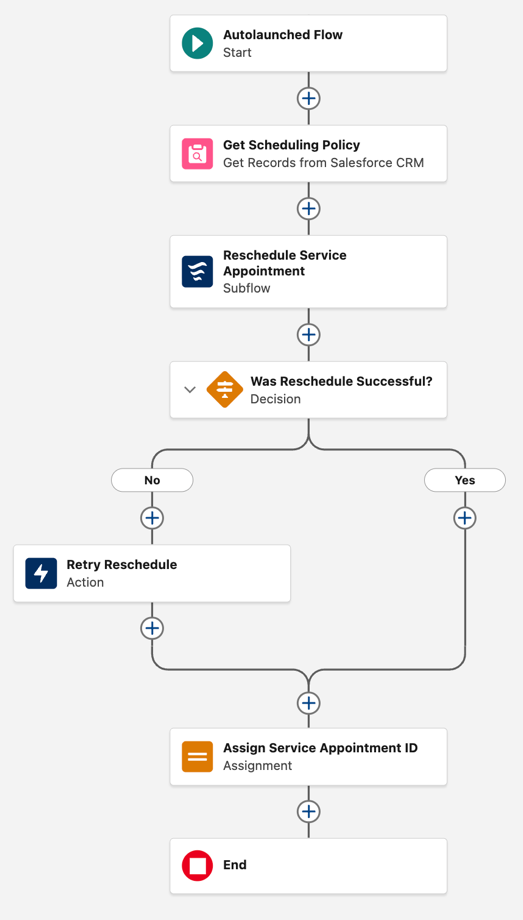
This flow attempts to reschedule the service resource’s service appointments one at a time.
Create an Autolaunched Flow with the following details.
Variables
| API Name | Details |
|---|---|
| saResults |
Data Type: Text Available for output |
| serviceAppointmentId |
Data Type: Text Available for input |
Elements
| Flow Element | Configuration |
|---|---|
| Get Records |
Label: Get Scheduling Policy Salesforce Object: Scheduling Policy Filter: All Conditions Are Met (AND) Field: Scheduling Policy Name, Operator: Equals, Value: Customer First |
| Subflow |
Subflow: Field Service: Schedule Service Appointment Label: Reschedule Service Appointment serviceAppointmentId: Included, Value: serviceAppointmentId |
| Decision |
Label: Was Reschedule Successful? Outcome Label: No Default Outcome Label: Yes Filter: All Conditions Are Met (AND) Resource: Outputs from Reschedule Service Appointment > serviceAppointmentId, Operator: Equals, Value: Blank Value (Empty String) |
| No > Action |
Action: Schedule Service Appointment (scheduleServiceAppointment) Label: Retry Reschedule Scheduling Policy ID: Scheduling Policy from Get Scheduling Policy > Record ID Service Appointment ID: serviceAppointmentId |
| Connect the No and Yes paths > Assignment |
Label: Assign Service Appointment ID Variable: saResults, Operator: Equals, Value: Outputs from Reschedule Service Appointment > serviceAppointmentId |
Your flow should look like this.