---
schema_version: "1"
id: 82047cef8d2ebc2fc8395277d7c462301434b06c0928129f5166bc3934e08dae
title: Customize Labels and Translations for the Channel Menu
collection: admin
version: current
locale: en-us
portal_url: https://docs.salesforce.com/admin/current/en-us/service/264-0-0/embedded_menu_labels.md
canonical_url: https://help.salesforce.com/s/articleView?id=service.embedded_menu_labels.htm&release=264.0.0&type=5
source_site: help.salesforce.com
content_type: documentation
content_hash: fefc4f6289fc787035fbcafe484bb85e484144a0acbc54e95a39e6f56e15c733
description: Customize the text that appears in the channel menu on your website or Experience Cloud site. You can use the existing default labels or create custom labels for your menu header and channel names. Additional steps are required for translated labels.
products:
- Service Cloud
release: "264"
---
# Customize Labels and Translations for the Channel Menu
Customize the text that appears in the channel menu on your website or Experience Cloud site. You can use the existing default labels or create custom labels for your menu header and channel names. Additional steps are required for translated labels.
### Required Editions
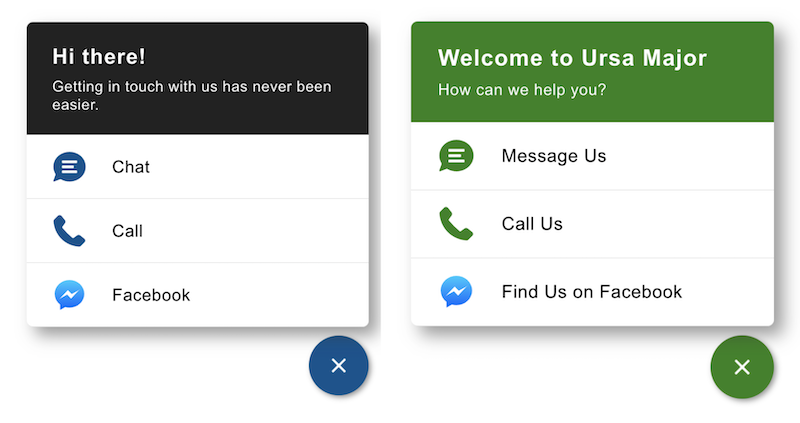
Here’s a side-by-side comparison of a channel menu before and after light branding. The button and header background colors were changed in Branding. The Header text and Menu Item text was changed in Labels.
1. From Setup, enter Channel Menu in the Quick Find box and select **Channel Menu**.
2. Click the name of the channel menu you want to edit.
3. In the Labels section, click **Edit**.
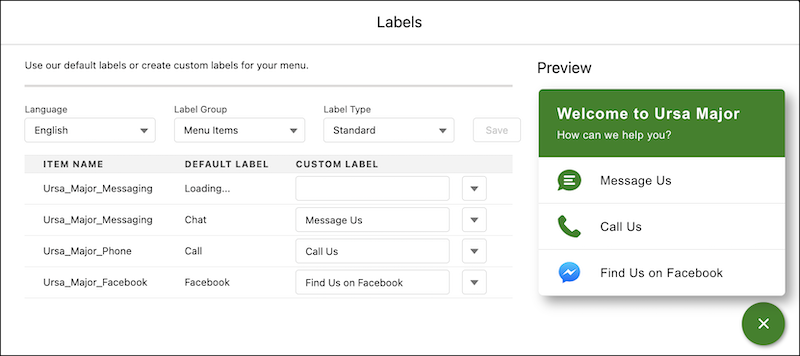
4. To change your default names, select **All** in the Label Group and **Standard** in Label Type.
5. Enter your custom label text for each default label.
6. Save your work before moving to a new Label Group or Label Type.
7. Your updated labels appear in the Preview window.
8. Click **Finish**.
If you don’t see the language you need in the Language field for your labels, add and activate languages for translation on the Translation Language Settings page in Setup.
The translation function isn't available in single-language Salesforce orgs. In addition, the admin must authorize a logged-in user to translate labels in a specific language.