---
schema_version: "1"
id: f5c5c3f09f9fdd68918a16675e4acd2eb9c398d4c9ee5dd82246de11f1077d6d
title: Add an Embedded Flow to Automate a Task
collection: admin
version: current
locale: en-us
portal_url: https://docs.salesforce.com/admin/current/en-us/service/264-0-0/embedded_flows_setup.md
canonical_url: https://help.salesforce.com/s/articleView?id=service.embedded_flows_setup.htm&release=264.0.0&type=5
source_site: help.salesforce.com
content_type: documentation
content_hash: 367290b038352b41efb394bb5726a7bc53d82ee7252b04f5ae6d221b3d9d93ff
description: Use an embedded screen flow to help customers or users complete simple, automated tasks. An embedded flow is also guest-user friendly because users don’t need to log in to access the flow.
products:
- Service Cloud
release: "264"
---
# Add an Embedded Flow to Automate a Task
Use an embedded screen flow to help customers or users complete simple, automated tasks. An embedded flow is also guest-user friendly because users don’t need to log in to access the flow.
### Required Editions

Important
Legacy Chat will be retired on February 14, 2026. To avoid service interruptions to your end users, switch to enhanced Chat (formerly Messaging for In-App and Web). Enhanced Chat offers many of the legacy Chat [features that you love](https://help.salesforce.com/s/articleView?id=service.miaw_replacing_chat_considerations.htm&language=en_US) plus asynchronous conversations that can be picked back up at any time. Learn about migrating in [Help](https://help.salesforce.com/s/articleView?id=service.miaw_replacing_chat_considerations.htm&type=5&language=en_US) and [Trailhead](https://trailhead.salesforce.com/content/learn/modules/migrating-from-legacy-chat-to-enhanced-chat).

Important Legacy Embedded Flows is also scheduled for [retirement](https://help.salesforce.com/s/articleView?id=002521427&type=1&language=en_US) on June 17, 2025. You can continue using this product until then. After the retirement, use an Experience Cloud site to create and embed preexisting flows.
Before you begin, create a flow using Flow Builder. Then add it to an Embedded Service deployment.
Embedded Service supports only flows of the Screen Flow type. Users don’t need to log in to access an embedded flow.
1. From Setup, in the Quick Find box, enter Embedded Service, and then select **Embedded Service Deployments**.
2. Click **New Deployment**.
3. Select **Embedded Flow** as your conversation type, and click **Next**.
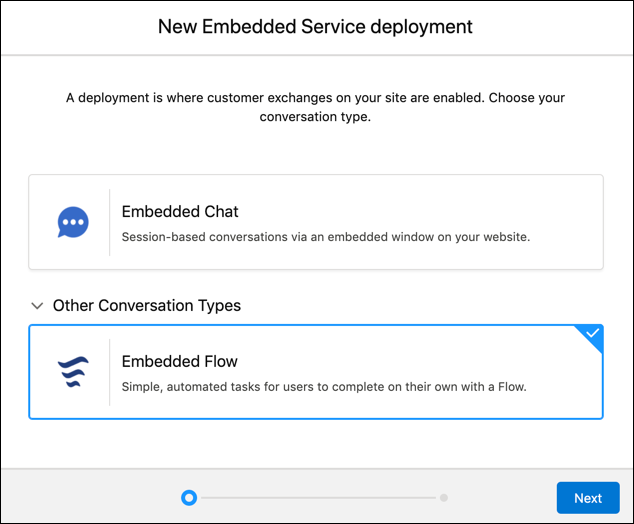
4. On the New Embedded Service deployment panel, in the Embedded Service Deployment Name field enter your flow name.

Tip The deployment is shown in a list on the Embedded Service page. If you have several deployments, use a descriptive name so it’s easy to distinguish each one.
5. The API Name field is automatically populated.
6. Under Site Endpoint, select the site you want to use and save it.
7. In Embedded Service Deployment Settings, click **Start** next to the Flow Settings.
8. Under Flow Name, select the flow you want to use in your Embedded Service deployment and save it.
9. In Additional branding, edit image dimensions and labels, and click **Finish**.

Example
- An insurance company can create an embedded screen flow so that policyholders can search for in-network medical providers without logging in.
- An online retailer can create an embedded screen flow to streamline how new customers create accounts.
To use a different flow in this Embedded Service deployment or to add custom labels, click **Edit** next to Flow Settings.
#### See Also
- [Create an Embedded Service Deployment](https://help.salesforce.com/s/articleView?id=service.snapins_create_deployment.htm&release=264.0.0&type=5 "Create an Embedded Service deployment for each embedded chat window that you’re using.")
- [Flow Builder Tour](https://help.salesforce.com/s/articleView?id=platform.flow_builder.htm&type=5&language=en_US)
- [Flow Types](https://help.salesforce.com/s/articleView?id=platform.flow_concepts_type.htm&type=5&language=en_US)