---
schema_version: "1"
id: c2c74f1886915d5b69035f264974ee5f731a319946205accd72258938490c3e2
title: Customize Embedded Chat Labels
collection: admin
version: current
locale: en-us
portal_url: https://docs.salesforce.com/admin/current/en-us/service/264-0-0/embedded_chat_custom_labels.md
canonical_url: https://help.salesforce.com/s/articleView?id=service.embedded_chat_custom_labels.htm&release=264.0.0&type=5
source_site: help.salesforce.com
content_type: documentation
content_hash: 77f37ee3456a2ca1073e0fe42824f18bacb633945c12d84780da1a89a2c5ee83
description: Create your own custom labels and manage the label language for your Embedded Chat deployment.
products:
- Service Cloud
release: "264"
---
# Customize Embedded Chat Labels
Create your own custom labels and manage the label language for your Embedded Chat deployment.
### Required Editions

Important
Legacy Chat will be retired on February 14, 2026. To avoid service interruptions to your end users, switch to enhanced Chat (formerly Messaging for In-App and Web). Enhanced Chat offers many of the legacy Chat [features that you love](https://help.salesforce.com/s/articleView?id=service.miaw_replacing_chat_considerations.htm&language=en_US) plus asynchronous conversations that can be picked back up at any time. Learn about migrating in [Help](https://help.salesforce.com/s/articleView?id=service.miaw_replacing_chat_considerations.htm&type=5&language=en_US) and [Trailhead](https://trailhead.salesforce.com/content/learn/modules/migrating-from-legacy-chat-to-enhanced-chat).
Custom labels are created within an individual deployment. Each Chat State has a set of default labels to customize your support needs and to match your website’s tone.
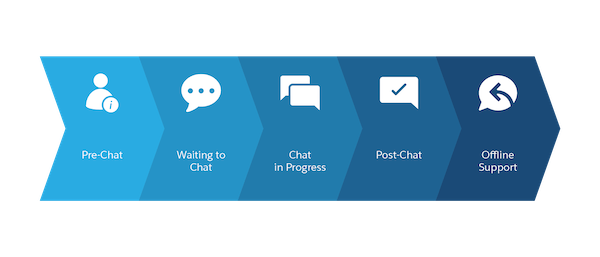
Also, a General section covers labels that appear throughout the chat process. To create your custom labels, follow these steps:
1. From Setup, in the Quick Find box, enter Embedded Service, and then select **Embedded Service Deployments**.
2. To select the Embedded Service deployment that you want to work with, click the arrow next to the deployment name, and then select **View**.
3. Click **Edit** next to Chat Settings.
4. In the Additional branding section, click **Edit**.
5. Click the **Labels** tab. Organized by Chat State, each Label Group focuses on a step in the chat window for the state.
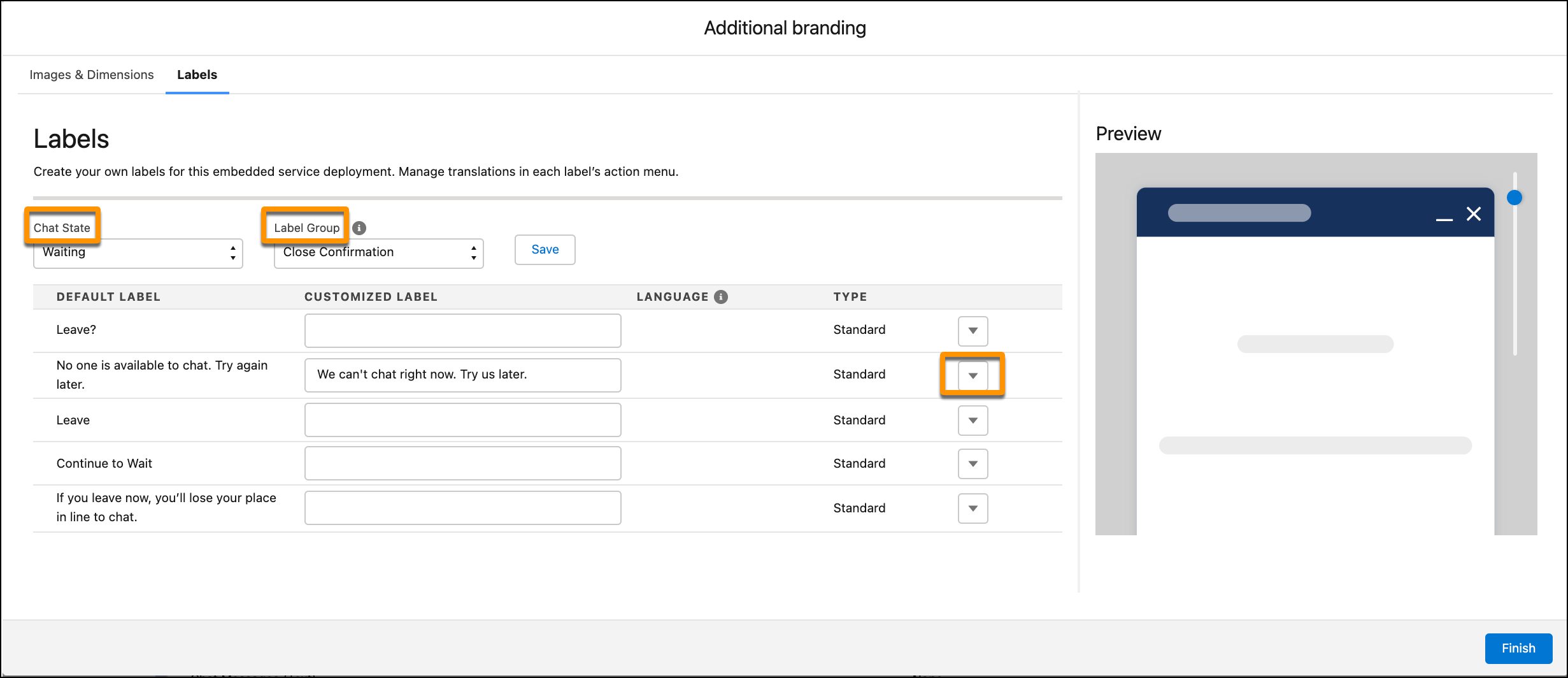
6. Select your Chat State and Label Group to create custom labels.
7. Under Customized Label, enter new labels for your embedded component. The preview highlights where the selected label appears in the chat window.
8. Save your customized labels before moving to another Chat State or Label Group.
9. To close the window, click **Finish**.

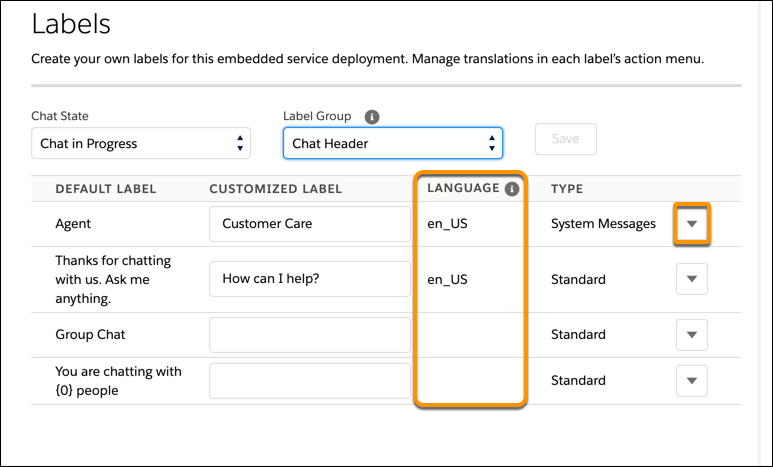
Important Some labels appear in multiple Chat States, so what you change can be reflected in other Label Groups. To return labels to the default choice, use the arrow at the end of each line.
The Language column indicates the language that each customized label was originally written in. To reset your customized labels, click the arrow next to the label type. Then select **Reset to Default**.
#### See Also
- [Translate Your Chat Window](https://help.salesforce.com/s/articleView?id=service.snapins_chat_localization.htm&release=264.0.0&type=5 "The primary language for a chat window is set in your embedded code snippet. An extra step in Translation Workbench is required for custom labels or platform-only languages.")
- [Customize the Embedded Pre-Chat Form](https://help.salesforce.com/s/articleView?id=service.snapins_chat_customize_prechat_form.htm&release=264.0.0&type=5 "Gather contact information and learn about customer needs before chatting. Create a custom pre-chat form and associate Salesforce records like leads, cases, and contacts. You can also customize the field labels used on the form.")
- [Customize the Embedded Chat Offline Form](https://help.salesforce.com/s/articleView?id=service.snapins_chat_customize_offline_support_form.htm&release=264.0.0&type=5 "Allow customers to submit a case form with Embedded Chat when your support agents are offline. Customize the form depending on your business use case. Choose which fields appear, change the order, and mark certain fields as required.")