
Add a menu of communication options to your website or Experience Builder site so customers can choose how they contact you. For example, show a menu with four options: Chat, WhatsApp, Text, and Call. Inquiries sent via the channel menu are routed to your support team according to your routing preferences.
Required Editions
| View supported editions. |
| User Permissions Needed | |
|---|---|
| To set up a channel menu: | Customize Application AND Modify Metadata |
| To create, update, or delete channel menu deployments: | Customize Application |
| To create and edit Salesforce sites: | Customize Application |
| To edit public access settings for Salesforce sites: | Manage Users |
Before you add a channel menu, lay the groundwork:
- Publish a Salesforce site or Salesforce Experience Builder site.
- Set up the channels that you want to add to your channel menu, such as Enhanced Web Chat or WhatsApp. See Provide Conversation Support with Messaging in Service Cloud.
Here are the steps for adding a channel menu.
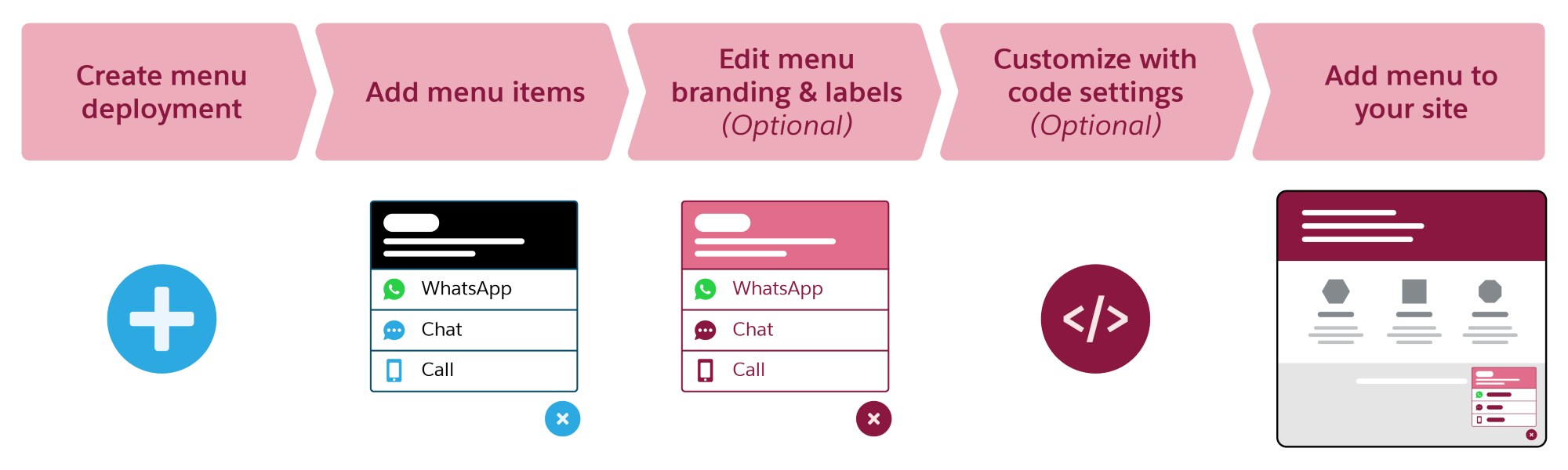
- Supported Editions for Channel Menu
Learn about the Salesforce user interfaces and editions that support Channel Menu. - Channel Menu Considerations and Limitations
When setting up your channel menu, keep these restrictions and considerations in mind. - Create a Channel Menu Deployment
To add a menu of contact channels to your website or Experience Cloud site, start by creating a channel menu deployment in Setup. After you create your menu deployment, you can add items to the menu and customize its branding. - Add Items to the Channel Menu
Select and customize the customer channels that will appear in the channel menu on your Salesforce site or Experience Cloud site. - Set Branding for the Channel Menu
After you create a channel menu for your Salesforce site or Experience Cloud site, customize the button colors, header background, and font to reflect your company’s brand. - Customize Labels and Translations for the Channel Menu
Customize the text that appears in the channel menu on your website or Experience Cloud site. You can use the existing default labels or create custom labels for your menu header and channel names. Additional steps are required for translated labels. - Create Channel Menu Code Settings
Add optional JavaScript code as a static resource to your channel menu to change the customer experience. Collect extra information in pre-chat or change the branding for your Enhanced Web Chat channel. - Apply the Channel Menu Code Snippet
Copy and paste the channel menu code snippet to add the button and menu to your website. - Add the Channel Menu to Experience Cloud Sites
To add a channel menu and button to your Experience Cloud sites, use the Channel Menu page component. - Sample Static Resource Files for Channel Menu
Create JavaScript files to upload as static resources and apply them to your Channel Menu website or Experience site. This code sample populates pre-chat settings and adds a company logo.