---
schema_version: "1"
id: 09e92536c1b21ee5ed5898ee9ad528f991e3df5b9f115b4777c3c287a89db750
title: Enable Article Recommendations
collection: admin
version: current
locale: en-us
portal_url: https://docs.salesforce.com/admin/current/en-us/service/264-0-0/einstein_article_recommendations_enable.md
canonical_url: https://help.salesforce.com/s/articleView?id=service.einstein_article_recommendations_enable.htm&release=264.0.0&type=5
source_site: help.salesforce.com
content_type: documentation
content_hash: 60abee2a640ba85437afc1c336197da31797f6d4044dcc9bf5588397954ce410
description: To get started, turn on Einstein Article Recommendations.
products:
  - Service Cloud
  - Service Intelligence
release: "264"
---
# Enable Article Recommendations

To get started, turn on Einstein Article Recommendations.

### Required Editions

<table class="slds-table slds-table_bordered slds-max-medium-table_stacked slds-m-bottom_small edition"><colgroup><col></colgroup><tbody><tr class=""><td class="slds-cell-wrap" style="vertical-align:top;"><a href="https://help.salesforce.com/s/articleView?id=service.einstein_service_intro.htm&amp;language=en_US" target="_blank">View supported editions</a>.</td></tr></tbody></table>

<table class="slds-table slds-table_bordered slds-max-medium-table_stacked slds-m-bottom_small permission">
        <colgroup>
          <col style="width:50%">
          <col style="width:50%">
        </colgroup>
        <thead class="slds-text-title_caps ">
          <tr class="">
            <th scope="colgroup" class="slds-cell-wrap" colspan="2" style="text-align:center;vertical-align:top;" id="d45827e55">User Permissions
              Needed</th>
          </tr>
        </thead>
        <tbody>
          <tr class="">
            <td data-label="User Permissions Needed" class="slds-cell-wrap" style="vertical-align:top;" headers="d45827e55 ">To enable Einstein Article Recommendations:</td>

            <td class="slds-cell-wrap" style="vertical-align:top;" headers="d45827e55 ">
              <p>Customize Application</p>
              <p>AND</p>
              <p style="margin-bottom:0;">Salesforce Knowledge enabled</p>
            </td>

          </tr>
        </tbody>
      </table>

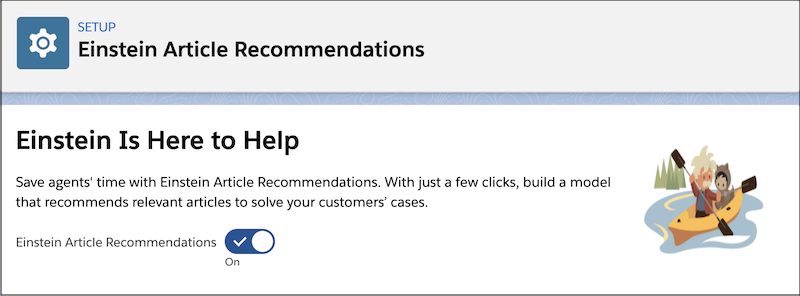
1. From Setup, in the Quick Find box, enter Einstein Article Recommendations, and then select **Einstein Article Recommendations**.
2. If you haven’t already, click **Review Terms**. Review and accept the terms, then click **Try Einstein**.
3. To turn on Einstein Article Recommendations, click the toggle.
    
    ![Einstein Articles Recommendation setup page.](https://sf-zdocs-cdn-prod.zoominsoftware.com/tdta-service-support_intelligence-264-0-0-production-enus/dcd06a7b-b5ab-448b-a767-4e2e90481508/support_intelligence/images/article_recommendations/ar_enable.png)

![Note](https://sf-zdocs-cdn-prod.zoominsoftware.com/tdta-service-support_intelligence-264-0-0-production-enus/dcd06a7b-b5ab-448b-a767-4e2e90481508/images/icon_note.png)

Note If you only see an option to request an order form supplement, submit your request so that you can enable Einstein Article Recommendations.