
The Article Recommendations action takes a Case ID as input and returns a JSON list of recommended articles identified from your active Einstein Article Recommendations model.
Required Editions
| View supported editions. |
| User Permissions Needed | |
|---|---|
| To assign permission sets: | Assign Permission Sets |

Note To add Article Recommendations to a flow, you must have an active Einstein Article
Recommendations model. Visit Salesforce Help to learn how to build and activate a
model.

Important To see and apply Einstein Article recommendations, service reps need
Read access.
- From Setup, in the Quick Find box, enter Flows, and then select Flows.
- On the Flows list, select the flow where you want to add article recommendations.
- On the Elements tab, drag the Action element onto the canvas.
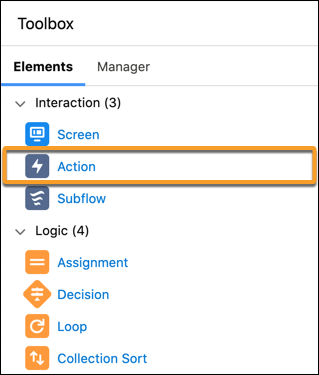
- Select Einstein and then select Create Article Recommendations.
- Give the action a label and optionally a description. The API name populates automatically.
- Under Set Input Values, Record ID, select the Case ID field.
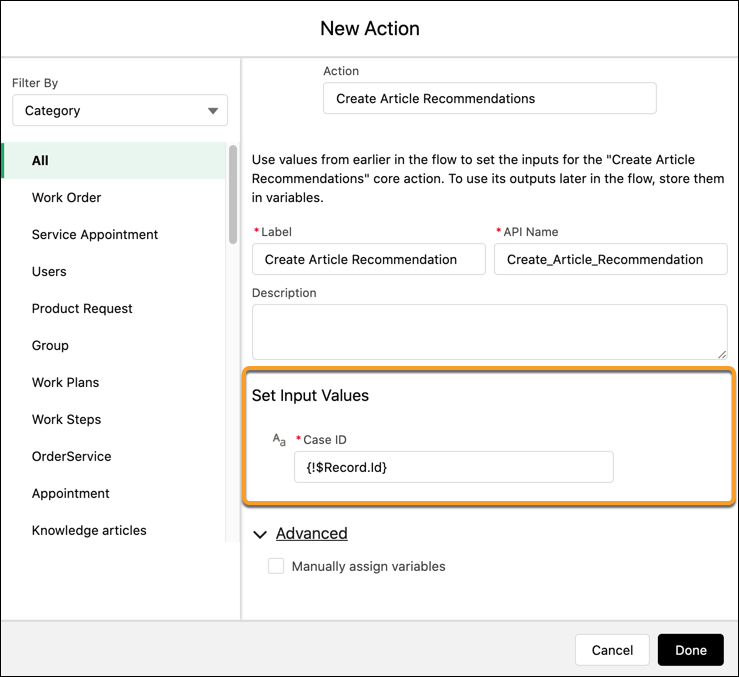 Note Einstein invocable actions are compatible only with case type objects.
 - Click Done, and then save your changes.
The Article Recommendation action returns a JSON list of recommended articles. Next, see how to use the recommendations by assigning the JSON output from the Article Recommendations action to a collection variable.

Example
[{
"knowledgeArticleId" : "kA0RM0000006XDh0AM",
"knowledgeArticleVersionId" : "ka0RM0000006E0uYAE",
"lastPublishedDate" : "2020-03-24T21:54:42.000Z",
"recommendationId" : "0QARM00000004PG4AY",
"relevanceScore" : 90.016695360335916,
"summary" : "To reset your password, go to settings on your user profile. Click Manage Account, then select username and password. Enter the new password, then select Update. Confirm the update with the previous password, and select Continue. Your password is successfully updated!",
"title" : "How do I reset my password?",
"urlName" : "kA0000000000003031-ABC-1013229425"
}]