---
schema_version: "1"
id: 807daeaac09697fc10a2ec00a277831f7ef4235e3c833a33b895ca3c6498fa29
title: Add the Knowledge Component to the Lightning Service Console
collection: admin
version: current
locale: en-us
portal_url: https://docs.salesforce.com/admin/current/en-us/service/264-0-0/einstein_article_recommendations_add_knowledge_component_to_console.md
canonical_url: https://help.salesforce.com/s/articleView?id=service.einstein_article_recommendations_add_knowledge_component_to_console.htm&release=264.0.0&type=5
source_site: help.salesforce.com
content_type: documentation
content_hash: fcc04cd2dffafada4d34aa5c588a1b60f516a1ee51c8faa476a955e2584efcbb
description: If it’s not there already, add the Knowledge component to the Lightning Service Console so your service reps can receive article recommendations.
products:
  - Service Cloud
  - Service Intelligence
release: "264"
---
# Add the Knowledge Component to the Lightning Service Console

If it’s not there already, add the Knowledge component to the Lightning Service Console so your service reps can receive article recommendations.

### Required Editions

<table class="slds-table slds-table_bordered slds-max-medium-table_stacked slds-m-bottom_small edition"><colgroup><col></colgroup><tbody><tr class=""><td class="slds-cell-wrap" style="vertical-align:top;"><a href="https://help.salesforce.com/s/articleView?id=service.einstein_service_intro.htm&amp;language=en_US" target="_blank">View supported editions</a>.</td></tr></tbody></table>

<table class="slds-table slds-table_bordered slds-max-medium-table_stacked slds-m-bottom_small permission">
        <colgroup>
          <col style="width:50%">
          <col style="width:50%">
        </colgroup>
        <thead class="slds-text-title_caps ">
          <tr class="">
            <th scope="colgroup" class="slds-cell-wrap" colspan="2" style="text-align:center;vertical-align:top;" id="d73497e60">User Permissions Needed</th>
          </tr>
        </thead>
        <tbody>
          <tr class="">
            <td data-label="User Permissions Needed" class="slds-cell-wrap" style="vertical-align:top;" headers="d73497e60 ">To view apps:</td>

            <td class="slds-cell-wrap" style="vertical-align:top;" headers="d73497e60 ">View Setup and Configuration</td>

          </tr>
          <tr class="">
            <td data-label="User Permissions Needed" class="slds-cell-wrap" style="vertical-align:top;" headers="d73497e60 ">To manage apps:</td>

            <td class="slds-cell-wrap" style="vertical-align:top;" headers="d73497e60 ">Customize Application</td>

          </tr>
        </tbody>
      </table>

1. From Setup, in the Quick Find box, enter App Manager, and select **App Manager**.
2. Click the dropdown next to the Lightning Service Console app where you want to add the Knowledge component, and click **Edit** | **Navigation Items**.
3. Select **Knowledge** from the Available Items list, and add it to the Selected Items list.
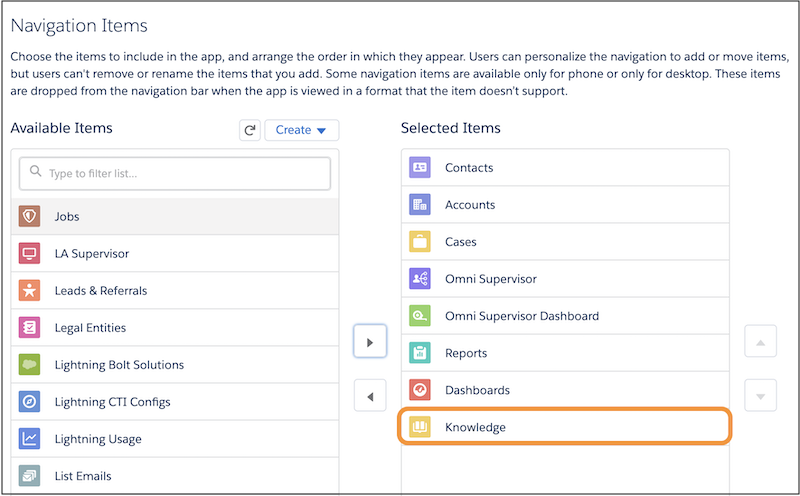
    
    ![Adding the Knowledge component](https://sf-zdocs-cdn-prod.zoominsoftware.com/tdta-service-support_intelligence-264-0-0-production-enus/dcd06a7b-b5ab-448b-a767-4e2e90481508/support_intelligence/images/article_recommendations/ear_knowledge_component.png)
4. Click **Save**.